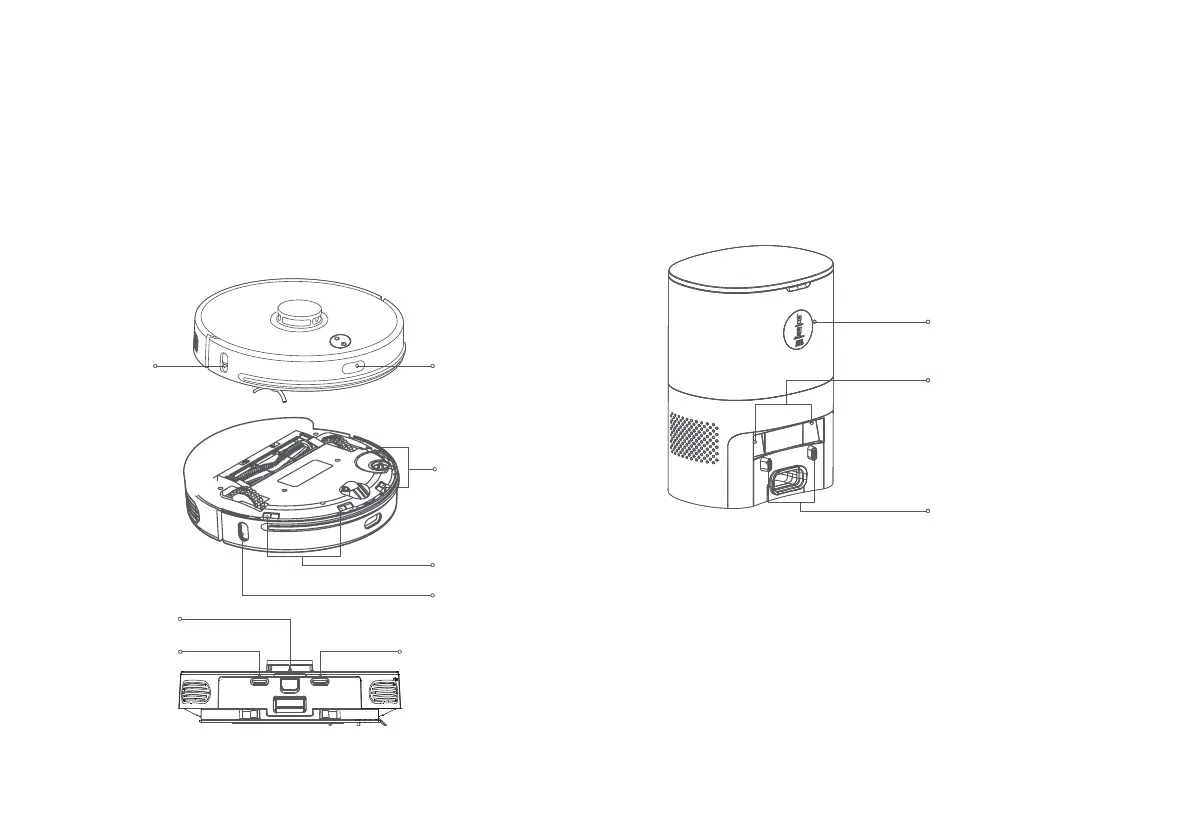
Cleaning the sensors
1. It is recommended to use a piece of dry, soft cloth to gently
wipe the dierent sensors once a week to ensure that the robot
vacuum can operate normally.
Robot vacuum:
Cli sensors x 4 Charging plates x 2
Infrared sensors x 3 Wall PSD detector x 1
Dust collection and charging stand:
Infrared lens x 2
Charging and dust collection sensor heads x 2
Wall PSD
detector
Infrared
sensor
Indicator light
Infrared lens
Charging and dust
collection sensor heads
Cli
sensors
Cli sensors
Infrared sensor
Charging plate
Infrared sensor
Charging plate
Maintaining the battery
1. The robot vacuum has a built-in high-performance rechargeable
lithium-ion battery pack. To preserve battery performance, please
keep it charged daily.
2. If the robot vacuum will not be used for an extended period of time,
power it off and store it. Charge it at least once a month to prevent
battery damage.
21 22



 To Next Page