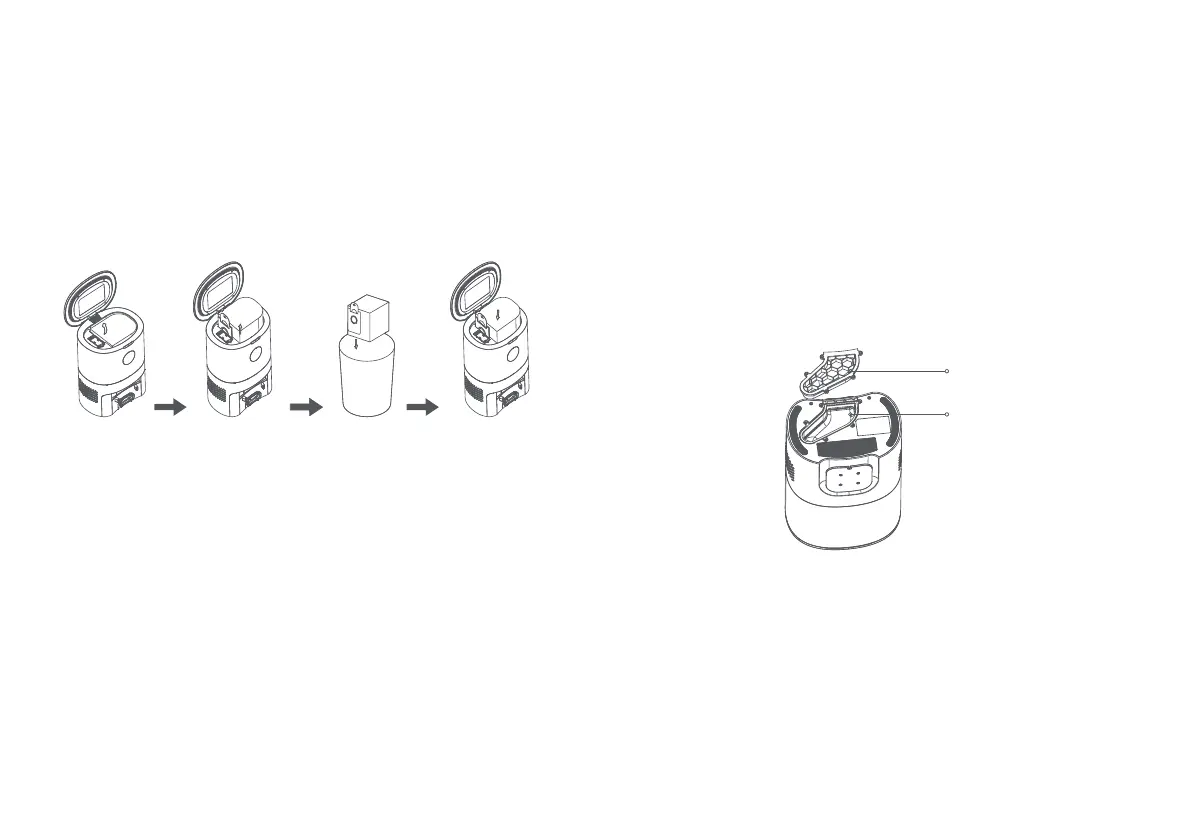
Replacing the dust bag
1. When the dust bag is full, the indicator on the dust bag’s
display will flash in orange. You may also receive an app
notification. Please replace the dust bag immediately. During
normal operation, the indicator on the dust bag's display will
flash in green or white.
Cleaning the dust vent
1. If the indicator on the dust collection station continues to
flash in orange even after the dust bag is replaced, unplugged
the power cable and flip over the dust collection dock. Check
the dust vent for any blockage. If the dust vent is blocked, use
a screwdriver to remove the transparent dust vent cover and
remove the blockage. See the diagram below.
Note: Be gentle when removing
the dust vent cover and dust vent. Put the parts in place after
cleaning them.
Transparent dust vent
cover
Dust vent
Open the cover. Pull up the
dust bag
handle to
remove the
dust bag.
Throw away
the old dust
bag.
Insert a
new dust
bag and
close the
cover.
19 20



 To Next Page