10
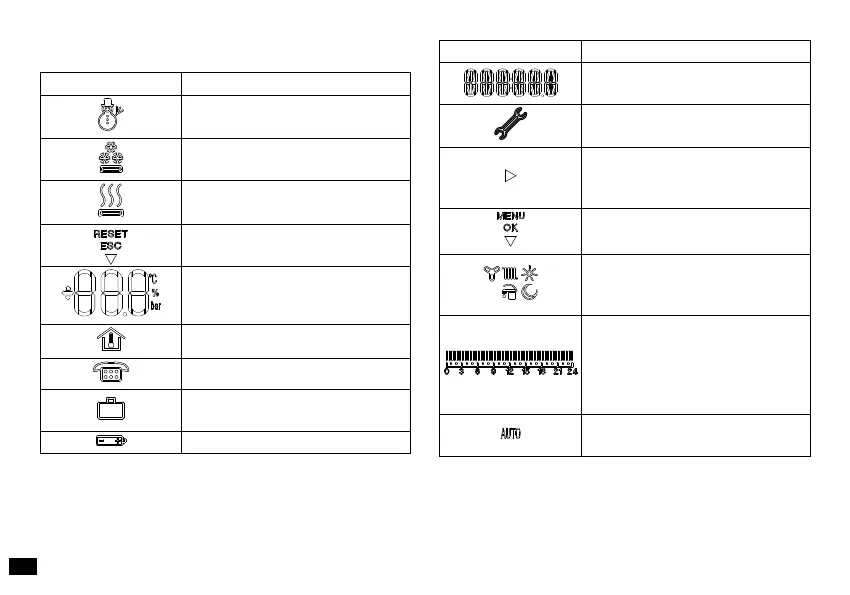
3. DESCRIPTION OF DISPLAY
Symbol Description
Winter - room central heating
functions are enabled
Cooling - the cooling function
is enabled
Request for room central heating
or cooling from CRONO 7
Description of functioning of the
button (1 g. 6) - Reset, or esc
Displays room temperature and
numerical data
Internal temperature display
Function activation from remote
Functioning with holiday timer
program
Batteries at
Symbol Description
Description of functioning state
in use
CRONO 7 anomaly presence
symbol
Indicates that it is possible to
modify a parameter via the two
buttons (8 and 9 g. 6)
Description of functioning of the
button (5 g. 6) - Menu or Ok
Symbols that identify the
functioning mode in the hourly
programming*
Time bar that identies the func-
tioning period at “comfort” and
“economy” temperature on the
basis of the type of programming
(cooling, central heating)
Functioning with automatic
program.



 To Next Page