59
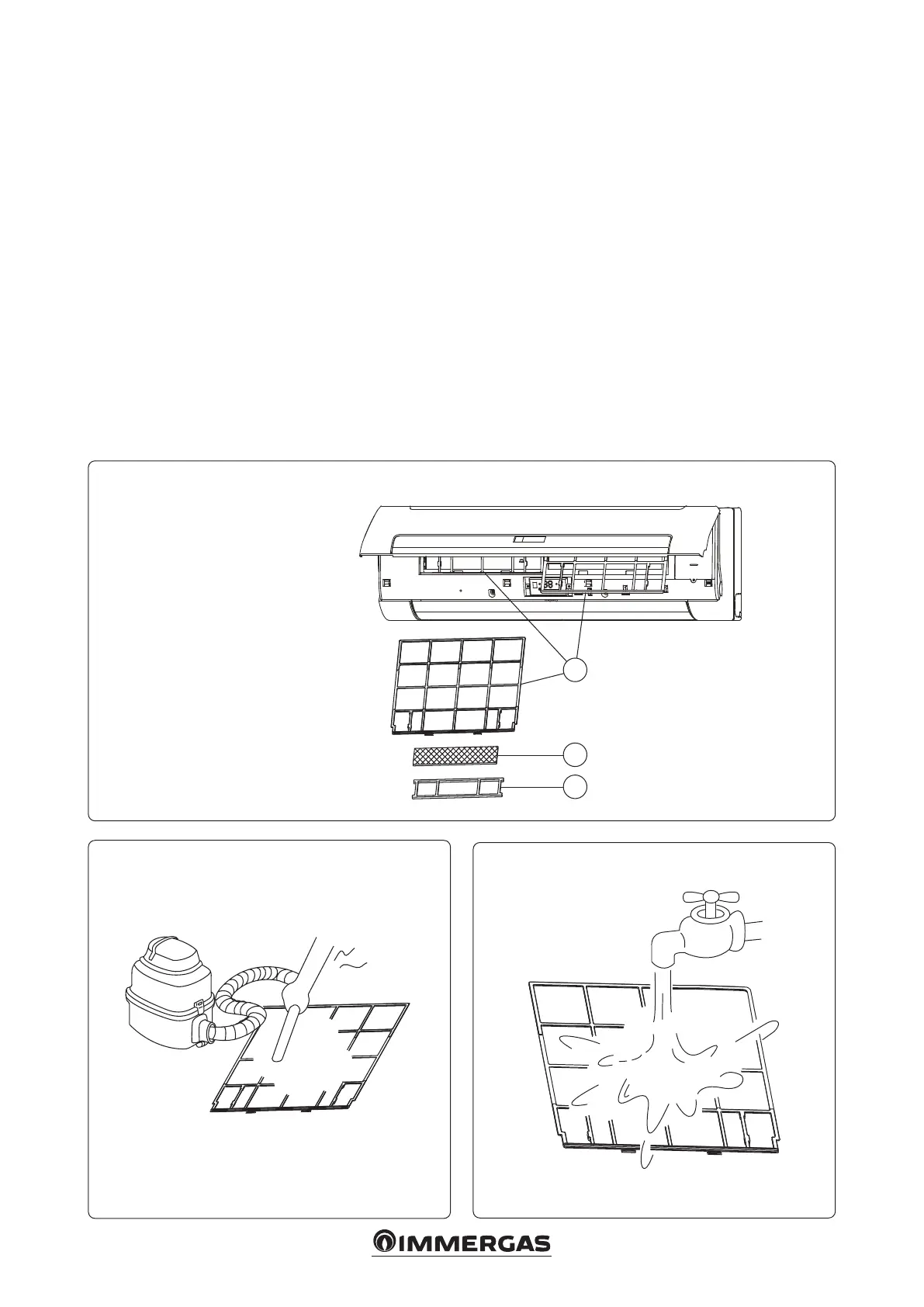
• Cleaning the air lter and the clean air grid.
e air lter can prevent the inltration of dust or
other particles. If it is clogged, the operating eciency
of the fan coil can reduce signicantly.
It is therefore necessary to clean the lter at least once
a fortnight during its period of use.
Clean the air lter frequently if the fan coil is installed
in a dusty environment.
If the accumulated dust is too much to be removed,
replace the lter (a replacement lter is an optional
accessory).
- Open the front panel and remove the air lter and the
clean air grid (Fig. 24).
- Clean the air lter.
e lter can be cleaned with a vacuum cleaner or clean
water. If the amount of accumulated dust is excessive,
use a so bristled brush and a mild detergent, then
leave it to dry in a cool place.
e air inlet side must face upwards when using a
vacuum cleaner.(Fig. 25).
e air inlet side must face downwards when using
water (Fig. 26).
- Remounting the air lter and the clean air grid.
- Close the front panel.
Note: do not dry the air lter in direct sunlight or near a re.
Note: do not leave switched on without lter.
24
1
2
3
25
26
Front panel
Key:
1 - Air lter
2 - Clean air grid
3 - Clean air grid mesh




 To Next Page