10
HOW TO USE BLUETOOTH IN YOUR CAR AUDIO
HOW TO PERFORM PAIRING
Before you can dial out from the car stereo, you must first perform PAIRING. Pairing is a procedure used
to connect 2 Bluetooth devices together.
1. Press and hold SEL button for 2 seconds.
2. Press SEL button repeatedly until “PAIRING” displays.
3. Press and hold SEL button to engage paring mode. “PAIRING” blinks on the display.
4. Turn on the Bluetooth feature of your mobile phone. Perform “Add Bluetooth device” from your mobile
phone. The mobile will search for any Bluetooth devices within the range. Select “CAR-BLUETOOTH”
and enter Passkey: “0000” to connect to the car audio. (Please refer to the instruction manual of your
mobile phone for Bluetooth Pairing).
5. The LCD will display “PAIRED” after successful pairing.
Note:
• IfIf “DISCONN” shows instead of “PAIRING”, it means the head unit currently is paired with another
device. Press and hold SEL button to disconnect the connection and perform steps above again.
• “CAR-BLUETOOTH” is the Bluetooth device name of the car stereo.
• Refer to your cellular user manual for the proper procedures of pairing Bluetooth devices.Refer to your cellular user manual for the proper procedures of pairing Bluetooth devices.
USING REMOTE CONTROL
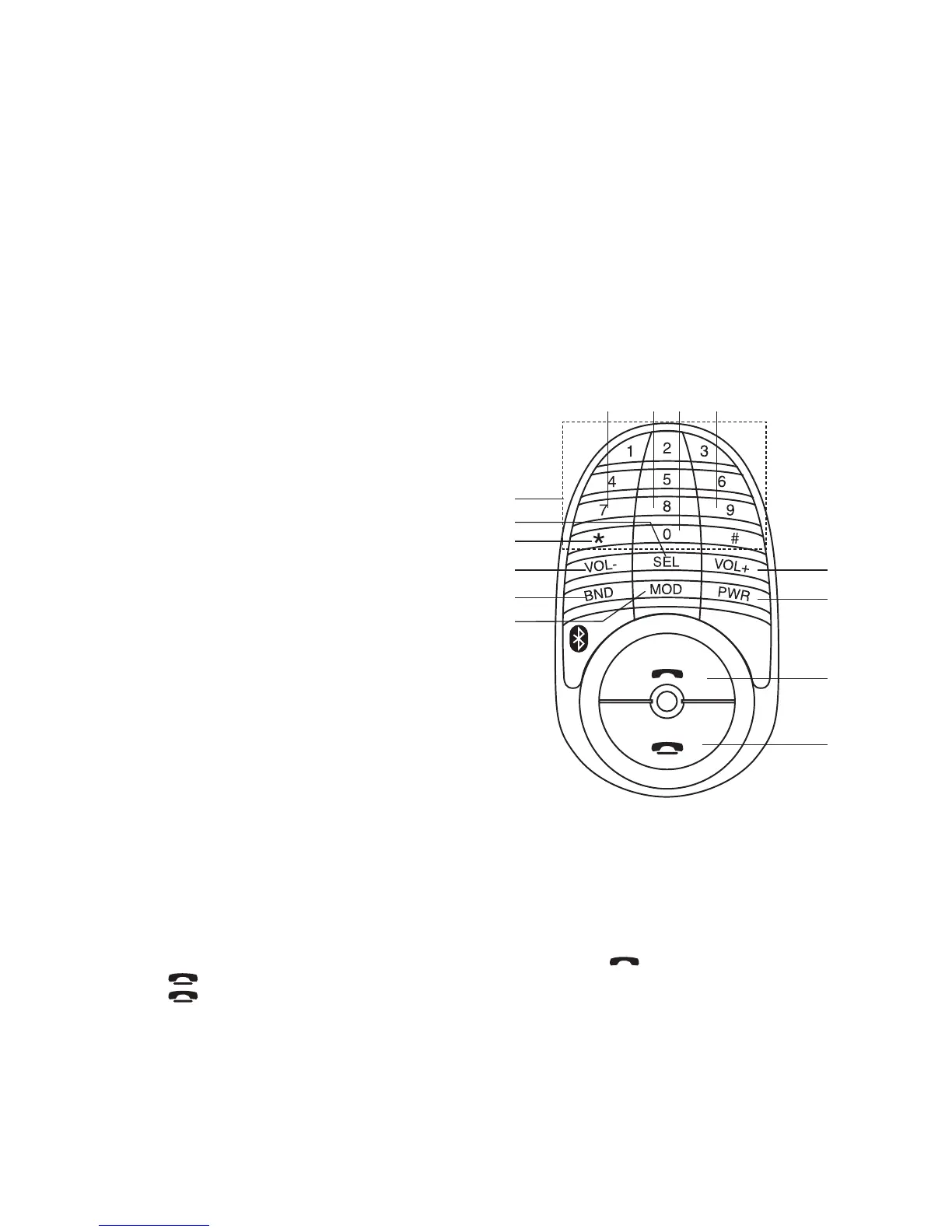
LOCATION OF REMOTE CONTROL
1. POWER ON / OFF
2. ANSWER / MAKE A CALL
3. VOLUME +
4. END A CALL
5. BAND
6. SELECT MENU FUNCTION
7. VOLUME -
8. MODE
9. PHONE NUMBER /
BUTTON 1-6: STATION PRESETS
10. STEREO / MONO
11. SCAN STATIONS / PHONE MODE
12. ALTERNATE FREQUENCIES (AF)
13. TRAFFIC ANNOUNCEMENT (TA)
14. PROGRAM TYPE (PTY)
Switching to Telephone Mode
1. During any operation mode, press and hold “
*
” to activate TELEPHONE mode. Press and hold it
again to return to previous mode.
Making Calls Using the Remote Control
You can make calls directly from the remote control. Before you make calls, make sure that the devices
are properly paired and connected.
1. Press and hold “
*
” on remote control. Unit switch to phone mode.
2. Enter the phone number via the remote control keypad and press button to dial out.
Press button to make corrections when entering numbers.
3. Press button to end call.
Scan Radio Station
SCAN function scans the entire channel’s frequencies and plays it for 5 seconds if a channel is found.
1. In Tuner mode, press “
*
” to start SCAN function. Press it again to end.
2. When a channel is found, you can press and hold a memory preset key (1-6) to save it.
1
3
4
2
7
6
9
5
8
10
11
12 13 14



 To Next Page