8
CD/MP3/WMA PLAYER MODE
CDP ---- CT ---- PS ---- FREQ ---- PTY
2) In case of receiving NON RDS station
RADIO MODE
FREQ ---- CLOCK ----NO PTY
CD/MP3/WMA PLAYER MODE
CDP ---- FREQ ---- CLOCK ---- NO PTY
Each display time is several seconds, and come back to 1’st position after several seconds.
Notes: • CT = clock time • FREQ = frequency • CDP = CD Player
9. MODE BUTTON (MD)
By pressing this key, user can select. AUX/TUNER/CD-MP3/USB or MMC/SD mode.
10. BAND BUTTON (BD)
Each band is toggled cyclically by pressing this key FM1---FM2---FM3--MW1--MW2.
11. AUTOMATIC OR MANUAL TUNING (FREQ UP OR FREQ DOWN )
(A) RADIO MODE
When pressed momentarily, these keys are operated as MANUAL tuning mode.
When pressed longer than 1 sec., they are operated as SEEK tuning mode.
(B) CD/MP3 PLAYER MODE
When pressed momentarily, they are operated as TRACK UP or TRACK DOWN mode.
When pressed longer than 1 sec., they are operated as CUE or REVIEW mode.
12. AUTO SEEK SEARCH TUNING (A/PS)
By pressing shortly, the radio searches for each preset station.
When field strength level is bigger than the threshold level of stop level, the radio is holding at that
preset number for 5 sec. with releasing mute, and then searches again.
By pressing longer than 1 sec, and then 6 strongest stations are preset to the corresponding preset
number. When AS operation is finished, the radio executes the preset scan.
13. ‘SCAN’ AUTOMATIC TUNING CONTROL (SCAN)
This key is operated as RADIO SCAN. The operation is similar as normal search but different thing
is holding 5 seconds on every station detected in RADIO SCAN mode.
14. MUTE BUTTON (MU)
Press and hold this button to mute the sound at once. Press again to return to previous volume level.
15. LCD DISPLAY
The Liquid Crystal Display will display the current state of the unit.
16. PANEL RELEASE BUTTON ( )
Press this button and the right-hand part of the panel will be released.
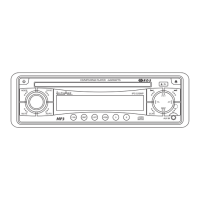
CD/MP3/WMA CONTROL LOCATION OF PARTS
17. CD SLOT
Carefully insert the CD into the disc slot with the label side uppermost. The CD starts automatically
play.
18. CD EJECT BUTTON
Press the EJECT button to remove the CD.
19. TOP BUTTON
Press to play first song of disc.
20. PAUSE BUTTON
During “PLAY”, press (20) button to “PAUSE”. Press it again to resume play.



 To Next Page