EasyManua.ls Logo

In Shape 17472 - Computer Overview and Functions; Computer Display Fields; Computer Buttons

Default Icon
Print Icon
To Next Page IconTo Next Page
To Previous Page IconTo Previous Page
Loading...
16
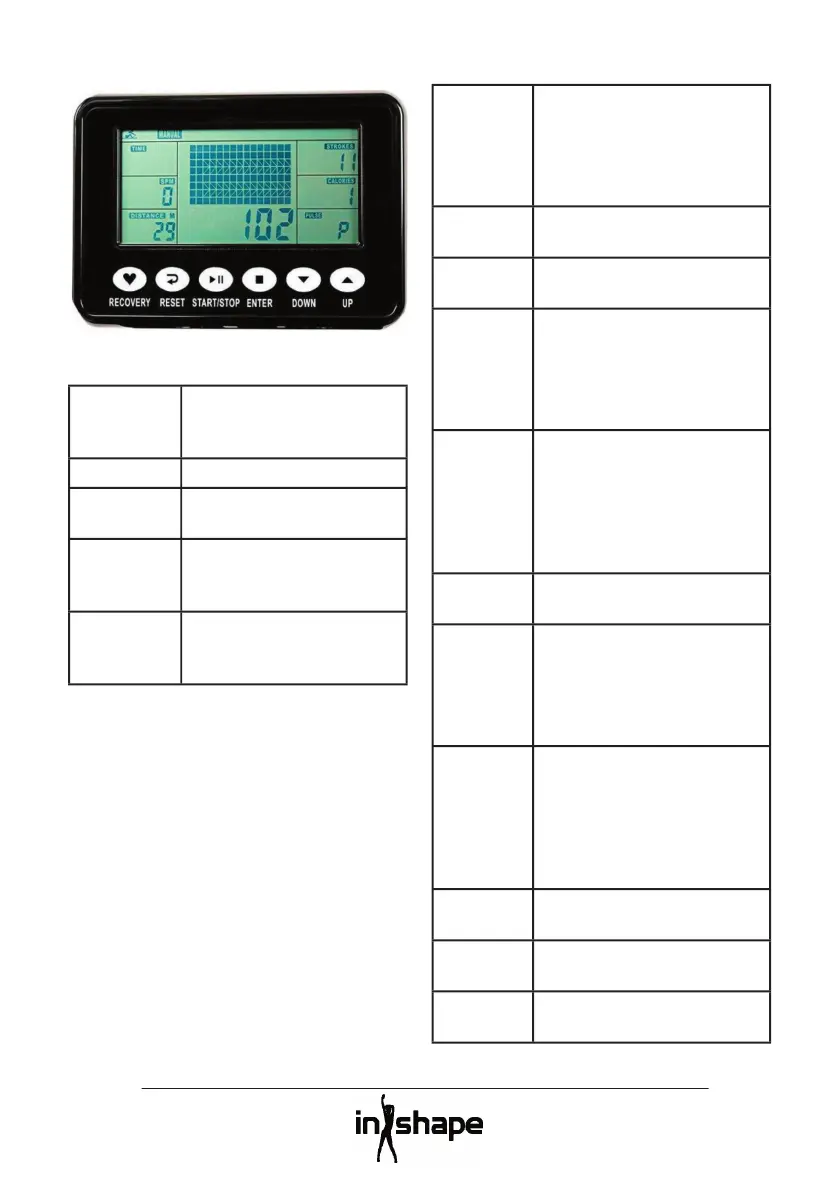
Overview of the computer
Buttons
UP/DOWN
Scrolls through the data
or increases/reduces the
current value.
ENTER
Confi rms your selection.
START/STOP
Starts and stops the
training session.
RESET
Resets on long press and
returns to start screen on
short press.
RECOVERY
Measures your pulse
recovery immediately after
a training session
Fields on the display
TIME
Shows the training time.
Set the training time from 1
to 99 minutes in intervals of
1 minutes, using the UP and
DOWN buttons.
TIME/
500 M
Shows the average time per
500 metres of rowing.
SPM
Shows the number of strokes
per minute.
DISTANCE
VShows the distance.ncen.
Set the distance from 100 to
9,999 metres in intervals of
100 metres, using the UP and
DOWN buttons.
STROKES
ViseShows the number of
strokes.
Set the number of strokes
from 10 to 9,990 strokes in
intervals of 10 strokes, using
the UP and DOWN buttons.
TOTAL
STROKES
Shows the total number of
strokes up to 9,999.
CALORIES
Shows calorie consumption.
Set the calories consumption
from 10 to 9,990 kcal in
intervals of 10 kcal, using the
UP and DOWN buttons.
HRC/
PULSE
Shows the pulse in beats per
minute
Set the target pulse from
30 to 240 bpm in intervals
of 1 bpm, using the UP and
DOWN buttons.
CALENDAR
Displays the year, month and
date in sleep mode.
TEMPERA-
TURE
Shows the ambient
temperature in sleep mode.
CLOCK
Shows the current time in
sleep mode.

Related product manuals