38 39
* Specications are subject to be changed without prior notice.
* This product is a medical device. Please read the WARNINGS and PRECAUTIONS before you use it.
* QR Code is registered trademark of DENSO WAVE INCORPORATED
Applied Rating
Current
1kHz : 70uA (+-10uA), Over 5kHz : 300uA (+-30uA)
Adapter
Bridgepower
(BPM040S12F07)
Power Input AC 100-240V, 50/60Hz, 1.2A(1.2A-0.6A)
Power Output DC 12V 3.4A
Mean Well
(GSM40A12)
Power Input AC 100-240V, 50/60Hz, 1.0-0.5A
Power Output DC 12V 3.34A
Display Type 1280 × 800 10.1 inch Color TFT LCD
Internal Interface Touchscreen, Keypad
External Interface RS-232C 4EA, USB Host 2EA, USB Slave 1EA, LAN(10/100T) 1EA, Bluetooth 1EA, Wi-Fi 1EA
Compatible Printer
InBody970 compatible printers available at www.inbodyservice.com
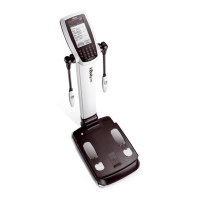
Dimensions 614.1(W) x 963.8(L) x 1239.3(H): mm
Equipment Weight 46kg (101.4lb)
Test Duraction About 90 seconds
Operation Environment
10 ~ 40
°
C
(50 ~ 104
°
F), 30 ~ 75% RH, 70~106kPa
Storage Environment
-10 ~ 70
°
C
(14 ~ 158
°
F), 10 ~ 80% RH, 50 ~ 106kPa (No Condensation)
Testing Weight Range 5 ~ 300kg (11.0 ~ 661.4lb)
Testing Age Range 3+ years
Height Range 95 ~ 220cm (3ft 1.40in ~ 7ft 2.61in)
F. OtherSpecications
Administrator Menu Setup: Congure settings and manage data
Troubleshooting: Additional information to help use the InBody970
InBody USB Copy, backup, or restore the LookinBody test data (data can be viewed on Excel or LookinBody120)
Barcode Reader Member ID will be automatically inputted when the Barcode is scanned
InBodyBAND Series
Recognition Function
Recognizes the InBodyBAND series of the subject and automatically inputs personal information to the
InBody970
Fingerprint Recognition
Function
Recognizes the ngerprint of the measurer and automatically inputs personal information to the InBody970
Backup data Backup data saved in InBody970 by using an InBody USB
QR Code See your result on InBody mobile App



 To Next Page