40
Dynamic Calibration can be triggered by clicking “Start Calibration” within
Smart Control Installer App.
This Calibration cycle can take up to 5 minutes to complete
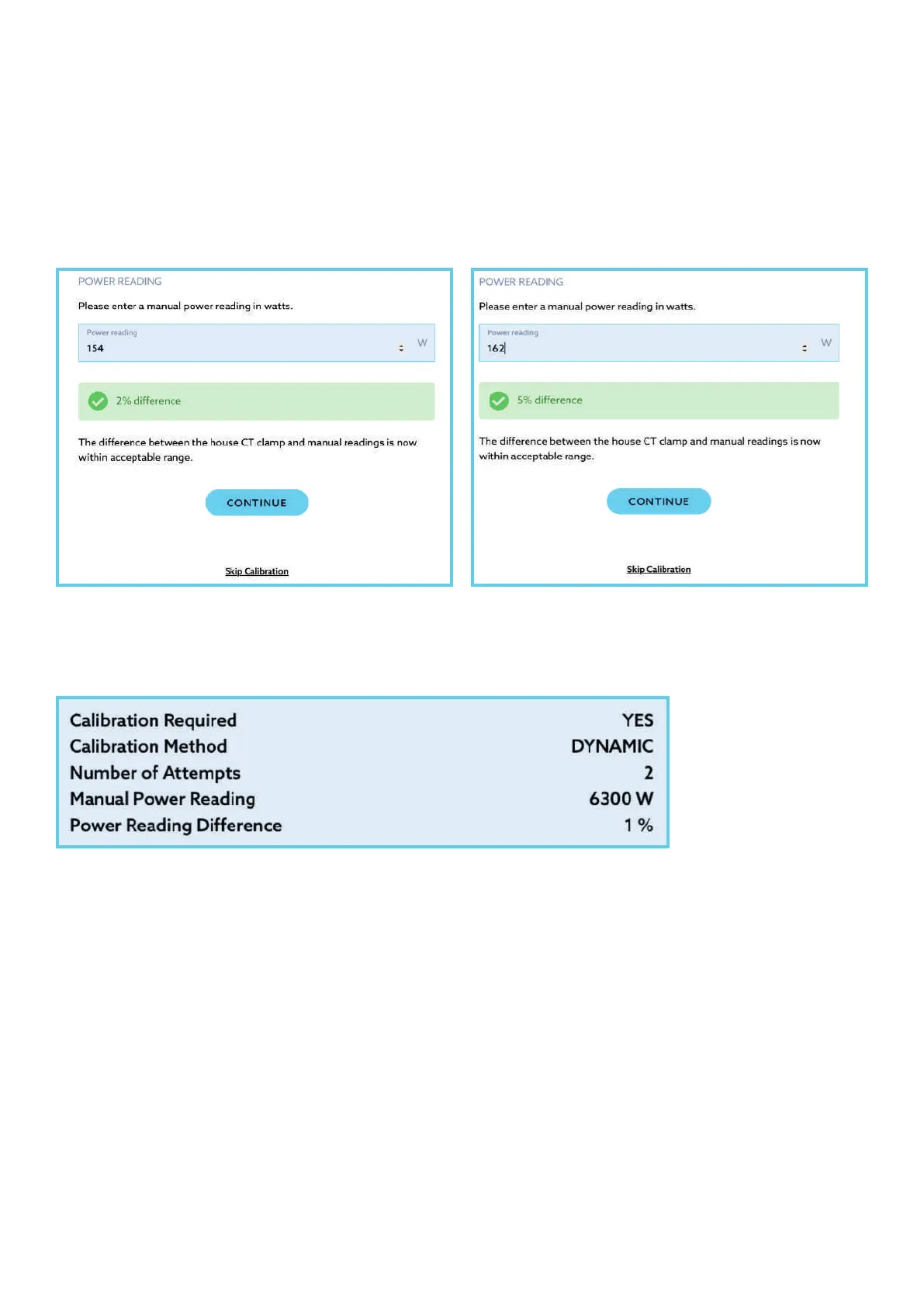
Once completed, you will be prompted to enter a new reading from the handheld
clamp meter/ multimeter.
Note: The in-app telemetry power readings may take up to 30 seconds to refresh,
to ensure you are comparing updated readings
This action should have reduced the difference between the power readings to be
within 5% of the truth. Where successful, the install summary page will reflect an
audit of actions related to Dynamic load calibration and relevant telemetry information:
Getting a 5% difference in readings is ideal but may not always be possible due
to the length of cable run or similar influences.
In this event, installers are advised of the need for further calibration, or rework,
to reduce the difference in readings. Where all best endeavours have been made
to complete this step but with no reduction in variance, there is an option to
skip calibration.


 To Next Page