TURN OFF ALLPOWER...
IMPORTANT!
IMPORTANT!
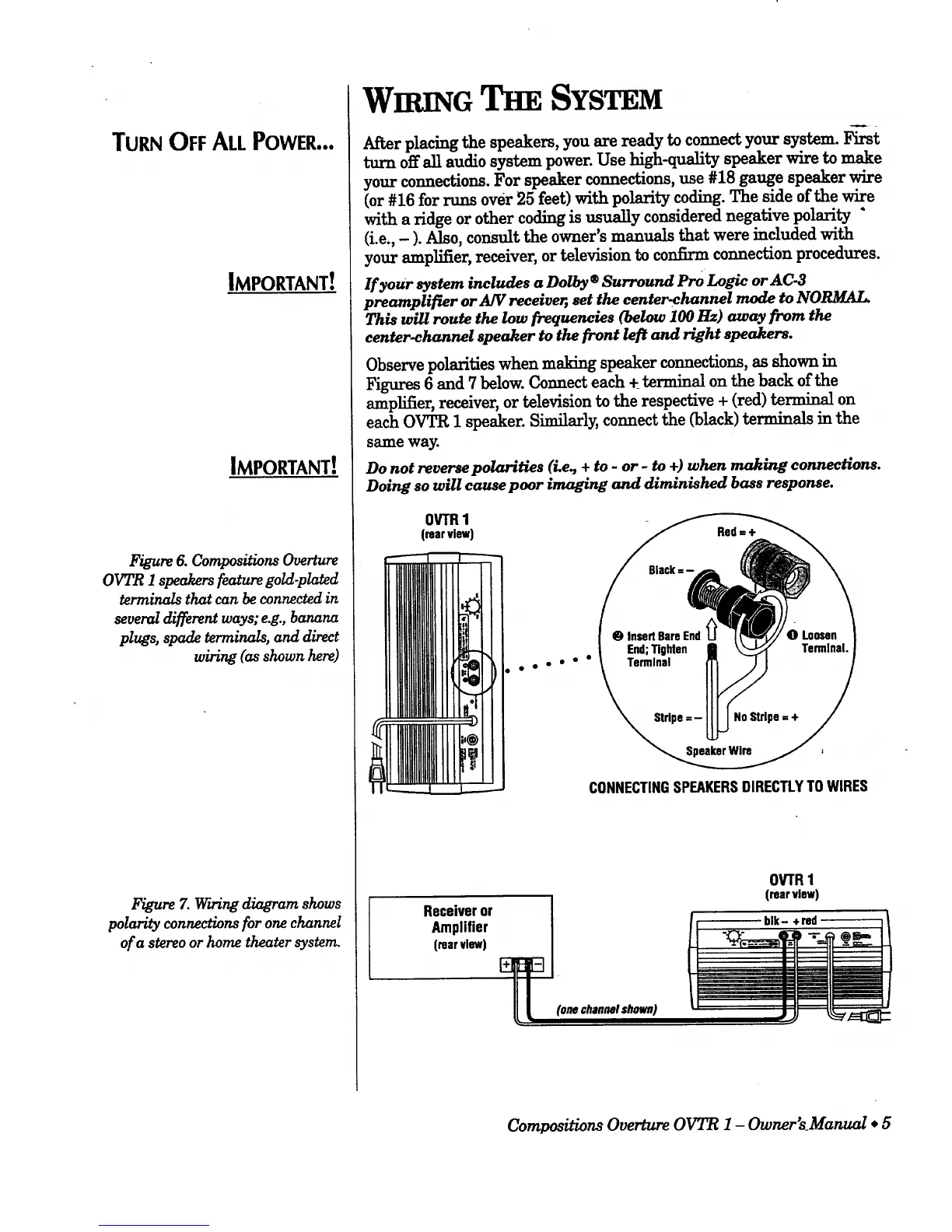
Figure 6. Compositions Overture
OVTR I speakers feature gold-plated
terminals that can be connected in
several different ways; e.g., banana
plugs, spade terminals, and direct
wiring (as shown here)
Figure Z v_rwing diagram shows
polarity connections for onechannel
of a stereo or home theater system.
WIniNG SYSTEM
After placing the speakers, you are ready to connect your system. First
turn off all audio system power. Use high-quality speaker wire to make
your connections. For speaker connections, use #18 gauge speaker wire
(or #16 for runs over 25 feet) with polarity coding. The side of the wire
with a ridge or other coding is usually considered negative polarity "
(i.e., - ). Also, consult the owner's manuals that were included with
your amplifier, receiver, or television to confirm connection procedures.
If your system includes a Dolby® Surround Pro Logic or AC-3
preamplifier or AW receiver, set the center,channel mode to NORMAL.
This will route the low frequencies (below 100 Hz) away from the
eenter_hannel speaker to the front left and right speakers.
Observe polarities when making speaker connections, as shown in
Figures 6 and 7 below. Connect each + terminal on the back of the
amplifier, receiver, or television to the respective + (red) terminal on
each OVTR 1 speaker. Similarly, connect the (black) terminals in the
same way.
Do not reverse polarities (i.e, + to - or - to +) when making connections.
Doing so will cause poor imaging and diminished bass response.
OVTfl1
(rearview)
ooO o°°
CONNECTINGSPEAKERSDIRECTLYTOWIRES
Receiveror
Amplifier
(rear view)
OVTR1
(rear view)
blk- + red
Compositions Overture OVTR 1 - Owner'sManual * 5





 To Next Page