Need help?
Do you have a question about the InfiRay EYE III and is the answer not in the manual?
Warning against pointing the lens at intense heat sources like the sun or laser equipment.
Caution to take breaks after longer periods of use to avoid wrist pain.
Caution to keep the device away from small children due to small parts that could be swallowed.
Handle with care, avoid fire/high temperatures, and do not disassemble the device.
Check power supply for damage, do not use defective parts, and use only the provided charger.
WEEE symbol indicates not to mix with household waste; proper disposal protects environment and health.
Contact dealer/supplier for disposal of electrical and electronic devices.
Contact local authority or dealer for disposal options outside the EU.
For nature observation, remote hunting, civil use; not a toy for children.
Ensure no visible damage, check for clear image, and verify device settings.
Use only as described in the manual; manufacturer/dealer not liable for misuse.
Details on Detector, Optical, Display specs like Resolution, Lens, FOV, Magnification, and Frame Rate.
Details on Battery Type, Power Supply, IP Rating, Memory, Wi-Fi, Temp, Weight, Dimension.
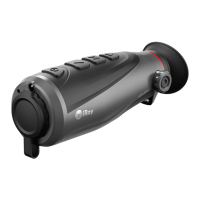
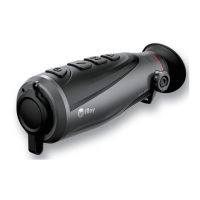
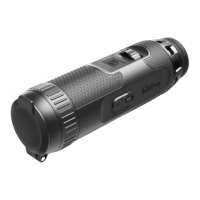
Identifies controller, camera button, magnetic port, power indicator, lens focus ring, objective lens, and lens cap.
Precautions for charging and handling the battery, including temperature limits and proper usage.
How to access and use the shortcut menu for quick adjustments of image mode, scene, brightness, and sharpness.
How to access and navigate the main menu for advanced device functions and settings.
Instructions for taking photos and recording videos using the device.
Procedures for powering off the device and putting it into standby mode.
Interpretation of battery icon colors and lightning symbol for power status.
Automatic calibration via software algorithm without needing to close the lens cover.
Manual background calibration performed by closing the lens cap.
How to take a photo using the camera button.
How to start, stop, and manage video recordings.
How to access recorded files via a computer connection.
How to select different image (White hot, etc.) and scene (Forest, etc.) modes.
How to adjust screen brightness and image sharpness levels.
Details on navigating menu options and controlling the Ultra-Clear mode.
Details on connecting via Wi-Fi and resetting Wi-Fi name/password.
How to connect the device to a mobile device using personal hotspot.
How to interconnect two EYE III devices manually.
How to enable/disable Picture-in-Picture and Auto Calibration features.
How to enable/disable the microphone for audio recording.
How to adjust the image hue between warm and cool colors.
How to enable, disable, or calibrate the compass function.
Procedure to calibrate the compass by rotating the scope.
How to change the device's display language.
Instructions for downloading and installing firmware updates from the official website.
Procedure to restore the device to its original factory settings.
Confirmation of factory reset and its effect on settings.
How to view detailed device information like model, SN, and software version.
How to reset the Wi-Fi name and password via the app.
Manually interconnecting two EYE III devices.
How to download and install firmware updates from the official website.
Information on using the InfiRay Outdoor App for image transmission.
Recommendations for performing technical inspections before use.
Guidelines for regular maintenance of the device.
FCC ID, compliance information, and labeling requirements.
User guidance on modifications, interference, and RF exposure compliance for body-worn use.
The InfiRay Outdoor EYE III Series Thermal Imaging Monocular is a versatile device designed for outdoor use, capable of displaying heat signatures for nature observation, remote hunting observations, and civil applications. It operates effectively day or night, and in harsh weather conditions such as rain, snow, fog, and haze, without being affected by strong external light. The monocular can even detect targets hidden behind obstacles like branches, grass, and shrubs. Its compact size, single-hand operation, and rich feature set make it comfortable and convenient for various outdoor scenarios.
The EYE III series monocular is equipped with a built-in rechargeable Li-ion battery, offering up to 8 hours of operation. For first-time use, a full charge is recommended. The device features a magnetic charge design, allowing for easy connection of the magnetic data cable to the magnetic port. In bumpy environments, users can opt to use a standard Type C cable for charging by pulling out the magnetic connector. A power indicator light (red when charging, green when fully charged) and a lighting icon on the display provide clear charging status. When the battery icon turns red during use, it indicates a low power level, prompting the user to charge the device to prevent data loss.
The device supports both photography and video recording, saving observed images and videos to its built-in 32GB memory. Files are named with timestamps, so synchronizing the date and time via the InfiRay Outdoor application is suggested for better organization. Photos are taken by long-pressing the Camera button, while video recording is initiated and stopped with a short press. During recording, users can still take photos and perform other operations. The maximum duration for a single video recording file is 30 minutes, after which a new file is automatically created. Users should regularly check the remaining memory space and transfer files to other media as needed.
Image calibration is a key function to improve image quality when it appears degraded or uneven. This process equalizes the background temperature of the detector and eliminates defects such as vertical bars or phantom images. The EYE III series offers two calibration modes: Auto Calibration and Background Calibration. Auto Calibration operates automatically based on a software algorithm and does not require closing the lens cover. Background Calibration is performed by closing the lens cap, which triggers an automatic calibration.
The device also features a digital zoom function, allowing users to quickly increase magnification from 1.5x up to 4x, and return to the basic 1x magnification. This is controlled by rotating the Controller clockwise for zoom-in and anticlockwise for zoom-out, with the current magnification displayed in the status bar.
Connectivity is enhanced with built-in Wi-Fi and Interconnection functions. The Wi-Fi function allows the monocular to connect with mobile devices (laptops or smartphones) for data transmission and control via the InfiRay Outdoor App. The Wi-Fi name (SSID) and password can be reset through the app. The Interconnection function enables two EYE III devices to connect manually, with one acting as a data sender and the other as a receiver, displaying the sender's screen image on the receiver.
The device also supports firmware updates, with notifications posted on the official website, social media, or the InfiRay Outdoor APP. Users can download update files and store them in a designated "update" folder in the device's memory. The update process is initiated through the main menu, and it is crucial to ensure the device is fully charged before updating.
The EYE III series is designed for ease of use with several intuitive features:
Regular maintenance is recommended to ensure the longevity and optimal performance of the EYE III series monocular:
 General
| Frame Rate | 50Hz |
|---|---|
| Pixel Size | 12μm |
| Waterproof Rating | IP67 |
| Display | OLED |
| Operating Temperature | -20℃~+50℃ |
| Battery Type | Li-ion |

 To Next Page