Need help?
Do you have a question about the InfiRay RL42 and is the answer not in the manual?
Explains the function of each button in different modes and operations.
Procedure for setting the zeroing range for accurate aiming.
Details on selecting and performing different calibration types.
Instructions for restoring the device to its original factory settings.
How to activate and operate the laser ranging feature.
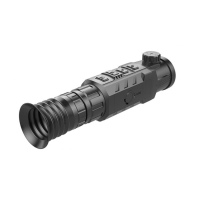
The Rico Series User Guide describes an advanced infrared thermal imaging scope designed for various applications, including night hunting, observation, terrain navigation, and search and rescue. Unlike traditional night vision devices, the Rico series operates based on infrared thermal image theory, meaning it does not require external lighting and is unaffected by strong light conditions. This allows users to observe objects hidden behind barriers like tree branches, tall grass, and shrubs, even in challenging weather conditions such as rain, snow, fog, or smog, as well as at night.
The Rico series infrared scope is equipped with a patented 12µm sensor, delivering high image quality. It features a robust aluminum alloy shell for durability. The device offers a maximum detection range of 2600m, making it suitable for long-distance observation. An optional high-precision laser rangefinder, with a maximum ranging capability of 1000m, enhances its utility for accurate distance measurement.
The scope boasts an AMOLED screen with a resolution of 1024x768 pixels, providing a clear and detailed display. It operates at a high frame frequency of 50Hz, ensuring smooth real-time imaging. Digital zoom functionality allows for magnification up to 4x (RL42 model) or 11.2x (RH50 model), providing visual amplification for closer inspection of targets.
For power, the Rico series uses a rechargeable Li-Ion Battery Pack IBP-1, offering an operational duration of up to 6 hours on a full charge. It also supports external power supply via a 5V Type C USB connection, allowing for extended use with power banks. The device has a high degree of protection with an IP67 rating, indicating its resistance to dust and water ingress.
The scope includes a built-in 32GB storage capacity, supporting both photographing and video recording functions. All captured media are time-stamped, making it easy to organize and retrieve files. A built-in Wi-Fi module enables connectivity with external devices like smartphones or tablet PCs, facilitating real-time image synchronization, remote control via an app, and firmware updates.
Additional features include a built-in digital compass and gravity sensor, which provide useful navigational and positional data. Users can choose from many reticle types and colors to customize their aiming experience. The "Ultra-Clear Mode" enhances image clarity, while Picture-in-Picture (PIP) and pixel calibration functions further improve usability and image quality. The device also offers three save slots for different rifle types, allowing for quick switching between zeroing profiles.
The Rico series is designed for user-friendly operation with a clear interface. The main controls include a power button, up/zoom in button, menu/M button, and down/photographing button. An eyepiece focusing ring and object lens focusing ring allow for sharp image adjustment.
Zeroing: The device employs a "Freeze" method for zeroing, allowing users to accurately align the reticle with the point of impact. This involves mounting the scope, setting a known target distance, and adjusting the reticle position based on shot impact. The image can be frozen to facilitate precise reticle movement, with options to move the reticle by 1 or 10 pixels at a time. Multiple zeroing profiles can be saved for different distances or rifle types.
Calibration: To maintain optimal image quality, the scope offers three calibration modes: Auto Shutter Calibration (A), Manual Shutter Calibration (M), and Background Calibration (B). Auto calibration occurs automatically, while manual calibration can be triggered by the user. Background calibration requires covering the lens with a lid to balance the sensor's background temperature and remove image defects.
Digital Zoom: Magnification can be adjusted in loops via the up button, with the current zoom ratio displayed on the status bar.
Photographing and Video Recording: Photos and videos can be captured directly from the main menu. All media are saved to the internal 32GB storage, named according to the current time. The device can be connected to a PC via a data cable to access and manage stored files, appearing as an SD card.
Status Bar: A comprehensive status bar at the top of the screen provides real-time information, including current image mode (White Hot, Black Hot, Red Hot, Pseudo color, Target Highlighting), zeroing type and distance, Ultra-Clear mode status, calibration mode, compass status, standby setting, video output status, Wi-Fi status, and clock.
Shortcut Menu: For quick adjustments, a shortcut menu allows users to easily change image mode, screen brightness, image sharpness, and zeroing range.
Advanced Menu: The advanced menu provides access to more detailed settings, including calibration modes, compass and gravity sensor activation, reticle type and color selection, zeroing profile management, standby settings, rangefinder zeroing, and pixel defect correction.
Laser Rangefinder (Optional): When equipped, the laser rangefinder can be activated to measure distances. It supports single-time ranging (SGL) and continuous ranging (CONT) modes. The ranging value is displayed on the screen, and a laser indicator can be switched on/off.
Wi-Fi Connectivity: The built-in Wi-Fi module allows wireless connection to external devices. Users can search for the "Rico_XXXXXX" signal, enter the default password (12345678), and then control the device and synchronize images via a dedicated app. The app also allows for changing the Wi-Fi name and password.
Picture in Picture (PIP): The PIP function displays a small, enlarged view (2x magnification) of the main screen's central region, which is centered on the reticle. This helps in precise aiming and observation.
Battery Management: The IBP-1 battery pack should be fully charged before first use. Charging involves aligning the battery pack pins with the jar's groove, inserting a Type C cable, and connecting to an adapter. An LED indicator on the battery pack shows charging status (red for charging, green for full, blinking red for no battery). Partial charging is recommended for long-term storage, and the battery should not be charged immediately after being brought from a cold environment. Charging should occur within a temperature range of 0°C to +45°C.
Safety Precautions: Users are advised not to leave the battery unsupervised while charging, use broken or modified chargers, or charge for over 24 hours. The battery should be kept away from high temperatures, fire, and water. Short circuits should be avoided, and the battery pack should not be disassembled, replaced, or dropped.
External Power Supply: The Rico series can be powered by external sources like power banks via the Type C port. When connected, the device will switch to external power and simultaneously charge the internal battery.
Firmware Updates: To ensure optimal performance, firmware, parameters, and product instructions are continuously updated. Users can download and install these updates from the official InfiRay website (www.xinfrared.com) or via the app when connected to a smartphone or tablet PC.
Pixel Defect Correction: Over time, some pixels on the screen may degrade. The device offers a pixel defect correction function to identify and remove these "bad pixels" (either brighter or darker than surrounding pixels), improving image quality.
Compass Calibration: The digital compass can be calibrated through the advanced menu, following on-screen prompts to move the scope in a specific track.
Factory Reset: The device can be reset to its default factory settings via the general settings menu. This will revert all customized settings, including image mode, zeroing range, Ultra-Clear mode, digital zoom, shutter calibration, and digital compass, to their original states.
General Settings: Users can adjust units of measure (meters or yards) in the general settings menu. The device also provides access to information about the product model, hardware and software versions, PN code, and SN code.
 General
| Sensor Resolution | 384x288 |
|---|---|
| Pixel Size | 12 μm |
| Frame Rate | 50 Hz |
| IP Rating | IP67 |
| Type | Handheld |
| Battery | Lithium-ion |
| Battery Type | Lithium-ion |
| Operating Temperature | -20°C to +50°C |


 To Next Page