6. Battery Pack
There is a rechargeable lithium-ion Battery pack IBP-1, operation duration: 6 hours. Please fully
charge the battery pack before first time using.
How to charge the battery pack:
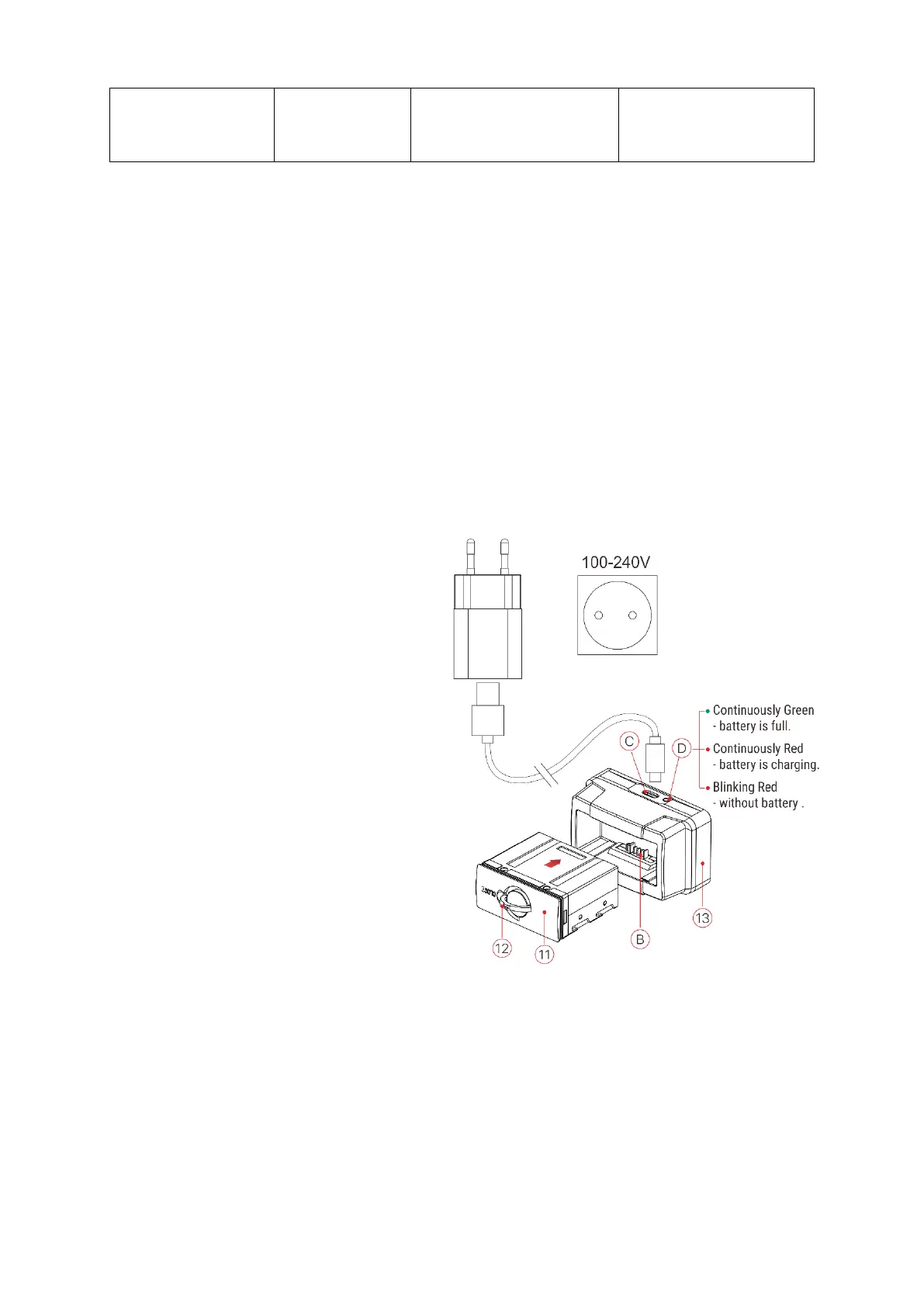
➢ Align the pins of battery pack (A) with the groove (B) of battery pack jar (13), insert battery pack
into the jar;
➢ Insect type C cable to the port in battery pack jar (C);
➢ Connect anther port of type C cable with adapter.
➢ Plug in the adapter to 100-240V socket
to charge battery pack;
➢ Once installation complete, the LED on
battery pack (D) will glow or blink;
- ;When LED continuously Red,
indicating the charging is
progressing;
- ;When LED turn to continuously
Green, means battery fully
charged;
- When LED blinking with Red color,
indicates charging jar connected
to power supply but no battery
pack installed.
➢ When fully charged, plug out and take battery pack from jar
Battery pack installation
➢ Pull out the Battery pack ring-pull (12), rotate the ring clockwise until it parallel with battery pack
horizontally.



 To Next Page