Need help?
Do you have a question about the InfiRay EH35 and is the answer not in the manual?
Warning against pointing the lens at intense heat sources like the sun or lasers to prevent damage.
Details of the thermal detector, including resolution and pixel size.
Technical details of the objective lens, field of view, and magnification.
How to access and use the shortcut menu for quick settings adjustments.
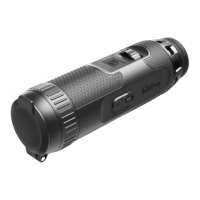
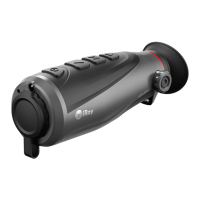
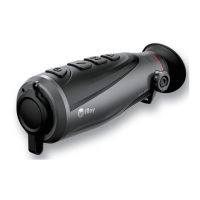
The InfiRay EYE III series thermal imaging monocular is a versatile device designed for outdoor use, capable of displaying heat signatures in various conditions, including day, night, rain, snow, fog, and haze, without being affected by strong light. It operates without requiring an external light source and can even detect targets hidden behind obstacles like branches, grass, and shrubs. The device is lightweight, portable, and designed for single-hand operation, offering comfort and a rich set of functions for hunting, searching, and general outdoor observation.
The EYE III series is equipped with a built-in rechargeable Li-ion battery pack, providing up to 8 hours of operation. For initial use, a full charge is recommended. Charging is indicated by a red power indicator next to the Type C port, which turns green when fully charged. A lighting icon appears on the display during charging and disappears when the data cable is removed or power is cut off. A red battery icon indicates a low power level, prompting timely charging to prevent data loss. The device should be charged at temperatures between 0°C and 50°C, and not immediately after being brought from a cold to a warm environment; a 30-40 minute wait is advised. Prolonged storage at temperatures below 20°C or above 50°C can permanently reduce battery capacity. For long-term storage, the device should be recharged to 40%-50% every two months and stored in a dry, well-ventilated environment. Partial charging is necessary if the battery is to be idled for a long time, avoiding fully charged or discharged states.
To power on the device, press and hold the Controller (3) for 3 seconds; the startup logo will appear within 1 second. Once an infrared image is displayed in the eyepiece, the monocular is in operating status. The diopter adjustment knob (2) allows users with different degrees of myopia to adjust the resolution of the icon on the display.
The device offers a shortcut menu, accessed by pressing the Controller (3) from the home screen. This menu allows quick adjustments to image mode (White hot, Black hot, Red hot, Rainbow), image contrast (levels 1-6), screen brightness (levels 1-6), and image sharpness (levels 1-4). The Controller (3) is used to switch between functions and set parameters. To save changes and return to the home screen, press and hold the Controller (3), or it will automatically save and exit after 5 seconds of inactivity.
For more advanced functions, the main menu is accessed by pressing and holding the Controller (3) from the home screen. The menu has two pages, and the Controller (3) is used to navigate through options cyclically. Pressing the Controller (3) briefly adjusts parameters or enters sub-menus. In any menu interface, pressing and holding the Controller (3) saves and exits to the home screen, while a short press of the Camera button (4) returns without saving. The menu automatically exits to the home screen after 10 seconds of inactivity.
The EYE III series supports photography and video recording, saving files to its built-in 32GB memory. Files are named with time, so synchronizing date and time via the InfiRay Outdoor application is recommended. To take a photo, press and hold the Camera button (4) from the home screen. A flashing camera icon indicates a photo is being taken, disappearing upon successful capture. An exclamation mark icon next to the camera icon warns of insufficient memory space. For video recording, a short press of the Camera button (4) starts recording, displaying a timer (HH:MM:SS) on the upper right. During recording, photos can still be taken with a long press of the Camera button (4). Another short press stops and saves the video. The maximum video duration is 30 minutes, after which a new file is automatically created.
The device can be set to standby mode by covering the lens cap (9) and rotating the Controller (3), or by simultaneously pressing the Controller (3) + Camera button (4). To wake up from standby, rotate the Controller (3). To power off from standby, briefly press the Camera button (4). The device automatically shuts down if in standby for over 30 minutes. To power off completely, press and hold the Controller (3) + Camera button (4) simultaneously for 3 seconds; the device will power off after a countdown, which can be canceled by rotating the Controller (3).
Digital zoom is supported, allowing magnification increments of 1.5x, 2x, 2.5x, 3x, 3.5x, and 4x, with the ability to return to 1x. Clockwise rotation of the Controller (3) zooms in, and anticlockwise rotation zooms out. The current magnification is displayed in the status bar.
The device features an Ultra-Clear mode, which enhances image contrast for rainy, foggy, and hazy conditions. This mode can be toggled on/off via the main menu, accompanied by a shutter calibration click.
Wi-Fi functionality allows connection to mobile devices (laptops or smartphones) for data transmission. After enabling Wi-Fi in the main menu, search for the device's Wi-Fi signal (named "EYEIII_XXXXX-XXXXXX," where XXXXX-XXXXXX is the serial number) and connect using the default password "12345678" (displayed for the first three times). Once connected, the InfiRay Outdoor App can control the device. The Wi-Fi name (SSID) and password can be reset via the 'Settings' icon in the InfiRay Outdoor App, requiring a device reboot to apply changes.
Interconnection with other EYE III devices or mobile devices is also possible. For mobile device interconnection, enable the personal hotspot on the mobile device, naming it "ICS" with password "12345678," then enable interconnection in the device's main menu. The device will automatically search for this hotspot. A "Sending Data" prompt and an interconnection icon indicate a successful connection, allowing control via the InfiRay Outdoor App without affecting the mobile device's internet function. For interconnection between two EYE III devices, enable Wi-Fi on one and interconnection on the other. For faster pairing, modify the Wi-Fi name and password to "ICS" and "12345678" in the InfiRay Outdoor App. Simultaneously short press the Camera button (4) + Controller (3) on both devices to start pairing. The device with Wi-Fi enabled acts as the data sender, displaying its screen image on the receiver. During image transmission, operations on the EYE III are still possible, except for photographing and video recording. Note that Wi-Fi and Interconnection functions cannot be enabled simultaneously.
The device also includes an auto-calibration function, which can be turned on/off in the main menu. When on, the device calibrates automatically using a software algorithm, eliminating the need to close the lens cover. A microphone function can be enabled/disabled to synchronously collect sound during video recording.
The image hue can be set to "W" (warm) or "C" (cool) via the main menu. Cool color images are brighter, while warm color images are softer and offer eye protection. This setting does not apply to Rainbow mode.
A compass function can be turned on/off and calibrated. In the submenu, users can select "Calibration" and rotate the scope along three axes (at least 360° each) within 15 seconds for automatic calibration.
The GUI language can be changed in the main menu, with options including English, Deutsch, Русский, Español, Italiano, Polski, Čeština, Svenska, and Magyar. The selected language is confirmed with a short press of the Controller (3) and automatically returns to the main menu. The language setting is not restored upon factory reset.
Firmware updates can be performed by downloading the update file from the official website (www.infirayoutdoor.com) and storing it in a folder named "update" in the device's memory. From the main menu, select "Firmware Update," then "Yes" to confirm. The device will automatically search for the update file. Ensure the device is fully charged before updating. Notifications about updates are posted on the official website, social media, or the InfiRay Outdoor App.
The device information, including product model, SN number, PN number, hardware version, software version, and FPGA version, can be viewed in the "Info" section of the main menu.
Regular maintenance is recommended at least twice a year. This includes wiping metal and plastic surfaces with a cotton cloth to remove dust and dirt, potentially using silicone grease for cleaning. Electric contacts and battery slots should be cleaned with a non-greasy organic solvent. The glass surfaces of the eyepiece and lens should be checked for cracks, greasy spots, dirt, or other deposits. Dust and sand should be cleared from the lens, ideally using a non-contact method, followed by cleaning optical surfaces with a specialized wiping tool and solvent.
A factory reset option is available in the main menu to restore default settings. This will reset image mode to White hot, image contrast to level 3, screen brightness to level 2, image sharpness to level 3, magnification to 1x, auto calibration to On, image hue to C, Ultra-Clear mode to Off, Wi-Fi to Off, Wi-Fi password to 12345678, interconnection to Off, PIP to Off, microphone to Off, and compass to Off. The device will restart automatically after a factory reset. If the device is reset to factory settings, the Wi-Fi name and password will also revert to their default settings.
Before each use, a technical inspection is recommended to check for cracks on the body, condition of the object lens and eyepiece, battery status (ensuring it's charged), and proper functioning of the controller/buttons.
 General
| Resolution | 384x288 |
|---|---|
| Frame Rate | 50 Hz |
| Battery Life | 8 hours |
| Pixel Size | 12 μm |
| Objective Lens | 35 mm |
| Display Resolution | 1024x768 |
| IP Rating | IP67 |
| Eye Relief | 15 mm |
| Waterproof | Yes |
| Digital Zoom | 2x, 4x |
| Battery Type | Lithium-ion |
| Operating Temperature | -20°C to +50°C |


 To Next Page