3
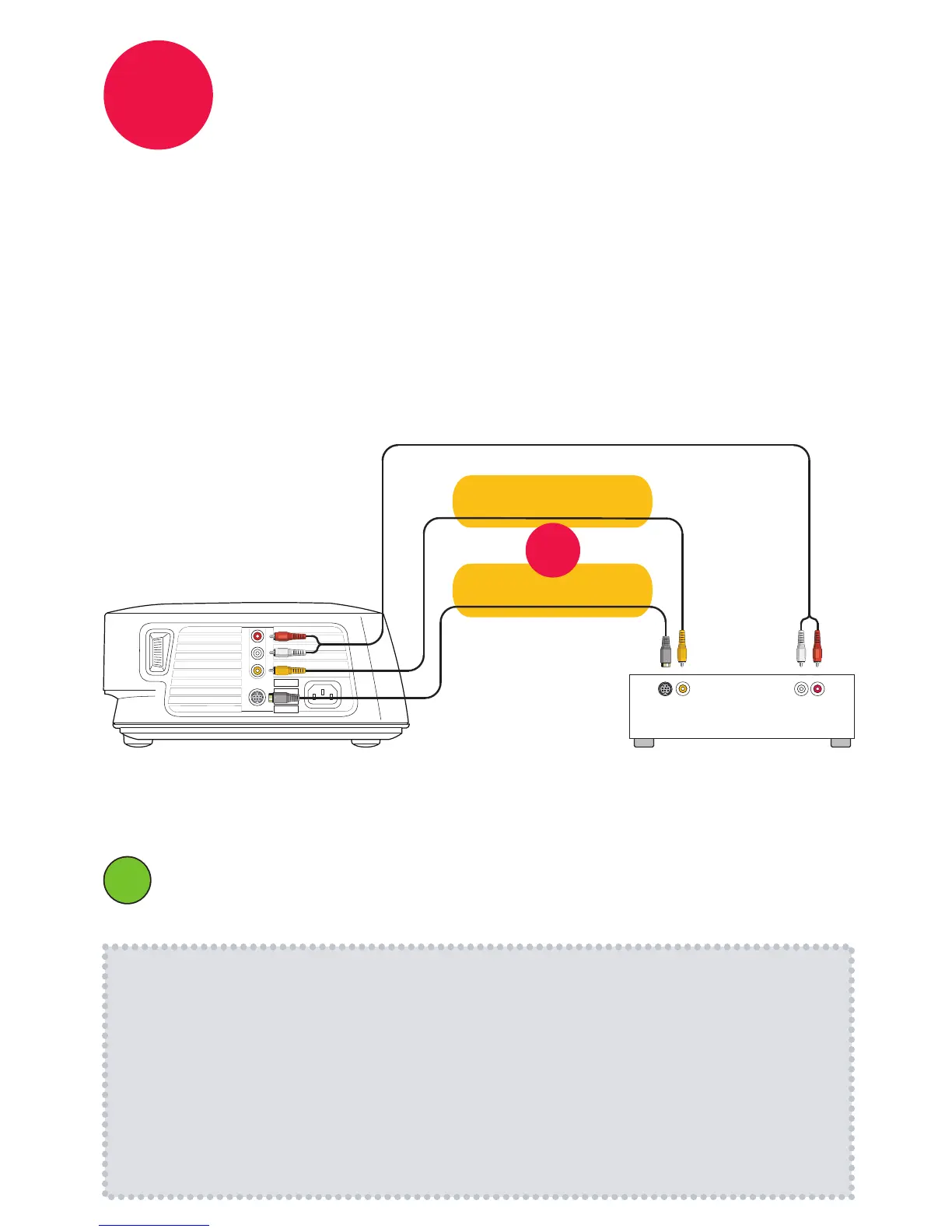
Connect to the video source
(DVD player, game console, VCR, etc.)
1
2
How-To Guides with instructions for connecting other types of sources are
available at www.infocus.com/service/howto
Connect video with a Composite Video Cable (good)
or an S-Video Cable (better)
www.infocus.com/store part number SP-CPSTVID-5M or SP-SVIDEO-10M
Connect audio with an RCA Audio Cable
www.infocus.com/store part number SP-RCAAUD-5M
Connect to component video sources with an s-video to component video
adapter.
www.infocus.com/store
part number SP-VIDEO-ADPT
ii
RCA Audio Cable
S-Video
Cable
Good
Better
OR
DVD, Game, VCR, etc.
Audio Out
L R
Video Out
R
L
vid
s-video
Composite
Video Cable
Note: Your video source may look
different. Look for color-coded
connections.
Some expansion modules may include additional connectors
See the module’s Reference Guide for more information.


 To Next Page