Setup Page 11
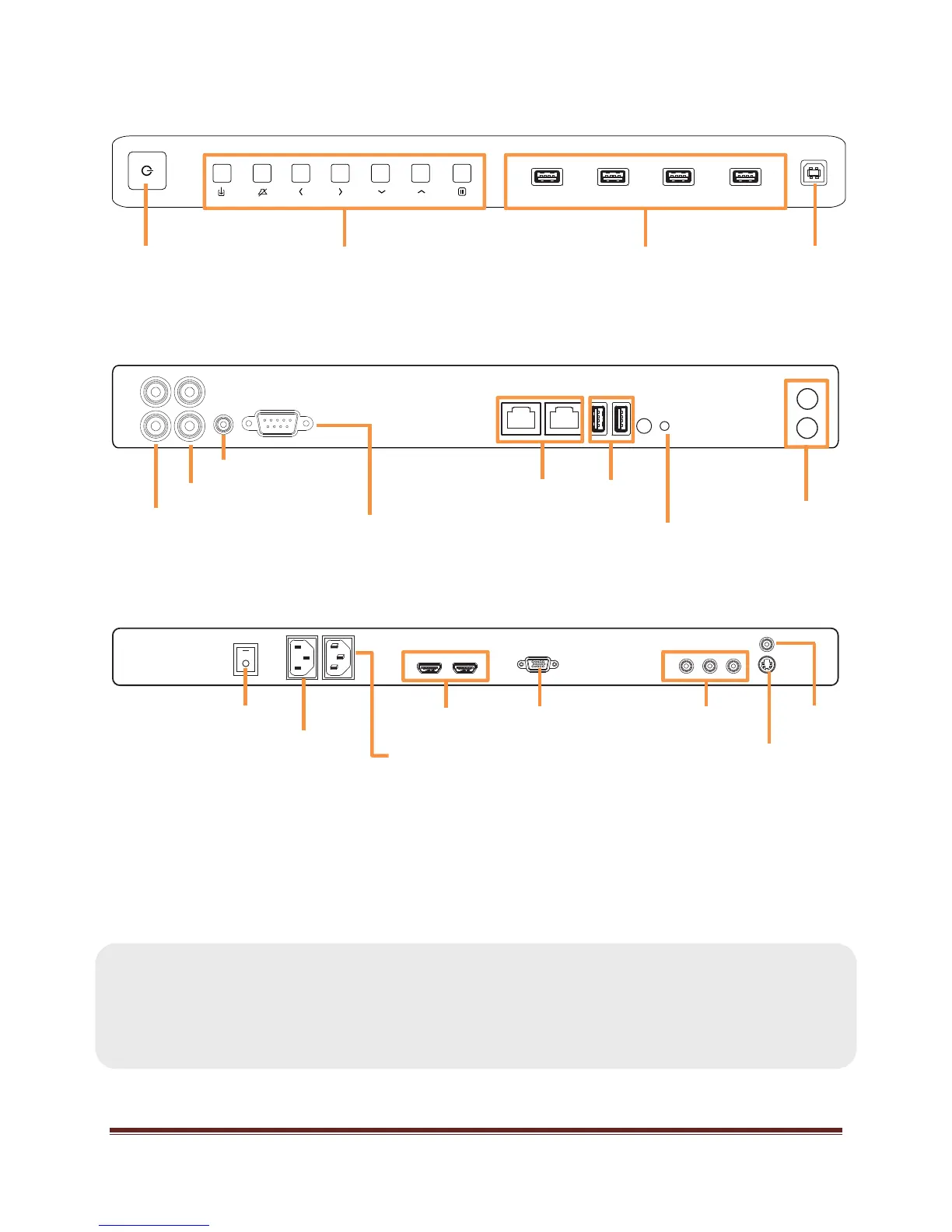
Bezel Connector Panel
Side Connector Panel
Bottom Connector Panel
Connecting AC Power
1. Connect one end of the AC power cord to the AC In jack on the back of the tablet.
2. Connect the other end of the AC power cord to an AC outlet.
3. Press the power switch on the Bottom Connector Panel ON. (The LED on the front of the
Mondopad™ tablet displays red.)
NOTES:
Your tablet should only be operated from the power source indicated on the label.
Always unplug the AC power cord from the power outlet when you are not using
your tablet for an extended period of time.
Power button USB-A jacks USB-B jack
Audio In (L/R)
RS232
RJ45
USB-A
Audio Out (L/R)
(for Sound Bar)
Keypad
Antennas
Power LED
Audio In (3.5mm)
Power switch
HDMI
®
VGA
Component
(YPbPr)
AC Power In
AC Power Out
S-video
Composite


 To Next Page