288713405
15
3.4.4 Communication (UPS-Server)
Dry relay alarm contacts or RS232 communication port can be used for communication with UPS. Users can
get information about any possible alarm like “Battery Low” “Line Failure” “Load On By-pass”. The relay
interface AS400 and Windows NT is an special edition for the systems.
You should use ITF3 and RS330 board for the communication with the PC. For this connections there must
be a dedicated serial port.
ATTENTION!!! The communication cables of this option must be shielded and must install away from the
voltage cables.
The RS232 port (at RS330 board and DB9 female) definition :
RS232 Signal Gnd (isolated) 7
RS232 Receive 6
RS232 Transmit 9
The settings for the Microsoft NT server , IBM AS400 connections will be done by the system’s operator in
accordance to the each user’s needs.
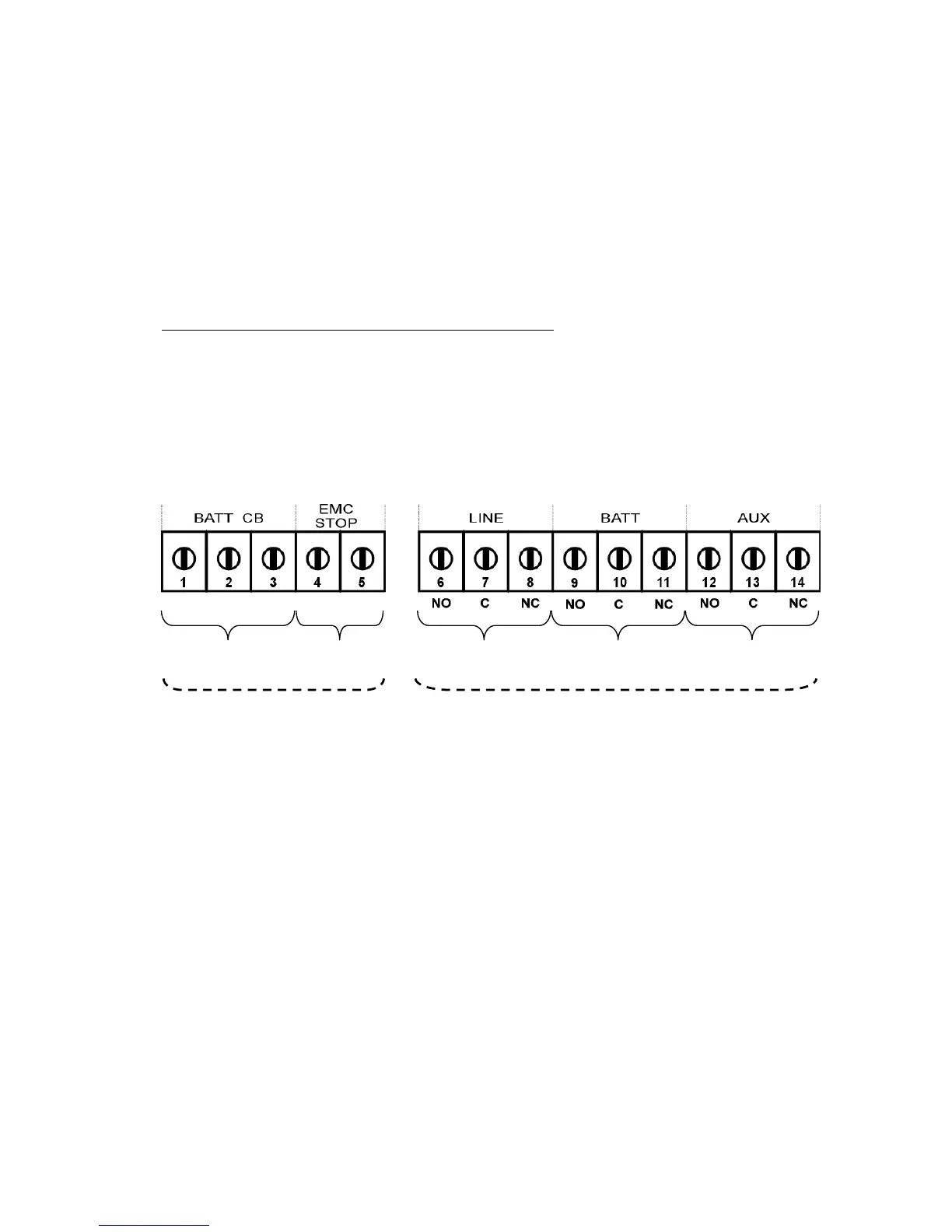
Figure 3.4 ITF3 Board Connection Details
CN3
CN4
Battery Circuit
Breaker Input
Emergency Stop
Line Failure
Relay
Battery Low Relay
or Common Alarm
Relay
By-Pass
Relay



 To Next Page