12
CD1-k – User Guide
Chapter 2 - Commissioning
4.3.2 - LOOP ADJUSTMENT WITH A VERTICAL LOAD
In the case of an axis with vertical load, proceed as follows:
Select the Limiting current limitation mode.
Initialize
the speed loop gains corresponding to the unloaded motor (execute therefore the Autotuning procedure
with the motor uncoupled from its mechanical load).
Couple the motor with its load. If possible, make a control in speed mode; otherwise, close the position loop with a
stable gain
.
Move the axis by means of the speed input command until a stall position where one motor revolution is not
dangerous for operator and machine (far enough from the mechanical stops).
Execute then the Autotuning procedure with the motor at standstill. If the axis is moving, this means that
the Autotuning has not been accepted by the amplifier.
4.4 - ROTATION / COUNTING DIRECTION
The counting direction can be reversed by selecting the Reverse movement in the Visual Drive Setup
parameter setting software.
5 - PARAMETER SAVING
When all adjustments have been made, the parameters may have to be stored in a non volatile EEPROM (the
amplifier must be disabled).
6 - MOTOR PHASING (PHASING) AT POWER ON
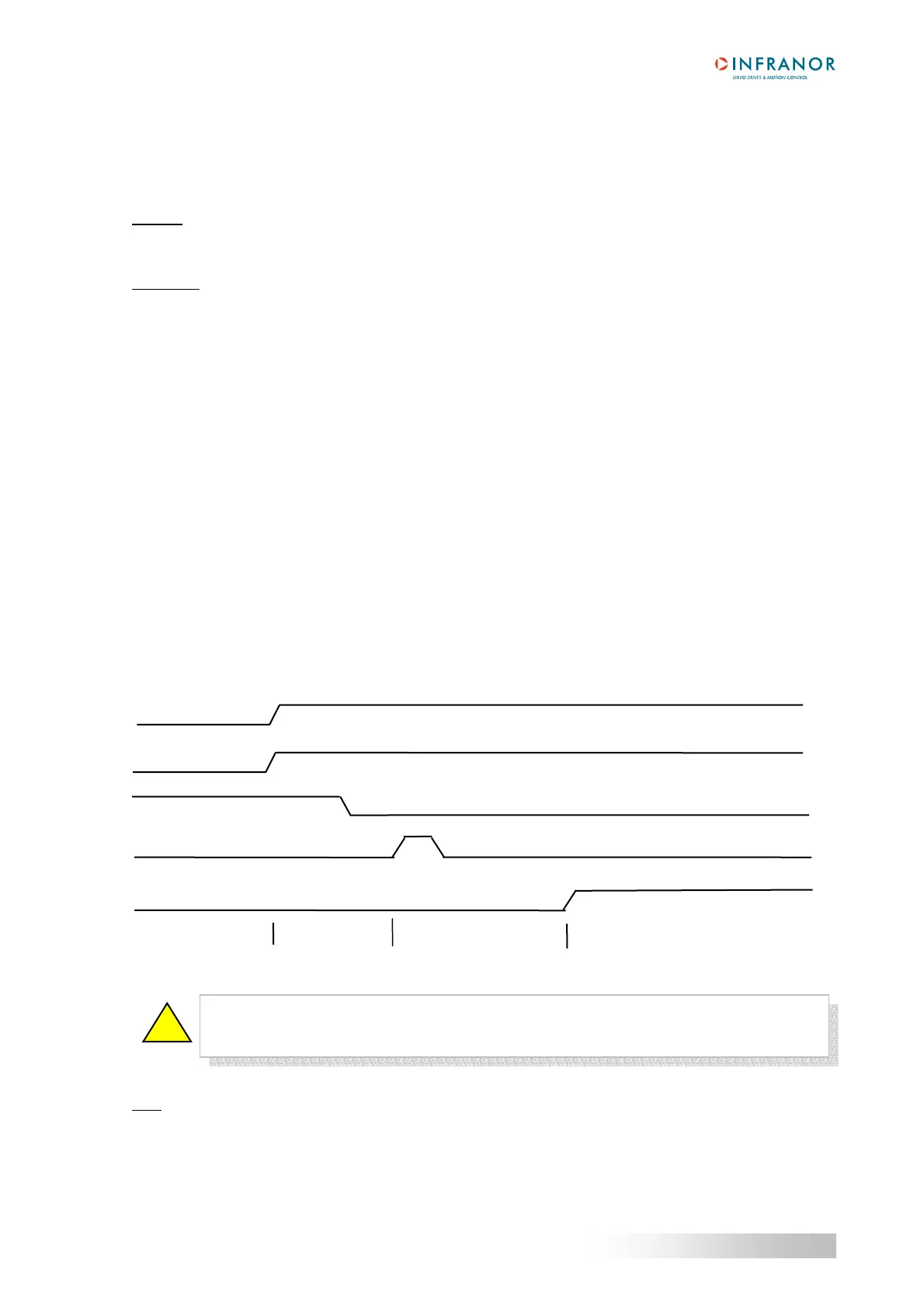
In the Incremental encoder without HES configuration, the motor phasing procedure (Phasing) must be
performed at each power on of the amplifier according to the diagram below:
Note
: In the Incremental encoder without HES configuration, the motor phasing procedure (Phasing) must be
renewed after the release of a Feedback or Counting error. The motor phasing procedure must also be renewed
after modification of the motor or encoder parameter value.
On an unbalanced axis (constant torque du to gravity effects on a vertical axis), the motor
phasing procedure is not possible. The motor must be equipped with an incremental
encoder + HES or with an absolute Sin/Cos encoder.
!
AOK
INHIBIT
Phasing
command
Phasing
OK
Power up
Ready
Phasing
Ready for running
Start phasing
End power up
End phasing
Power On


 To Next Page