InHand ER605 User Manual
27
10 VPN
A virtual private network (VPN) is a private network established on a public network for encrypted
communication. A VPN gateway encrypts data packets and translates destination IP addresses of data
packets to implement remote access. The VPN service can be provided through a server, hardware client, or
software client.
10.1 IPSec VPN
IPSec VPN is an open network security protocol suite developed by IETF to ensure secure data transmission
over the Internet through source authentication, data encryption, data integrity check, and anti-replay at the
IP layer. This protocol suite lowers the risks of data leakage and interception, and ensures the data integrity
and privacy, thus protecting the security of communication.
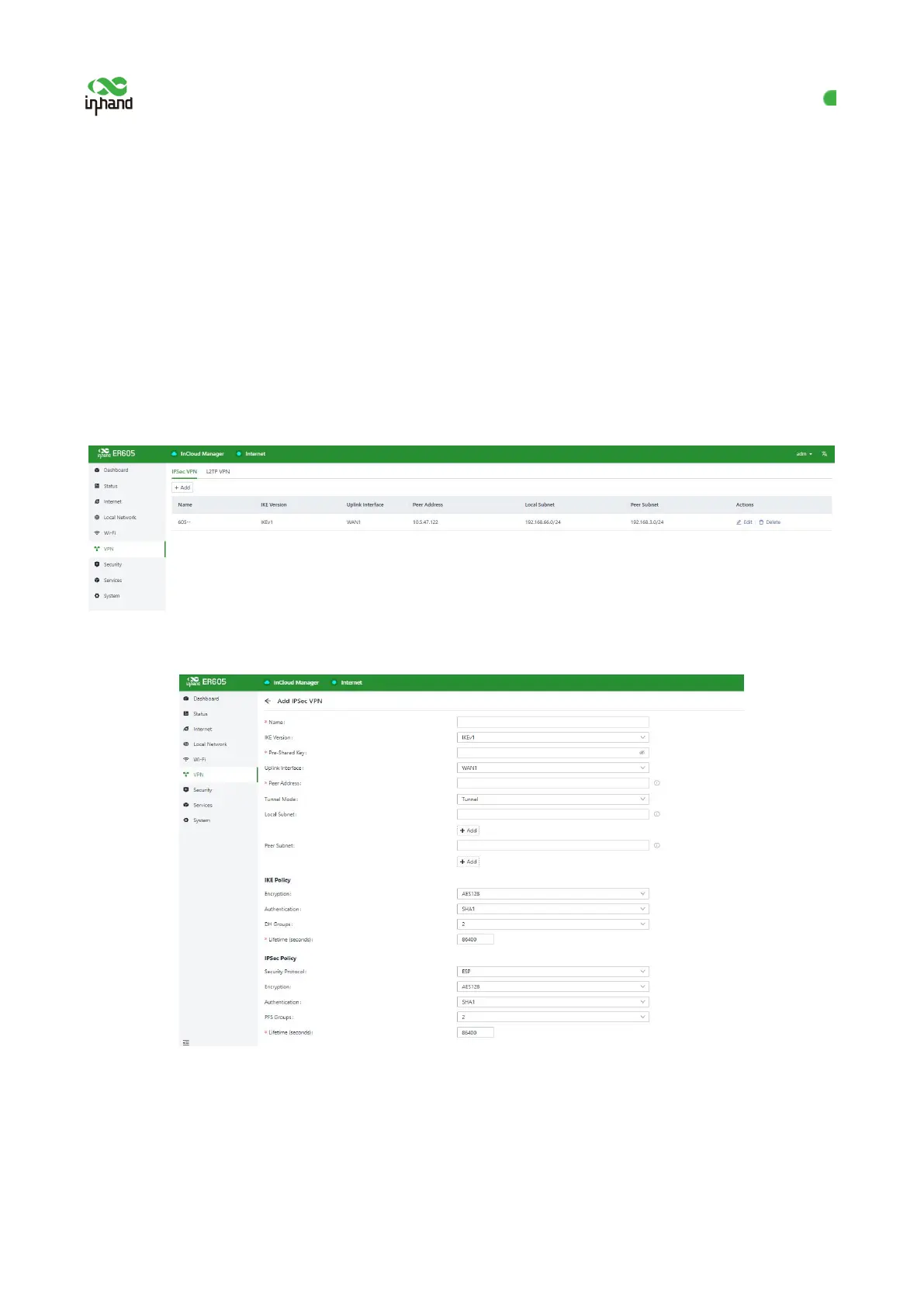
Choose VPN > IPSec VPN, and click Add to add an 【IPSec VPN.】
Figure 10-1-1 Adding an IPSec VPN
Figure 10-1-2 Setting the new IPSec VPN
After the IPSec VPN configuration is completed on both sides, an IPSec VPN tunnel is established. To check the status
of this tunnel, click Status on the left pane, and then click the VPN tab. The following parameters must be set:
Name: specifies the name of the IPSec VPN created on the router, which is used for local VPN management.
IKE Version: specifies the version of the Internet Key Exchange (IKE) protocol used on the router, which can be
IKEv1 or IKEv2.


 To Next Page