InHand ER605 User Manual
30
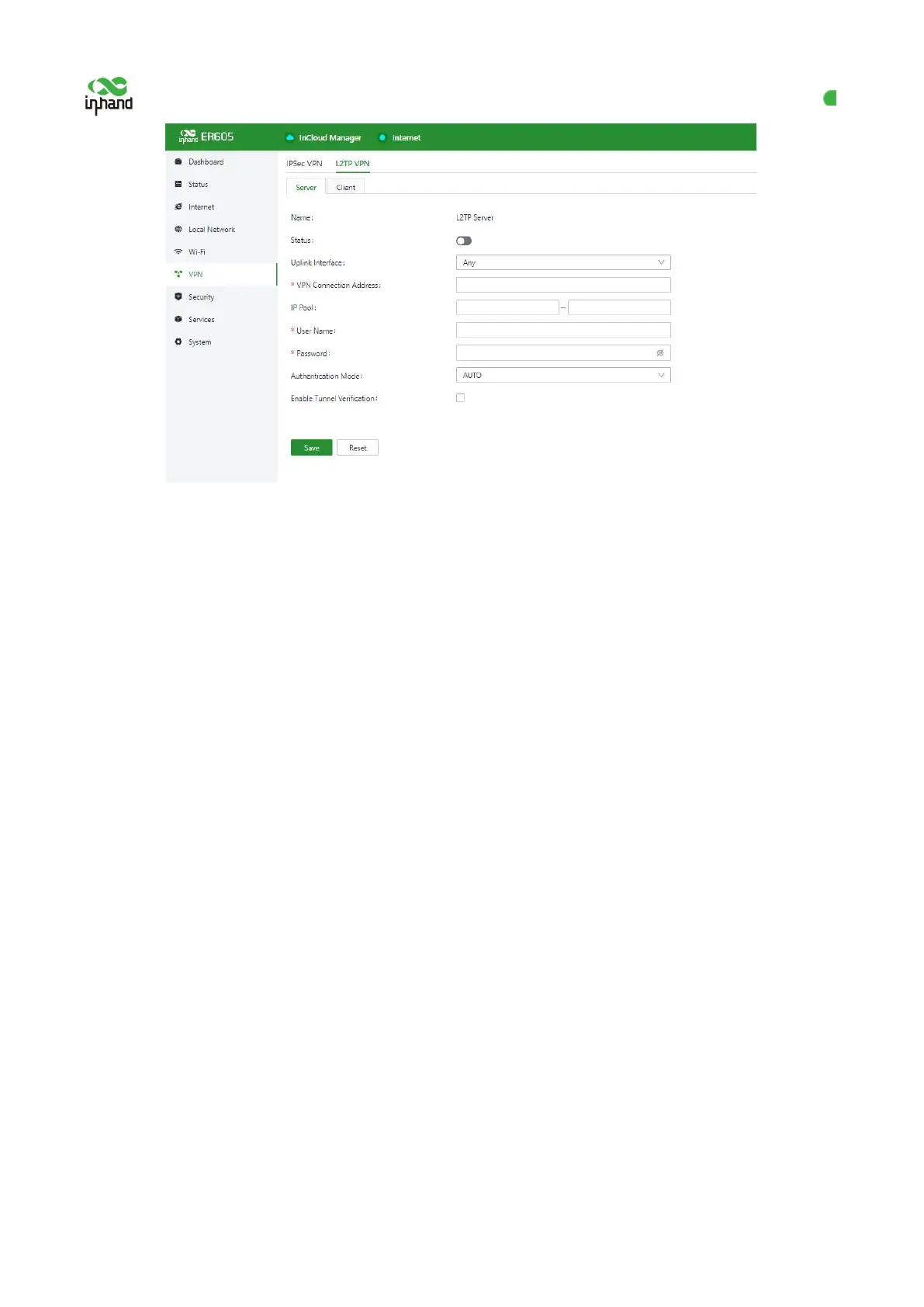
Figure 10-2-2 L2TP server configuration
Name: displays the name of the L2TP server, which cannot be changed.
Status: enables or disables the L2TP server function. This function is disabled by default.
Uplink Interface: specifies the uplink interface used to establish a tunnel from the L2TP server.
VPN Address: specifies the gateway address for the L2TP client. The gateway assigns an IP address to the L2TP
client from the specified IP address pool.
Address Pool: specifies the IP address range for the L2TP client.
User Name/Password: specifies the user name and password for L2TP negotiation, which must be consistent on
both ends of the tunnel.
Authentication: specifies the authentication mode for the L2TP tunnel.
Enable Tunnel Authentication: when this option is selected, make sure both ends of the tunnel are configured
with the same user name and password.
10.3 VXLAN VPN
VXLN is essentially a tunneling technology that establishes a logical tunnel on the IP network between the
source network device and the destination network device, and forwards user-side packets through this
tunnel after specific encapsulation.
Choose VPN > VXLAN VPN, and click Add to add an 【VXLAN VPN.】


 To Next Page