Home
INNOCN
Monitor
15A1F
Page 35
INNOCN 15A1F - Page 35
53 pages
Manual
Save Page as PDF
To Next Page
To Next Page
To Previous Page
To Previous Page
Loading...
Deutsch
8
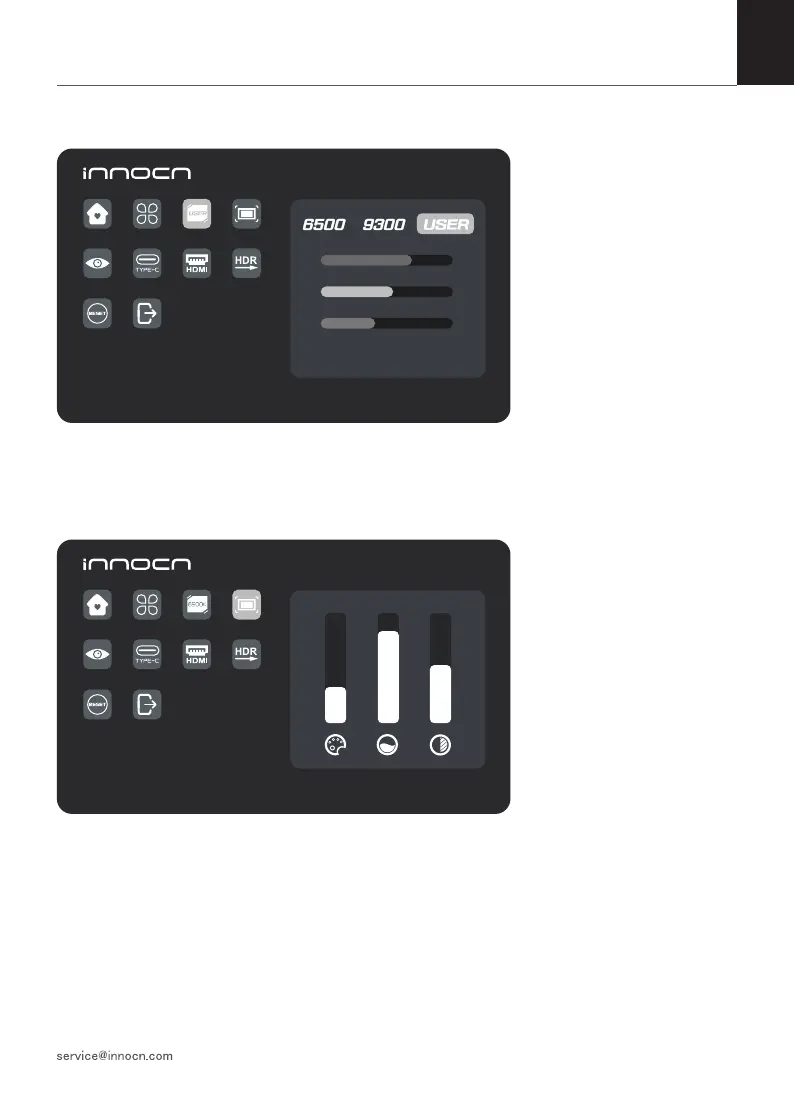
Farbtemperatur
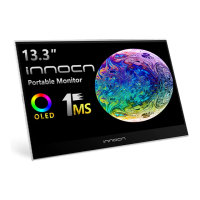
Farbe
Drücken Sie die obere und untere
Steuertaste, um Chroma, Sättigung
und Schärfe einzustellen.
Wählen Sie den Modus USER,
um den RGB-Wert einzustellen.
1920*1
080@60Hz
75
50
35
1920*1
080@60Hz
30 80 50
34
36
Table of Contents
Main Page
English
4
Table of Contents
4
Packaging List
5
Product Instruction
5
Key Instruction
5
Input Connector
6
Osd(On-Screen Display) Menu
7
Troubleshooting(Faq)
11
Product Specification
12
German Rhine TÜV Low Blue Light Certification
12
Warranty Information
13
日本語
16
ボタンの説明
17
モニターの操作
17
本パッケージの内容
17
接続方法
18
モニタ-とデバイスを接続する方法
19
Osdメニュー
21
ドイツ TÜV Rheinland ローブルーライト認証
25
故障かなと思ったら
25
主な仕様
26
保証情報
27
Deutsch
30
Verpackungslist
31
Anleitung zum Produkt
32
Eingangsanschluss
32
OSD-Menü (Bildschirmanzeige)
33
Fehlersuche (FAQ)
37
Produkt-Spezifikation
38
Rheinischer TÜV Niedriges Blaulicht Certification
38
Informationen zur Garantie
39
Français
42
Instruction de Touches
43
Instruction du Produit
43
Liste de Conditionnement
43
Connecteur D'entrée
44
Menu OSD (Affichage À L'écran)
45
Depannage (FAQ)
49
Certification À Lumière Bleue Faible de TÜV du Rhin Allemand
50
Spécifications du Produit
50
Informations Sur la Garantie
51
Related product manuals
INNOCN 13K1F
41 pages
INNOCN 13A1F
53 pages
INNOCN N2F
39 pages
INNOCN 27G1G
67 pages
INNOCN 40C1R
19 pages
INNOCN 25G1G
41 pages
INNOCN 44C1G
51 pages
INNOCN 32M2V
3 pages
INNOCN 39G1R
3 pages
INNOCN 29C1F-D
63 pages
INNOCN 27C1U-D
67 pages
INNOCN PU15-PRE
9 pages



 To Next Page