Need help?
Do you have a question about the INNOCN 25G1G and is the answer not in the manual?
Details the items included in the monitor's packaging for verification.
Instructions for attaching the monitor stand base to the main unit.
Steps to securely mount the monitor on a wall using a bracket.
Connects the monitor to power and display sources via various ports.
Explains the purpose and operation of each control button on the monitor.
Details the meaning of different indicator light states for power and signal.
Describes how to navigate and interact with the On-Screen Display menu.
Provides contact details and website for customer service and technical support.
 General
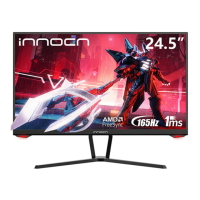
| Screen Size | 24.5 inches |
|---|---|
| Panel Type | IPS |
| Response Time | 1ms (MPRT) |
| Refresh Rate | 240 Hz |
| Aspect Ratio | 16:9 |
| Contrast Ratio | 1000:1 |
| Brightness | 400 cd/m² |
| Color Gamut | 99% sRGB |
| VESA Mount | 100 x 100 mm |
| Viewing Angle | 178° (H) / 178° (V) |
| Weight | 5.5 kg |
| Resolution | 1920 x 1080 |
| Connectivity | HDMI 2.0, DisplayPort 1.2 |

 To Next Page