Errors excepted, subject to availability and modifications.
E 05/2020 | A 05/2020, Copyright © 2000-2020 innovaphone® AG
innovaphone® AG | Umberto-Nobile-Str. 15 | D-71063 Sindelfingen | Phone +49 7031 73009-0 | www.innovaphone.com | E-Mail: info@innovaphone.com
6 / 12
innovaphone IP101/102 – User Guide
Making & Answering Calls
Making calls is possible in any mode, as to be expected: You pick up the handset, dial a number and hear the
ring tone until someone has answered the call.
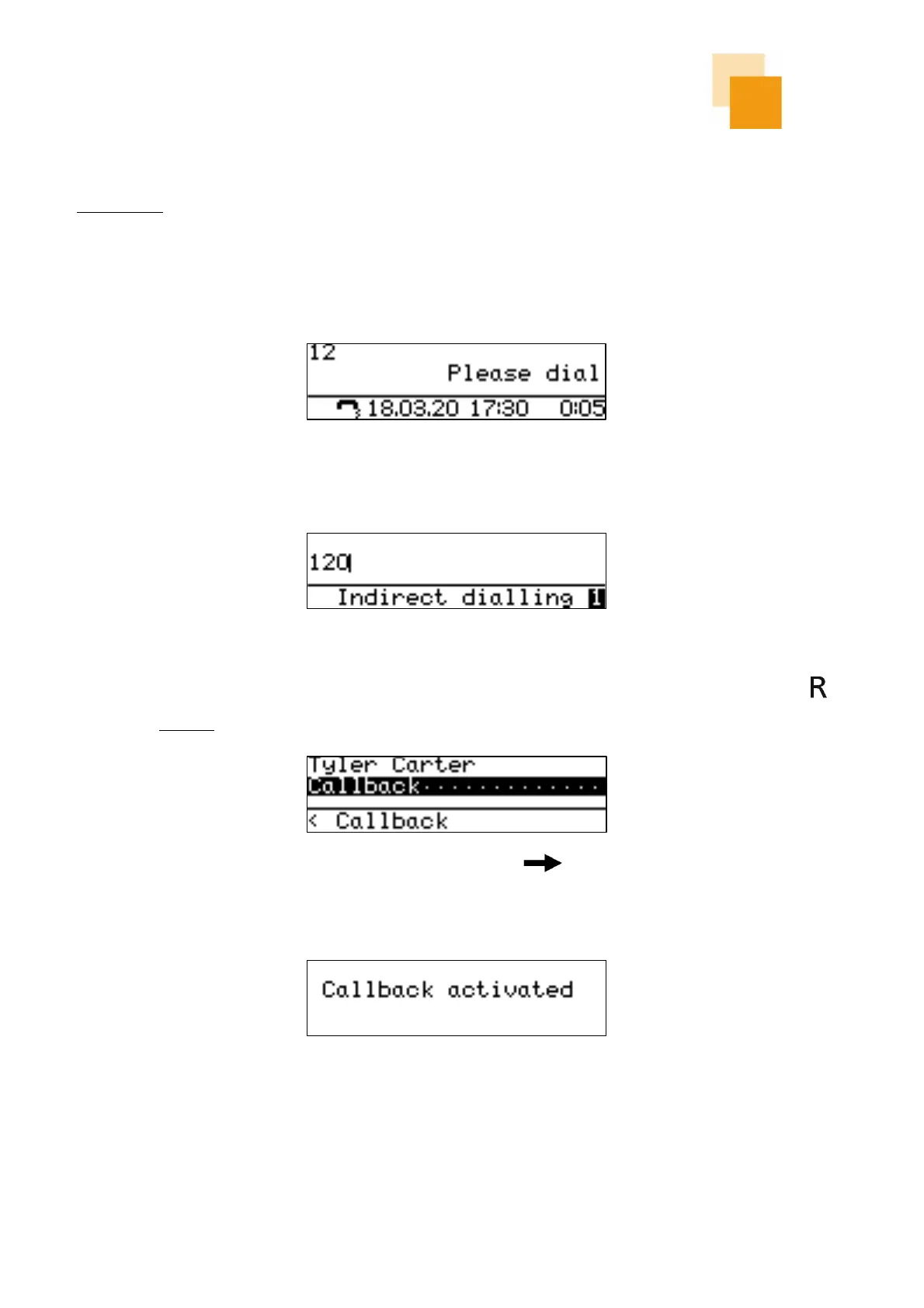
When you pick up the handset, the telephone display will automatically show “Please dial”. On the screen,
you can see the numbers that have already been dialled.
If the handset is on hook, the telephone display shows “Indirect dialling”.
If the outbound call remains unanswered (free or engaged), the call can be ended by pressing the button
to initiate a callback. The display shows following information:
The callback must be confirmed by pressing the right arrow key . After 2 seconds, the display returns
to the idle state. If an active callback is set, the phone will inform the user as soon as the other party is
available again. However, this only works if the device of the other party supports this function.



 To Next Page