7
Copyright Innovative Technology Ltd 2014 GA717-3
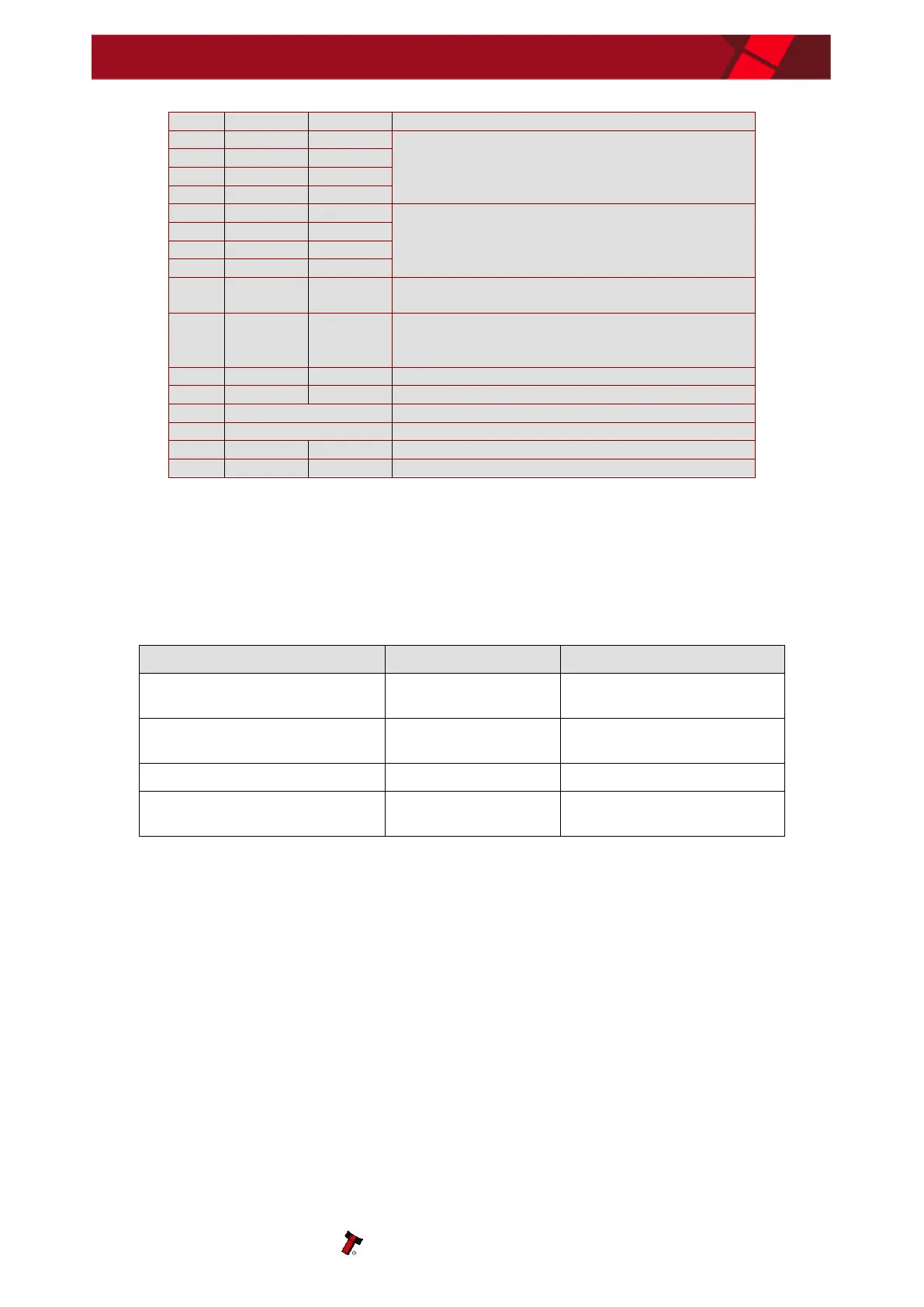
Open collector outputs. Function changes
depending on machine interface protocol (see
individual interface descriptions for details)
Inputs are held high to internal +5V via 10KΩ.
Function changes depending on machine interface
protocol (see individual interface descriptions for
details)
Active LOW when the BV50 is transporting, reading
or stacking a note
Enable the escrow function by holding LOW in
Parallel, Pulse or Binary modes (See Appendix E –
Escrow Function)
Table 6 – 16 way External Connector Pin Out
4.2.3 CONFIGURATION BUTTON FUNCTIONS
The functions available via the Configuration Function Button are detailed in Table 7 - Configuration
Button Functions.
Table 7 – Configuration Button Functions
Sets BV50 to Programming
Mode (SSP)
Enables Configuration Card
Programming
Press twice (within half a second)
Current Setting Indicator
Press & Hold (as power is applied)
Resets ccTalk key to Default
setting


 To Next Page