7
Important:
- Closing the top cover will help prevent dust from seling on the turntable.
- Always relock the tone arm clip before transporng the unit.
- Do not place anything on top of the turntable cover, especially while playing a record.
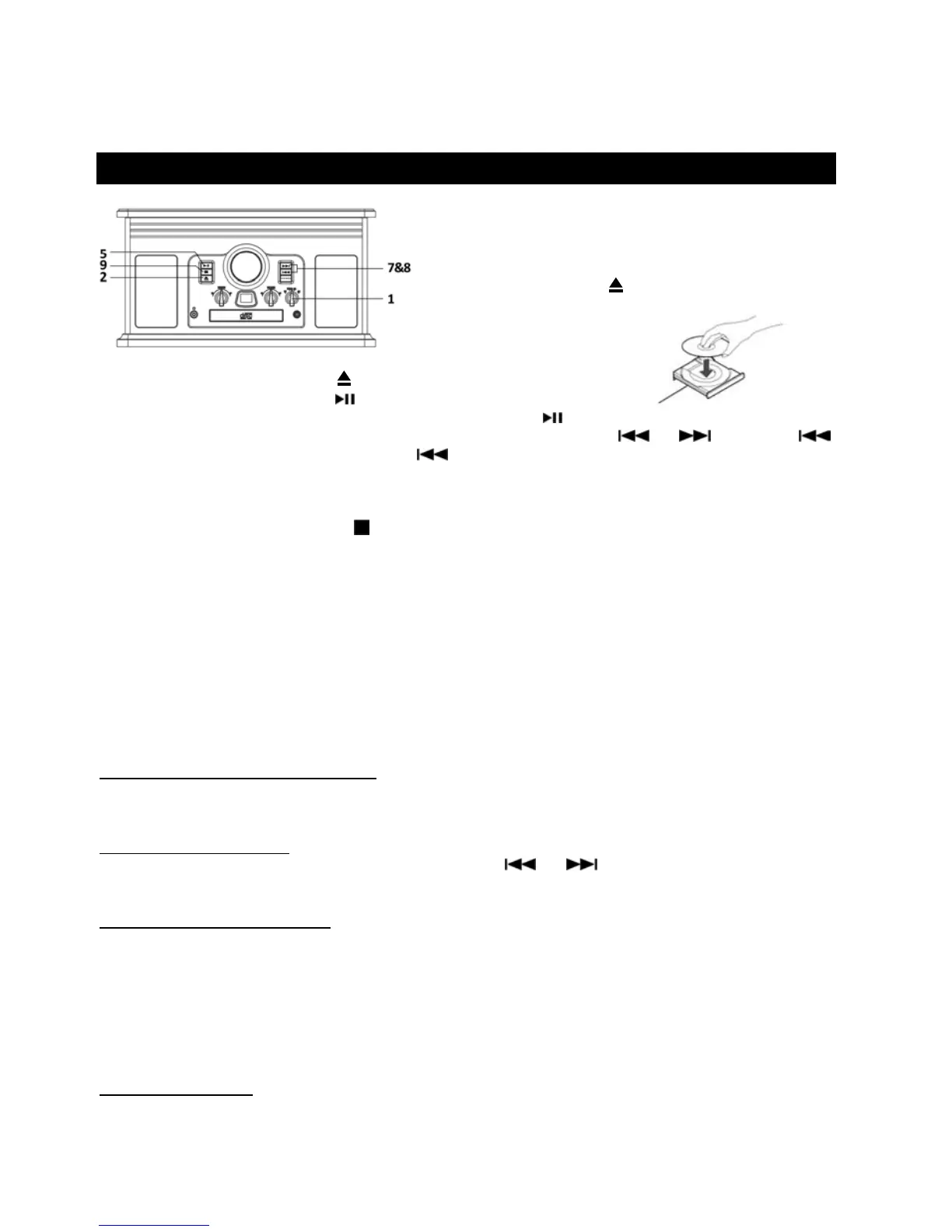
LISTENING TO A CD
1. Rotate the FUNCTION knob to the “CD” posion (1).
“- -” will blink for a few seconds.
Note: When no disc is set, “NO” will appear on
the display.
2. Press the OPEN/CLOSE ( ) buon (2).
3. Place a disc on the tray with the printed label
face up.
4. Press the OPEN/CLOSE buon ( ) to close the tray.
5. Press the PLAY/PAUSE buon (
) to begin playback.
6. To temporarily pause playback, press the PLAY/PAUSE buon (
). Press again to resume.
7. To skip tracks forward or backward, press the corresponding skip buon (
or ). Pressing
one will restart the current track. Pressing
twice in succession will return to the beginning of the
previous track.
8. To fast forward / rewind within a track, press and hold down the corresponding skip buon unl the
desired posion is reached.
9. To stop playback, press the STOP
buon
Note: CD playback will automacally begin if a CD is already in the disc tray before the unit is switched to
the CD funcon.
Important:
- Never place more than one disc on the tray.
- The disc must be placed in the center of the disc tray. An incorrectly
loaded disc can permanently damage
the tray door mechanism.
- Do not push the CD tray – always use the OPEN/CLOSE buon.
- It takes a moment for the unit to load a disc, during wh
ich all buons will be temporarily deacvated.
Repeat Playback/ Programmed Playback
Each me the PLAY MODE buon is pressed, the repeat mode will cycle through the following opons:
REPEAT 1 (Repeat one track)
The current track will be played repeatedly. If you press the (
or ) buon to select another track,
the track you select will be played repeatedly.
REPEAT ALL (Repeat the enre CD)
The enre CD will be played repeatedly.
Notes:
- If one of the following buons is pressed, the repeat mode will be cancelled.
OPEN/CLOSE, POWER, or rotate the FUNCTION knob to FM, AM or PHONO posion.
- Repeat playback works with finalized discs only.
Programmed Playback
Up to 20 tracks can be programmed to play in the desired order.
Note: Programmed playback works with finalized disc only.



 To Next Page