4
Rotate the knob to select a fun on
(CD/PHONO/FM/AM).
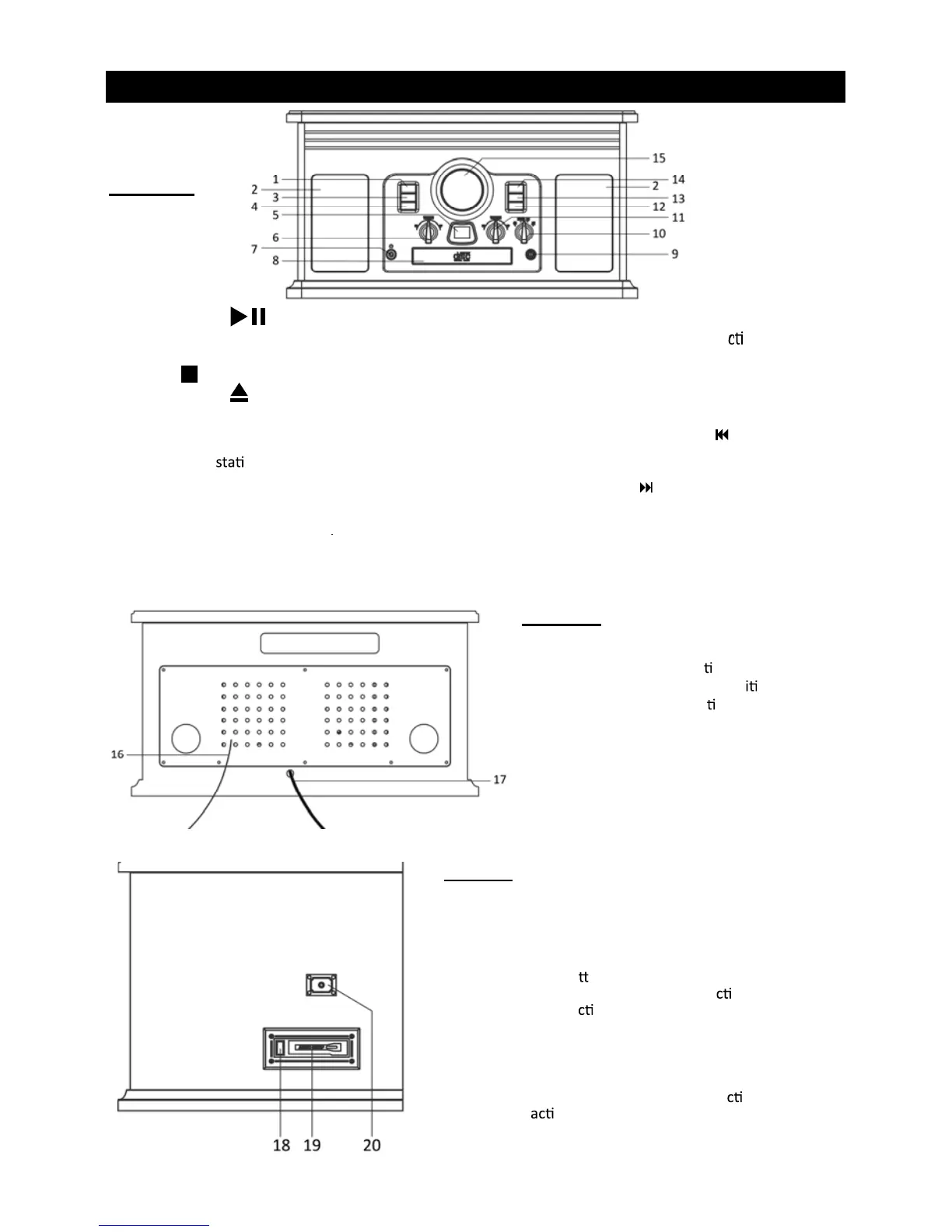
14. NEXT TRACK /FF
In CD Mode, press once to skip to the next
track. Press and hold to fast forward.
15. RADIO TUNER DISPLAY
Rear View
16. FM wire antenna
While tuned to a sta
on in FM mode,
extend the wire and repos
on to
adjust for best recep
on.
17. AC Power Cord
Plugs into a wall outlet.
Side View
18. CASSETTE FF & EJECT
Press halfway to fast forward. Press all the way to
end to eject the tape.
19. CASSETTE DECK
Insert a casse
e tape. When a tape is inserted,
it will stop the current playing fun
on except
the AUX fun
on.
20. AUX IN jack
For audio sources with 3.5mm jack, use plug on
end of the audio cable into the jack and the other
into the audio source. Once the AUX IN jack is
occupied, all the other working fun
on will
be de
vated.
PRODUCT OVERVIEW
Front View
1. PLAY/PAUSE Press to start playback.
During playback, press again to pause.
2. STEREO SPEAKERS
3. STOP Press to stop playback
4. OPEN/CLOSE In CD mode, use to open
and close the disc tray.
5. CD DISPLAY
6. RADIO TUNER KNOB In FM or AM mode, turn
7. 3.5mm JACK
Accepts headphone/earphone plugs.
8. DISC TRAY
11. “VOLUME” KNOB Turn to adjust volume.
12. PLAY MODE In CD mode press to set a
repeat/program playback.
13. PREVIOUS TRACK /REWIND
In CD Mode, press once to skip to the previous
to tune in a
on
9. “POWER ON/OFF” Switch to turn the unit on
or off.
10. FUNCTION KNOB
track. Press and hold to fast rewind.



 To Next Page