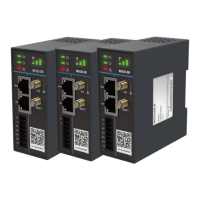
The Inovance WL432 Series IoT Module is a sophisticated 4G smart hardware product designed for remote monitoring, commissioning, and maintenance across various industrial applications. This series of modules excels at collecting local device data, including operational status and fault information, and seamlessly integrates with Inovance's Internet of Things (IoT) server. Communication with the server is facilitated through multiple channels, including 4G, Wi-Fi, or Ethernet, ensuring robust and flexible connectivity.
Function Description:
The primary function of the WL432 Series IoT Module is to bridge local industrial devices with a remote IoT platform. This enables users to access a web server for real-time monitoring of device status and comprehensive fault analysis. The module supports remote commissioning and maintenance, significantly reducing the need for on-site interventions. Its design emphasizes security, reliability, wide application compatibility, and strong stability, making it suitable for critical industrial environments such as elevators, air compressors, and cranes.
The series offers different models tailored to specific communication needs:
- WL432-DB (Elevator/Air compressor platform): This model is designed for serial port data collection. It connects to local device controllers via RS485 or RS232 ports to acquire data. This data is then uploaded to the server using 3G, 4G, Ethernet, or Wi-Fi. It also facilitates the transmission of control commands from the server back to the local device controllers.
- WL432-DE (General-purpose Uweb platform): This model focuses on network port data collection. It connects to a Local Area Network (LAN) where target devices are located. It gathers data from multiple local target devices and uploads it to the server using 3G, 4G, Ethernet, or Wi-Fi. Similar to the DB model, it can also transmit control commands from the server to local device controllers.
- WL432-DK (General-purpose Uweb platform): This model, like the DB, is also for serial port data collection, connecting to local device controllers via RS485 or RS232. It uploads data and receives control commands through 3G, 4G, Ethernet, or Wi-Fi.
A key functional advantage across the series is remote safety commissioning. Utilizing SSL VPN, the module ensures the secure commissioning, upgrade, and maintenance of target devices, providing a protected channel for remote operations. In the event of an external power supply failure, the product automatically reports the power supply failure event to a specified server and stores the event in its memory, ensuring critical data is not lost and issues are promptly addressed.
The module supports both transparent and encrypted wireless data transmission, offering flexibility and security for data exchange. Fault alarms are available, providing immediate notification of operational issues. The industrial-grade terminals are designed to meet the rigorous requirements of industrial field applications. Remote upgrade and maintenance capabilities further enhance the module's utility, allowing for software updates and troubleshooting without physical access. Its compact design, facilitated by a special DIN rail mounting, simplifies integration into existing systems.
Usage Features:
The WL432 Series IoT Module is designed for ease of use and integration. The various ports on the module cater to different connectivity requirements:
- Power Ports (24V, 0V): These DC power ports accept a voltage range of 12 V to 24 V, with 24V indicating the positive pole and 0V the negative pole. The maximum input current is 0.8 A.
- Serial Ports (485+, 485-, GND1, RXD, TXD): These 7-pin socket ports support standard RS485 and RS232 serial communication. It's important to note that RS232 and RS485 cannot be used simultaneously. For the WL432-DE model, the RS232 port (RXD, TXD) is unavailable. GND1 serves as the common reference ground for both RS232 and RS485.
- Antenna Ports (4G, Wi-Fi): The 4G antenna port is standard, designed for a sucker antenna with internal threads and an inner male pin. An optional Wi-Fi antenna port is available for a sucker antenna with internal threads and an inner female pin.
- SIM Card Slot: The module includes a standard SIM card slot (25 mm x 15 mm). However, users are generally not recommended to change SIM cards; Inovance's technical engineers should be contacted for such requirements.
- Reset Key: A short press (1s to 20s) of the reset key restores Wi-Fi parameters, while a long press (over 20s) restores factory settings.
- Ethernet Ports (WAN, LAN): The WAN port connects to external networks, supporting 10 M and 100 M networks. The LAN port connects to local devices, also supporting 10 M and 100 M networks.
LED indicators provide clear visual feedback on the module's status:
- Cloud service state indicator (green):
- Steady Off: No network.
- Steady On: Device online, or starting (within 33s), or button restoring triggered.
- Blinking: IP obtained, connecting to the server.
- Data communication indicator (green):
- No data transceiving.
- WL432-DE/WL432-DK: Blinking indicates normal communication; quicker blinking signifies a higher communication rate.
- WL432-DB: Steady on indicates normal communication; slow blinking indicates a password is used for the controller.
- Fault indicator (red):
- Normal.
- Starting (within 33s), or button restoring triggered.
- Blinking: Disconnected from the target device, or network registering, or poor 4G signal.
- 4G or Wi-Fi signal strength indicator (green):
- One bar: Poor signal.
- Two bars: Fair signal.
- Three bars: Good signal.
- All off: No available signal, no network connection, or poor network.
The module supports both AP (default) and Wi-Fi operating modes. The default hot spot operates in AP mode, with a user name of "IOT_Device ID" and a password of "Device ID" (e.g., if the device ID is ABCDEFGHIJ, the user name is IOT_ABCDEFGHIJ and password is ABCDEFGHIJ). The wireless security standards supported include 64-bit and 128-bit WEP, WAP-PSK, and WPA2-PSK.
Maintenance Features:
The WL432 Series IoT Module is designed with maintenance in mind, offering features that simplify troubleshooting and ensure long-term reliability.
- Remote Upgrade and Maintenance: The module's ability to be upgraded and maintained remotely is a significant advantage, reducing the need for physical site visits. This is crucial for deploying software updates, applying security patches, and resolving software-related issues efficiently.
- Fault Alarms: The availability of fault alarms allows for proactive maintenance. When an issue arises, the module can trigger an alarm, notifying operators or maintenance personnel immediately. This enables prompt investigation and resolution, minimizing downtime.
- Power Failure Reporting: In the event of an external power supply failure, the module automatically reports the incident and saves the event in memory. This feature is vital for understanding the root cause of system interruptions and for ensuring data integrity during power outages.
- Reset Key Functionality: The reset key provides two levels of recovery:
- Wi-Fi Parameter Restoration: A short press allows for quick restoration of Wi-Fi parameters, useful for resolving connectivity issues without affecting other settings.
- Factory Settings Restoration: A long press restores the module to its factory default settings, serving as a comprehensive recovery option for more severe configuration problems.
- Industrial-Grade Design: The use of industrial terminals and a robust design ensures the module's durability and reliability in harsh industrial environments, reducing the likelihood of hardware failures and the need for frequent repairs.
- Simplified Integration: The small volume and special DIN rail mounting simplify installation and integration, which in turn can ease maintenance by providing a standardized and accessible mounting solution.
- Comprehensive Documentation and Support: Inovance provides extensive documentation, including user guides and commissioning guides, available on their website. This resource allows users to access the latest information, troubleshoot issues, and understand advanced functionalities. Additionally, direct contact with Inovance's technical engineers is recommended for specific requirements, such as SIM card changes, ensuring expert support.
- Host Controller Software Compatibility: The module is compatible with Inovance's AutoShop software (V2.93 or higher) for commissioning and monitoring. For third-party PLCs, users can obtain corresponding host controller software from the respective manufacturers. This broad compatibility ensures that the module can be integrated into diverse control systems, simplifying the overall maintenance ecosystem.
- Commissioning Assistant and USB Security Key: For commissioning, a USB security key (model: SJK1149) and a commissioning assistant client are available. These tools streamline the setup process and ensure secure access to the module's functionalities, contributing to efficient maintenance operations.

 Need help?
 General


 To Next Page