EasyManua.ls Logo

Inseego FX2000 - User Manual

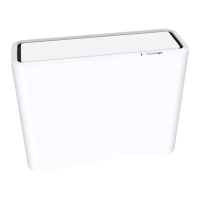
Inseego FX2000
38 pages
Print Icon
To Next Page IconTo Next Page
Loading...
FX2000 Quick Start Guide Table of Contents
ﺔﯿﺑﺮﻌﻟا
English
French
German
Italian
Spanish
Question and Answer IconNeed help?

Do you have a question about the Inseego FX2000 and is the answer not in the manual?

Summary

Top View

Multicolor LED Indicators

Describes LED colors and their meanings for connection status, software updates, and router booting.

Back View

Setting Up Your FX2000

Install the SIM Card

Instructions for inserting the Nano 4FF SIM card into the device using the SIM tool.

Power on the FX2000

Connect the power cord and adapter to turn on the FX2000 device.

Identify a Location for Your FX2000

Connecting to a Wireless Device

Monitoring and Managing Your 5 G Indoor CPE

Restoring Factory Settings

Inseego Mobile App Requirements

System Requirements

Support and More

Summary

Top View

Multicolor LED Indicators

Describes LED colors and their meanings for connection status, software updates, and router booting.

Back View

Setting Up Your FX2000

Install the SIM Card

Instructions for inserting the Nano 4FF SIM card into the device using the SIM tool.

Power on the FX2000

Connect the power cord and adapter to turn on the FX2000 device.

Identify a Location for Your FX2000

Connecting to a Wireless Device

Monitoring and Managing Your 5 G Indoor CPE

Restoring Factory Settings

Inseego Mobile App Requirements

System Requirements

Support and More

Inseego FX2000 Specifications

General IconGeneral
CategoryWireless Router
ModelFX2000
5G SupportYes
Wi-Fi Standards802.11a/b/g/n/ac/ax
Wi-Fi TechnologyWi-Fi 6
SecurityWPA3, VPN, Firewall
Wi-Fi Bands2.4 GHz, 5 GHz
BatteryNo
Cellular TechnologyLTE
SIM Card SlotNano SIM
ManagementMobile App
Maximum Wi-Fi Speed3.6 Gbps
External Antenna Ports2 x TS9

Related product manuals