EasyManua.ls Logo

Insignia NS-CF17BK9-C - User Manual

Insignia NS-CF17BK9-C
16 pages
Print Icon
To Next Page IconTo Next Page
Loading...
Before using your new product, please read these instructions to prevent any damage.
USER GUIDE
1.7 or 2.6 Cu. Ft.
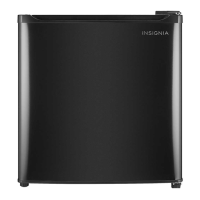
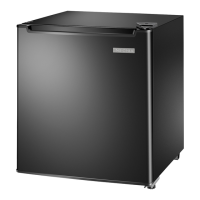
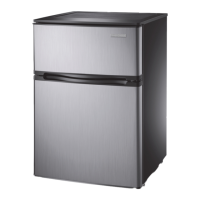
Compact Refrigerator
NS-CF17BK9/NS-CF26BK9/NS-CF26WH9
NS-CF17BK9-C/NS-CF26BK9-C/NS-CF26WH9-C

Questions and Answers

  • J
    josephmillsAug 3, 2025
    Why is my Insignia NS-CF17BK9-C not working?
    • A
      ashley92Aug 3, 2025
      Your Insignia Refrigerator might not be working due to several reasons. First, ensure it's properly plugged into the outlet. Check that the thermostat isn't set to '0'; if it is, turn the thermostat knob to '4'. Also, inspect the house fuse/circuit breaker box, and replace the fuse or reset the circuit breaker if needed. Finally, if there was a recent power failure, turn off your refrigerator and unplug it until the power is restored.
  • A
    Alexander MatthewsAug 7, 2025
    What to do if Insignia NS-CF17BK9-C Refrigerator is not cooling?
    • R
      Robert RodriguezAug 7, 2025
      If your Insignia Refrigerator isn't cooling, it could be due to a few reasons. Make sure that the door is closed properly. If you've just added a large amount of food, allow time for it to cool. Also, ensure the thermostat isn't set too high; try setting it to a lower setting.
  • M
    Melissa ValdezAug 11, 2025
    How to get rid of bad smell in Insignia NS-CF17BK9-C?
    • M
      mollymcdonaldAug 12, 2025
      To eliminate a bad odor in your Insignia Refrigerator: ensure all strong-smelling foods are wrapped or stored in airtight packaging. Consider that certain containers and wrapping materials (such as paper, foil, or plastic) can cause odors, so try using different ones. Check for and remove any spoiled food. Also, clean the inside of your refrigerator in case food has spilled.
  • M
    Mariah GonzalezAug 16, 2025
    Why is there condensation inside my Insignia Refrigerator?
    • M
      Meghan CastroAug 16, 2025
      Moisture buildup in your Insignia Refrigerator can occur if the door isn't closed properly or is opened too often, so make sure that the door is closed properly. If your refrigerator is in a humid location, move it to a dryer spot. Also, repackage any food that isn't sealed properly.
  • B
    Brenda ReynoldsAug 20, 2025
    How to fix Insignia NS-CF17BK9-C door that won't close?
    • W
      williamsrachelAug 20, 2025
      If your Insignia Refrigerator door won't close completely, first check if food packages are blocking it; if so, move them or remove some food. Ensure the shelf is correctly positioned. Clean the door gasket. Finally, make sure your refrigerator is level by adjusting the leveling feet.
  • W
    wesleynealAug 25, 2025
    Why is my Insignia NS-CF17BK9-C Refrigerator making noise?
    • M
      Margaret ReidAug 25, 2025
      Unusual noises from your Insignia Refrigerator could be due to a few things. Ensure your refrigerator is level on the floor by adjusting the leveling feet. Check that the body of your refrigerator isn't touching a wall, and if it is, move it away from the wall. If the drip tray in the back of the refrigerator is not properly placed, contact a qualified repair technician to fix the problem.
  • A
    Alicia SmithAug 28, 2025
    What to do if food is freezing in my Insignia Refrigerator?
    • M
      Melissa WilliamsAug 28, 2025
      If food is freezing in your Insignia Refrigerator, the thermostat might be set too low. Try adjusting the thermostat to a higher setting.

Summary

Introduction

Important Safety Instructions

Grounding Requirement

Explains the importance of proper grounding for electrical safety and how to achieve it.

Features

Package Contents

Lists the items included in the refrigerator package for user verification.

Exterior

Describes the external features and components of the refrigerator, including diagrams.

Setting Up Your Refrigerator

Before Using Your Refrigerator

Initial cleaning and preparation steps for the refrigerator before the first use.

Finding a Suitable Location

Guidance on choosing an appropriate place for the refrigerator, considering ventilation and heat sources.

Providing the Correct Power Source

Instructions for connecting the refrigerator to a power outlet, emphasizing grounding and avoiding extension cords.

Leveling Your Refrigerator

How to adjust the feet to ensure the refrigerator is level for proper door sealing and cooling.

Reversing the Refrigerator Door

Step-by-step guide for changing the direction the refrigerator door opens, with safety precautions.

Setting the Thermostat

Defrosting Your Refrigerator

Shutting Down Your Refrigerator for a Long Time

Moving Your Refrigerator

Tips on Saving Energy

Troubleshooting

Specifications

One-Year Limited Warranty

Overview

This document is a user guide for the Insignia 1.7 or 2.6 Cu. Ft. Compact Refrigerator, models NS-CF17BK9, NS-CF26BK9, NS-CF26WH9, NS-CF17BK9-C, NS-CF26BK9-C, and NS-CF26WH9-C. It provides essential information for setting up, operating, and maintaining the refrigerator.

Function Description:

The Insignia compact refrigerator is designed for reliable and trouble-free performance, offering either 1.7 or 2.6 cubic feet of storage capacity. It functions as a compact cooling appliance suitable for home or office use, designed to keep food and beverages chilled. The refrigerator features a thermostat control knob for adjusting the internal temperature, allowing users to set the cooling level from 1 (warmer) to 7 (cooler), with 4 being the recommended setting for general use. Setting the thermostat to 0 stops the cooling cycle.

Important Technical Specifications:

cu. ft. refrigerator:

  • Dimensions (W x D x H): 17.4 x 18.9 x 19.5 inches (44.2 x 48 x 49.3 cm)
  • Weight: Gross Weight: 33.5 lbs. (15.2 kg), Net Weight: 28.8 lbs. (13 kg)
  • Power requirements: AC115V~60Hz
  • Current: 1.5A
  • Power cord length: 4.9 ft. (1.5 m)
  • Power consumption per year: 245 kWh
  • Average life expectancy: 5 years
  • Thermostat control knob settings: 0 through 7

cu. ft. refrigerator:

  • Dimensions (W x D x H): 19.1 x 17.7 x 27.6 inches (48.5 × 45 × 70.1 cm)
  • Weight: Gross Weight: 50.3 lb. (22.8 kg), Net Weight: 44.3 lbs. (20.1 kg)
  • Power requirements: AC115V~60Hz
  • Current: 1.5A
  • Power cord length: 4.9 ft. (1.5 m)
  • Power consumption per year: 250 kWh
  • Average life expectancy: 5 years
  • Thermostat control knob settings: 0 through 7

Both models require a 115V, 60Hz power supply and must be connected to a 3-prong grounding outlet.

Usage Features:

  • Temperature Control: A thermostat knob allows users to adjust the internal temperature. The recommended initial setting is 4, with adjustments from 1 (warmer) to 7 (cooler). Setting to 0 turns off the cooling cycle.
  • Door Reversibility: The refrigerator door can be reversed to open from either the left or right side, providing flexibility for placement. This process involves removing the top hinge, door, bottom hinge bracket, and leveling foot, then reattaching them on the opposite side.
  • Leveling Feet: Adjustable leveling feet ensure the refrigerator is stable and the door closes and seals correctly, preventing cooling, frost, and moisture issues.
  • Interior Storage: The 1.7 cu. ft. model includes a wire shelf and bottle storage in the door. The 2.6 cu. ft. model features glass shelves and bottle storage in the door.
  • Power Source: The refrigerator must be plugged into a dedicated 3-prong grounded outlet. Extension cords or ungrounded adapters are not recommended.

Maintenance Features:

  • Cleaning: The interior should be washed periodically with a damp, warm cloth and a baking soda solution (two tablespoons in a quart of water), then wiped dry. The exterior should be cleaned with a damp cloth.
  • Defrosting: The refrigerator requires manual defrosting. To defrost, the thermostat should be set to 0, the door left open, and all food removed. Melted frost should be cleaned with a cloth. If excessive frost or ice is present, towels should be placed under the refrigerator to prevent water damage. After defrosting, the thermostat should be returned to its original position.
  • Energy Saving Tips:
    • Locate the refrigerator in the coolest area of the room, away from direct sunlight and heat sources.
    • Allow hot foods to cool to room temperature before placing them inside.
    • Wrap foods correctly and wipe containers dry to reduce frost build-up.
    • Organize food to minimize door openings and extended searches.
  • Troubleshooting: The user guide provides a comprehensive troubleshooting section addressing common issues such as the refrigerator not operating, food freezing or not cooling, unusual noises, moisture build-up, and bad odors, along with possible causes and solutions.
  • Long-Term Shutdown: For extended periods of non-use (several months), the refrigerator should be turned off, unplugged, emptied, cleaned, and the door left slightly ajar to prevent mold and odors.
  • Moving: When moving the refrigerator, it should be turned off, unplugged, emptied, loose items secured, doors taped shut, and kept in an upright position.

Safety Information:

The guide emphasizes important safety instructions, including warnings about electric shock, proper grounding, ventilation, avoiding heat sources, and supervision of children. It also highlights the use of R600a refrigerant, which is flammable, and advises against damaging the refrigerant circuit. Servicing should only be performed by qualified personnel.


Insignia NS-CF17BK9-C Specifications

General IconGeneral
BrandInsignia
ModelNS-CF17BK9-C
CategoryRefrigerator
LanguageEnglish

Related product manuals