12
NS-HTTCFB8
www.insigniaproducts.com
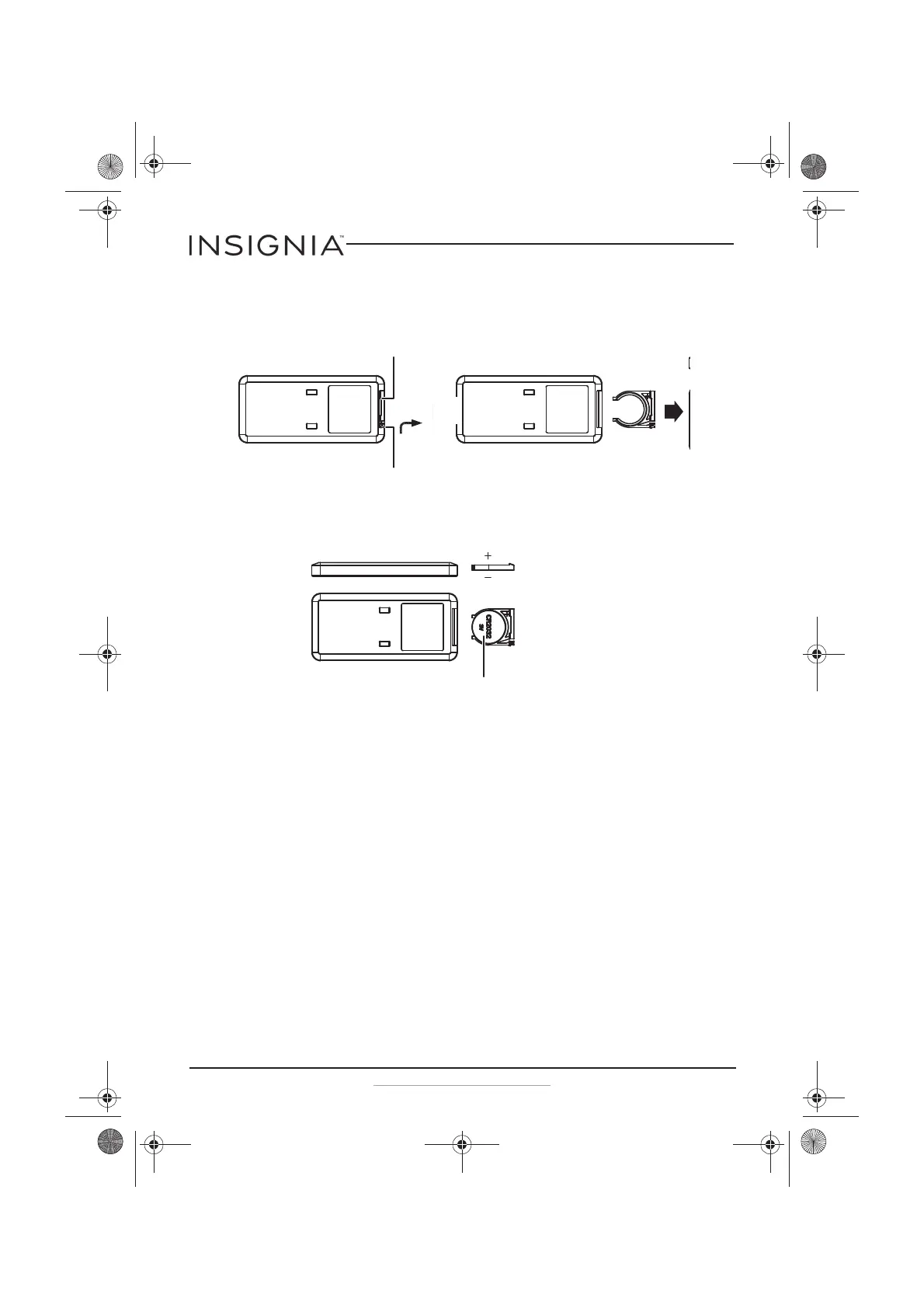
Replacing your remote control battery
1 Squeeze then pull the battery holder out of the remote control.
2 Insert the battery into the battery holder with the positive (+) side
toward the front of the remote control.
3 Push the battery holder into the remote control.
Safety features
The heater is equipped with double over-heating protection, which
causes the unit to stop operating in the event that the internal
temperature exceeds the normal operating temperature. It also includes
tip-over protection, which turns the heater off in case it is tipped over.
If the heater shuts down:
1 Turn off and unplug the heater.
2 Put the heater in the upright position, if necessary.
3 Wait for at least 10 minutes until the heater cools.
4 Plug the heater into the power outlet and then turn it on. The heater
resumes its normal operation.
Squeeze together then pull out.
Squeeze together then pull out.
Positive (+)
toward front.
Insert battery (CR2032 3V Lithium)
NS-HTTCFB8_17-0321_MAN_V1_ENG.fm Page 12 Thursday, June 15, 2017 2:09 PM



 To Next Page