EasyManua.ls Logo

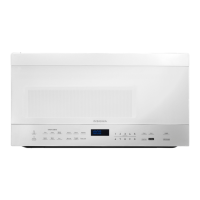
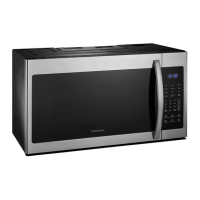
Insignia NS-OTR16WH9 - User Manual

Insignia NS-OTR16WH9
20 pages
Print Icon
To Next Page IconTo Next Page
Loading...
Before using your new product, please read these instructions to prevent any damage.
USER GUIDE
1.6 Cu. Ft.
Over-the-Range
Microwave
NS-OTR16SS9 / NS-OTR16WH9

Questions and Answers

  • P
    phillipsmatthewJul 31, 2025
    Why won't my Insignia Microwave Oven start?
    • G
      gcarpenterAug 1, 2025
      There are several reasons why your Insignia Microwave Oven might not start. First, ensure the electrical cord is properly plugged in. Second, make sure the door is completely closed. Finally, verify that you have set the correct operation according to the instructions.
  • T
    Tina CampbellAug 5, 2025
    What to do if I see arcing or sparking in my Insignia NS-OTR16WH9 Microwave Oven?
    • W
      William FernandezAug 5, 2025
      Arcing or sparking in your Insignia Microwave Oven can occur due to several reasons. Be sure to use only microwave-safe materials. Avoid operating the microwave when it’s empty. Also, ensure that you regularly clean any spilled food with a wet towel.
  • R
    Robert WilsonAug 9, 2025
    How to fix unevenly cooked foods in my Insignia NS-OTR16WH9 Microwave Oven?
    • J
      Jacob ZunigaAug 9, 2025
      Unevenly cooked food in your Insignia Microwave Oven can result from several factors. Ensure you are using microwave-safe materials. Completely defrost food before cooking. Use the correct cooking time and power level. Turn or stir the food during cooking.
  • C
    Caroline RichardsAug 13, 2025
    Why is my Insignia NS-OTR16WH9 Microwave Oven undercooking food?
    • S
      Samuel AdamsAug 13, 2025
      Undercooked food in your Insignia Microwave Oven can be due to several reasons. First, ensure you are using microwave-safe materials. Second, make sure the food is completely defrosted before cooking. Third, verify that you are using the correct cooking time and power level. Lastly, ensure that the microwave ventilation ports are not blocked or restricted.
  • M
    Michael BryanAug 17, 2025
    What causes overcooked foods in Insignia NS-OTR16WH9 Microwave Oven?
    • R
      riosjeanAug 18, 2025
      Overcooked food in your Insignia Microwave Oven is often caused by using the incorrect cooking time or power level. Make sure you use the correct settings for the food you are cooking.
  • C
    Carla FoxAug 22, 2025
    How to improve defrosting in my Insignia NS-OTR16WH9?
    • R
      Rebecca DavisAug 22, 2025
      Improper defrosting in your Insignia Microwave Oven can occur due to: using incorrect materials, not using the correct cooking time or power level, or not turning/stirring the food. To improve defrosting, ensure you use only microwave-safe materials, select the correct cooking time and power level, and turn or stir the food during the defrosting process.
  • R
    Rhonda ColeAug 27, 2025
    Why does the vent fan turn on by itself on my Insignia NS-OTR16WH9?
    • A
      April StoneAug 27, 2025
      The vent fan in your Insignia Microwave Oven may automatically start when heat rises from range surface units or burners. It will stay on until the temperature decreases to protect the microwave from excessive temperatures. This is normal operation, and the fan cannot be turned off manually during this time.

Summary

Safety Information

Precautions to Avoid Excessive Microwave Energy

Important safety measures to prevent harmful exposure to microwave energy when operating the oven.

Important Safety Instructions

Basic safety precautions to reduce the risk of burns, electric shock, fire, and injury.

Grounding Instructions

Electrical Requirements

Details on the voltage, frequency, and amperage required for the microwave oven.

Power Supply Cord

Guidelines for using the power supply cord and extension cords to ensure safety.

Radio or TV Interference

Cookware and Cooking Materials

Materials You Can Use

List and description of materials safe for microwave cooking, including foil and glass.

Materials to Be Avoided

List of materials that can cause arcing, fire, or damage in the microwave.

Features

Package Contents

Microwave Oven

Control Panel

Setting Up Your Microwave Oven

Installing the Turntable

Using Your Microwave

Cooking in Your Microwave

Instructions on how to set cooking time and power levels for manual cooking.

Setting the Clock

Guide on how to set the microwave's internal clock to 12-hour or 24-hour format.

Using the Kitchen Timer

How to use the built-in kitchen timer for countdowns.

Cooking Quickly

Method for starting cooking immediately at 100% power for 30-second intervals.

Defrosting in Your Microwave

Detailed instructions on how to defrost food by weight or time.

Defrosting by Time

Quickly Defrosting One Pound

Cooking with the Auto Menu

Cheese or Butter

Instructions for using the auto menu to cook cheese or butter based on weight.

Pizza, Potato, Meat, Reheat, or Veggies

Guide to using auto menu for common food items by entering their weight.

Popcorn

Steps for cooking popcorn using the dedicated auto menu setting.

Beverage

Hot Dogs or Frozen Sandwiches

Chicken Nuggets or French Fries

Using Energy Saver (Eco) Mode

Checking Time and Power Level While Cooking

Using the Light

Using the Vent Fan

Using the Child Lock

Using the Turntable

Cleaning and Maintaining Your Microwave

Cleaning the Outside of Your Microwave

Methods for cleaning the exterior surfaces, door, and control panel.

Cleaning the Inside of Your Microwave

Instructions for cleaning the interior cavity, including removing odors.

Waveguide Cover

Specific care instructions for cleaning the waveguide cover to ensure performance.

Turntable and Turntable Support

How to clean the turntable and its support, including dishwasher safety.

Cleaning and Replacing the Filters

Cleaning the Grease Filters

Steps for cleaning the grease filters, including cautions about cleaning agents.

Replacing the Charcoal Filter

Guide on how to replace the charcoal filter for recirculated installations.

Changing the Light Bulbs

Countertop Light (Exterior)

Instructions for replacing the exterior countertop light bulb.

Microwave Light (Interior)

Troubleshooting

Obtaining Replacement Parts

Specifications

Legal Notices

FCC Statement

Information regarding radio frequency emissions and interference compliance.

Copyright

Copyright information and trademark details for the product.

One-Year Limited Warranty

Insignia NS-OTR16WH9 Specifications

General IconGeneral
Appliance CategoryMicrowave Oven
Microwave TypeCountertop
Capacity1.6 cu. ft.
TurntableYes
Display TypeDigital
ColorWhite
Cavity MaterialStainless Steel
Weight37.5 lbs
Cooking PresetsYes
Turntable Diameter12.4 inches

Related product manuals