3
USING YOUR INSTANT POT XL
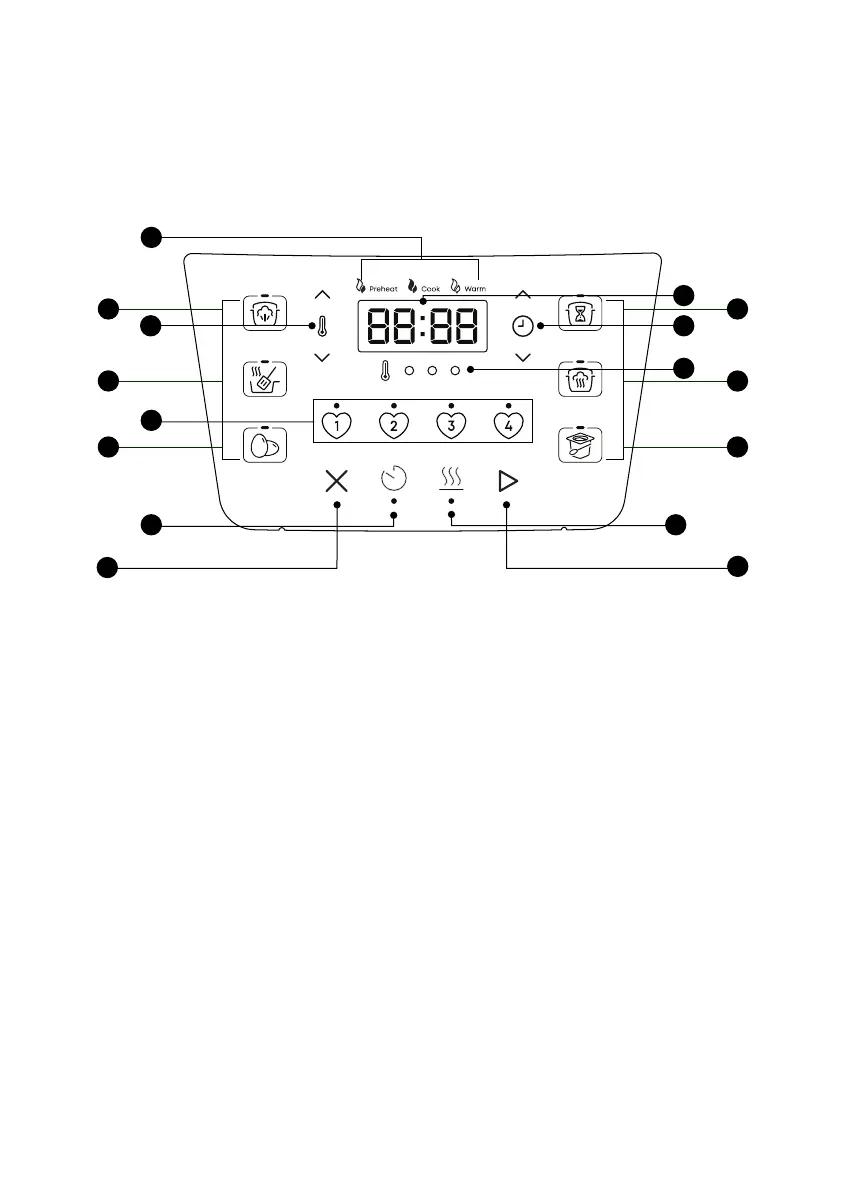
Control panel
We’ve designed the Instant Pot control panel to be simple to use and easy to read.
1. Guided Cooking Indicator
• Cooking stages are active when lit
2. Temperature Controls
3. Status Display
• Temperature
• Cooking time
• Delay Start time
• Keep Warm time
• Status messages
4. Time Controls
5. Temperature Level Lights
6. Smart Program Buttons
• Light shows the active Smart Program
6A. Pressure Cook
6B. Saute
6C. Egg
6D. Slow Cook
6E. Steam
6F. Yoghurt
7. Favourites Buttons
• Light shows active
8. Delay Start
• Light shows ON
9. Keep Warm
• Light shows ON
10. Cancel
11. Start
4
5
11
9
3
6E
6F
6D
6B
6C
6A
1
10
8
7
2













 To Next Page