3. Menu Functions
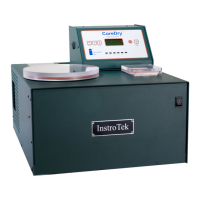
To access the Menu press the ‘Menu’ Button on the CoreDry
Keypad. To cycle through the different menu settings press the
Up or Down key to change the menu options. To view or
change a menu press ‘Enter’ when a particular menu option is
displayed. To exit out of the Menu press ‘Stop’ or press the
‘Down’ key until the main display is reached.
1. Program #: This menu function allows you to program up
to 5 different settings for drying cores or other samples.
Press the ‘UP’ and ‘DOWN’ keys to cycle between
Programs 1 through 5. Once the desired program is
selected press ‘Enter’ to Store.
2. Oil Change: Displays the amount of time until your next
oil change is required. Time is displayed in hours.
3. Run Hours: Displays the amount of time the CoreDry unit
has operated. Time is displayed in hours.
4. Max Cycles: This menu function shows the maximum
number of cycles the CoreDry will run until the sample
needs to be rotated. Default setting is 10.
5. Check Cal: This will display the current status of the
Calibration. It will show either “Calibrated” or “Not
Calibrated.”
6. Cool Time: Displays the amount of time that the Cold
Trap will cool at initialization and in between samples.
Default setting is 60.
7. Self-Test: Before using Self-Test place both lids on sample
tank and Cold Trap. The Self-Test switches between the
individual parts of the CoreDry to isolate and determine
the operational status of each part. The Self-Test will
switch between the valves, relay, pump, +Line, and
Power Supplies. Once the Self-Test is completed the
CoreDry will display the results of the Self-Test as well as


 To Next Page