DPS-5.4
DISASSEMBLY DVD MECHANISM-1
1. Remove the Bonnet by removing the six screws.
Bonnet
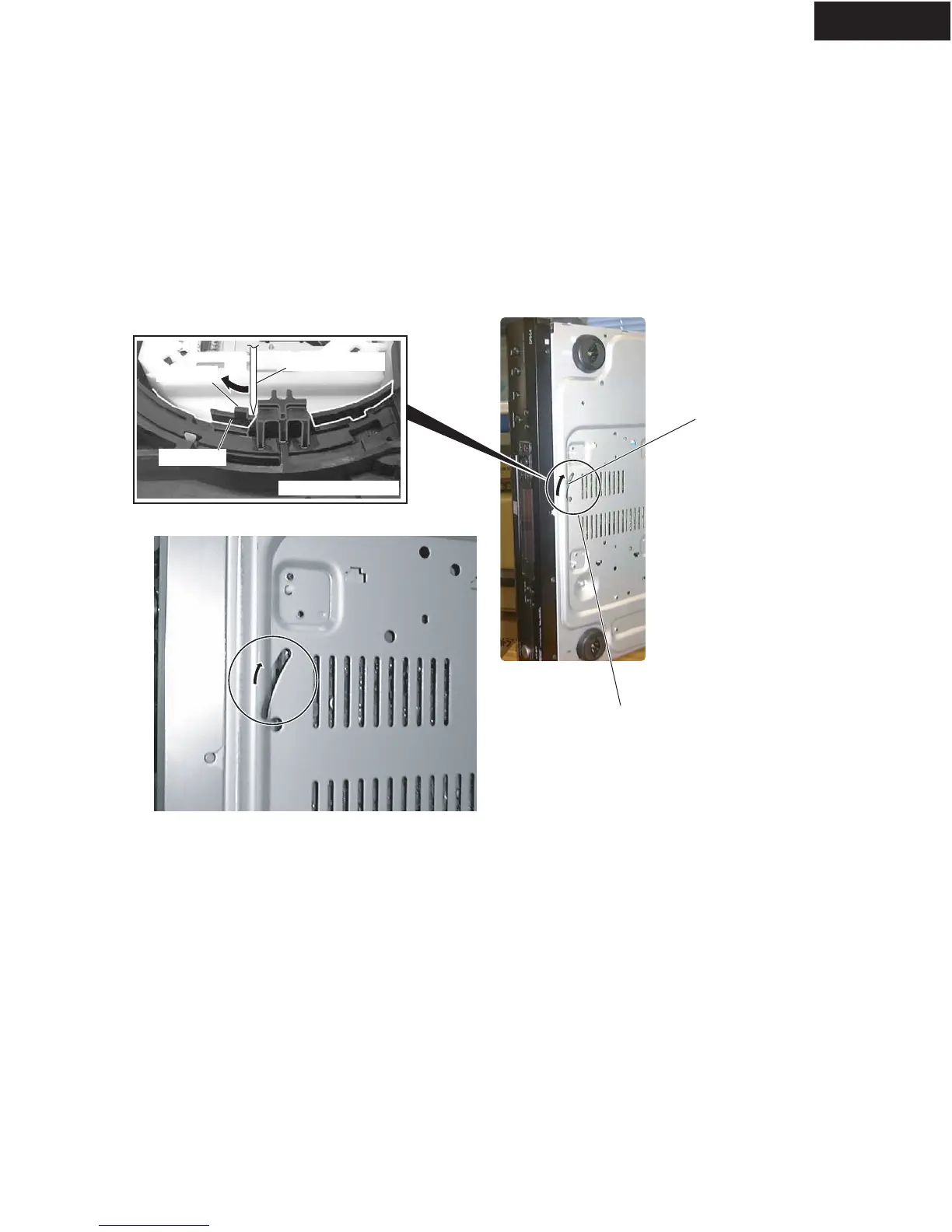
How to open the Tray when the power cannot be on
Slit
Drive Gear
Loading Mecha.Assy
Screwdriver (small)
Screwdriver (small)
Projection
Insert a screwdriver (small) into the slit located
at the bottom of the unit, and slide the
projection of the Drive Gear in the Loading
Mecha. Assy in the direction of the arrow, as
Remove the mechanism assembly
1. Remove three screws (Black 3TT+8B(BC) from bottom side. Remove the front panel.
2. Remove two screws on front bracket. And release the FFC (P71).
3. Remove two screws on the power switch PC board and wire holder.
4. Remove four screw (3SMS8W.SW+14B(BC)) from DVD mechanism.
5. Soldering the short lands. It is required because of static electricity protection.
6. Remove sex FFCs and one connector assy.
7. Remove the DVD mechanism assembly.



 To Next Page