DPS-5.4
1
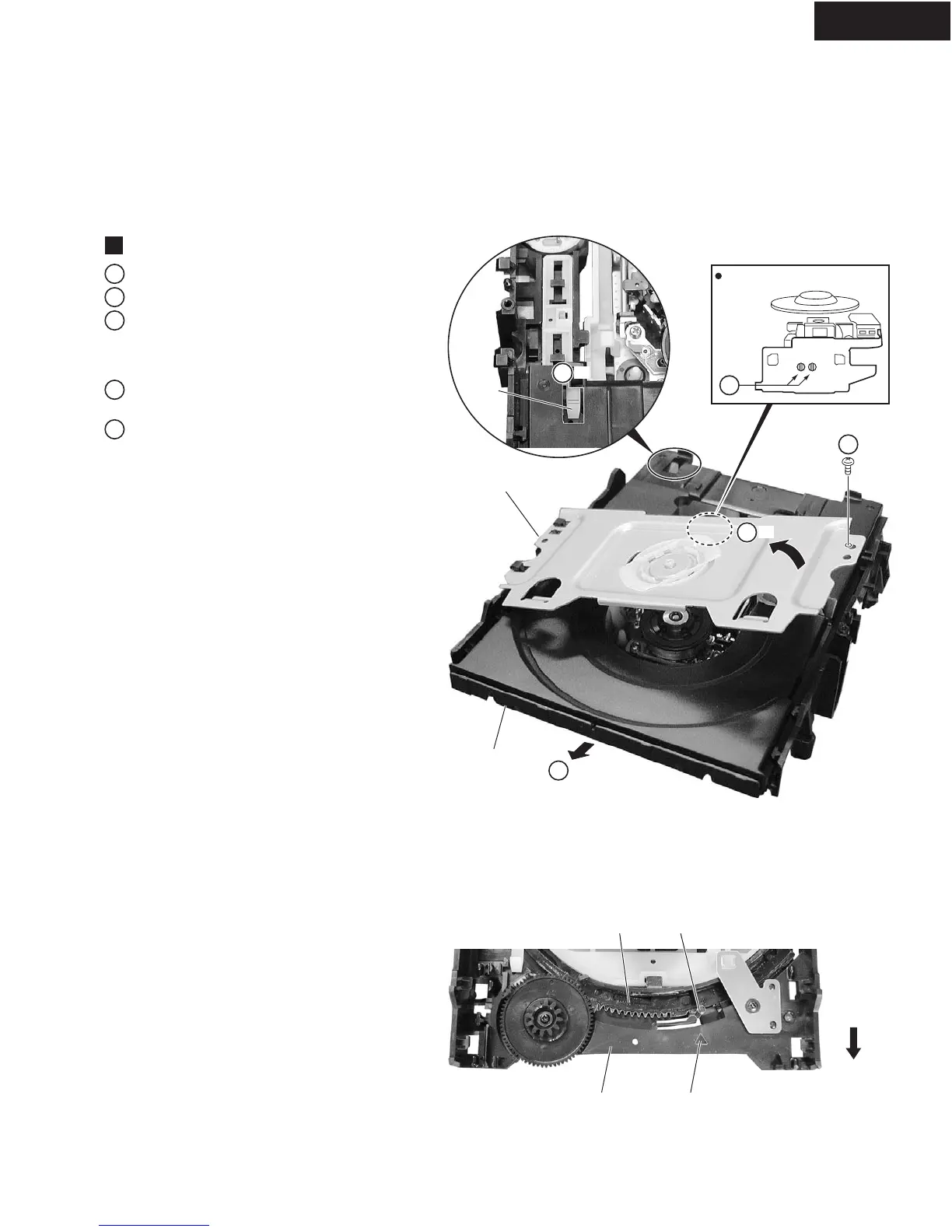
Remove the bridge by removing the one screw.
2
Pull out the tray, then remove it by pressing the hook.
3
Short-circuit two points of C and D by soldering.
4
Remove the four connectors from the Loading
Mecha. Assy.
Note: After replacement, connect the flexible cable,
then remove the soldered joint (open).
5
Remove the four screws that secure the Loading
Mecha. Assy to the unit.
Loading Mecha. Assy
1
Rear View
Front Side
1
3
-1
1
-2
2
-1
2
-2
Loading Base Triangle
Drive Cam Pin
Hook
Bridge
Tray
Note : when reinserting the Tray
C D
Removing the Traverse Mecha. Assy-S and Pickup Assy-S
When reinserting the Tray, first align the triangle
printed on the Loading Base and the pin of the Drive
Cam, then insert the Tray.



 To Next Page