Setting the Monitor Function
Pressing the Monitor button for 2 seconds will let you hear the background noise, so you can adjust the volume level
of the radio when you are not receiving a signal. The Monitor function may also be used to check any activity on the
current channel before transmitting or to listen to the weakest signals. To exit the Monitor function, press again the
Monitor button.
LCD Display Lighting
During the unit starting, the Display lighting is active for aproximely 7 seconds. It is possible to enable the LCD backlight
by shortly pressing the Monitor key ; it will be active about 5 seconds and you can stop backlight pressing again the
Monitor key. At the same way is possible to enable the LCD backlight by shortly pressing the Power/Menu key, light will
be on for about 5 seconds.
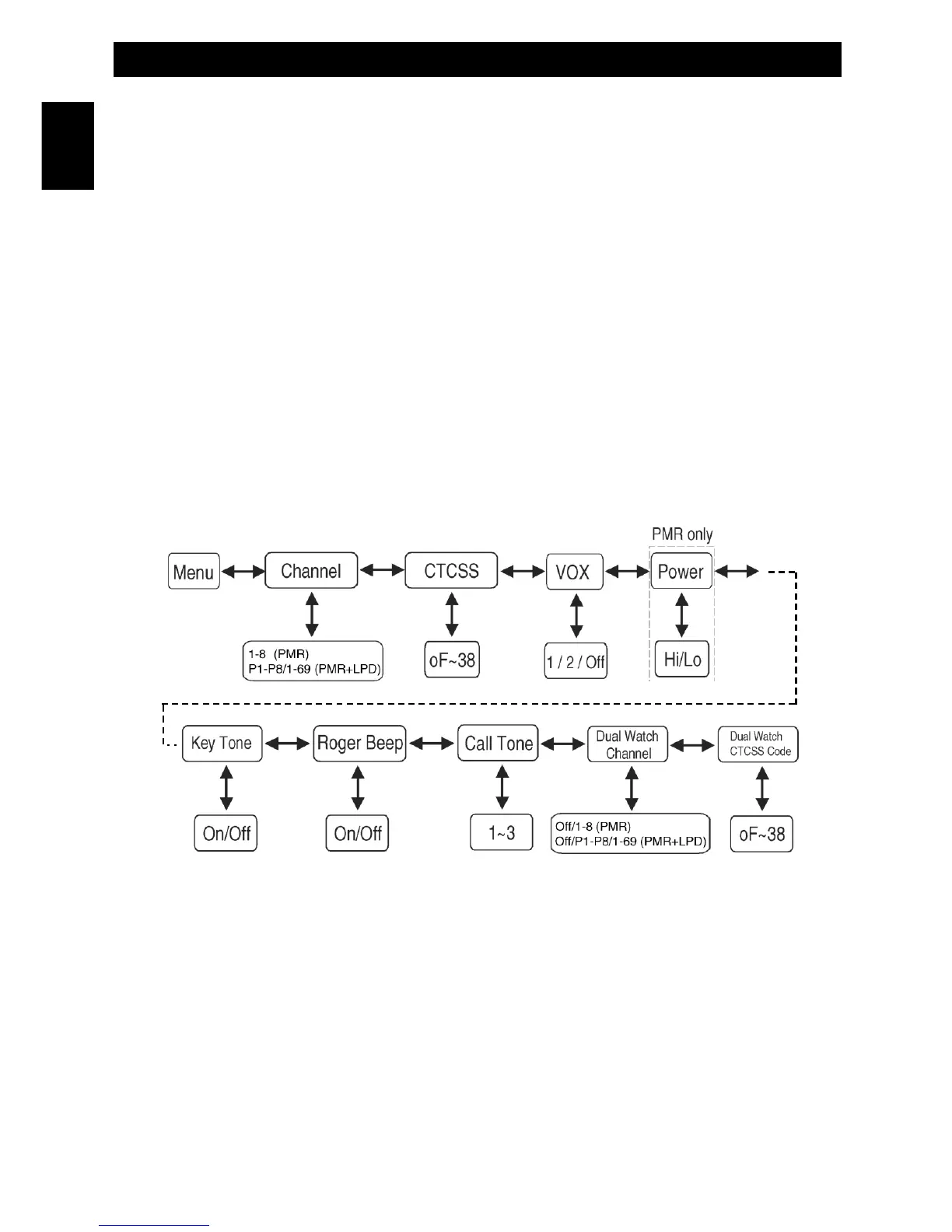
Navigating through the Menu
To access the several advanced features of the MT-4040, your radio has a convenient Menu program :
Radio (Receiving) Mode
1. To enter or exit to Radio Mode, press the Power key for around 2 seconds. A long key beep tone is locally
generated when the unit goes into Radio Mode and the LCD will temporarily display the segments and icons for
the Radio.
2. To enter the Menu Mode/Program, press the Power/Menu key briefly. A key beep will be locally generated when
the Menu Mode is engaged.
- 9 -
Operation
English


 To Next Page