Installing and Replacing Desktop Board Components
43
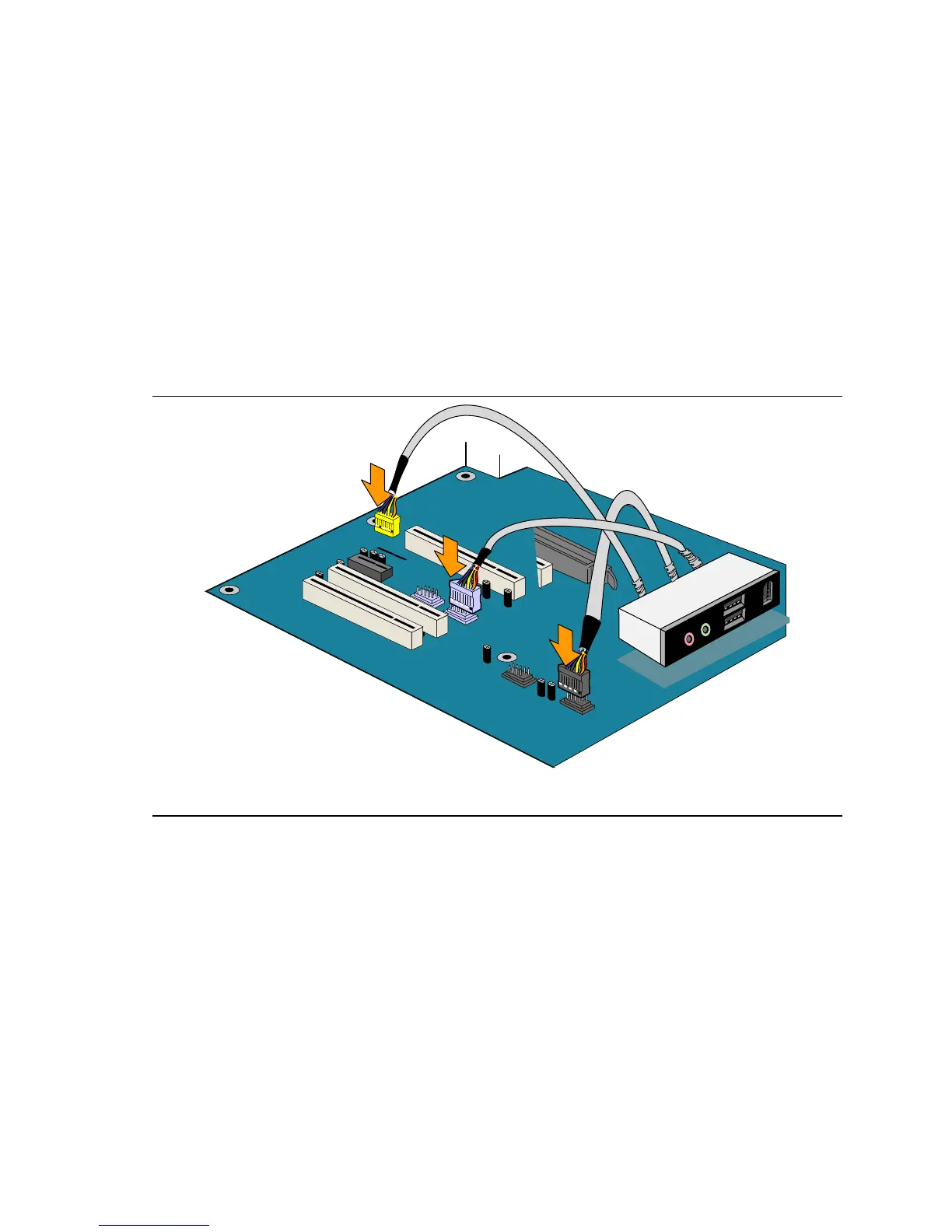
Installing the Front Panel USB/IEEE 1394a/Audio Solution
To install the front panel USB/IEEE 1394a/audio solution cables to the headers, follow these steps
(see
Figure 22):
1. Observe the precautions in "
Before You Begin" on page 23.
2. Turn off all peripheral devices connected to the computer. Turn off the computer and
disconnect the AC power cord.
3. Remove the cover.
4. Locate the front panel audio header (yellow), USB 2.0 header (black), and IEEE 1394a header
(blue) on the desktop board.
5. Install a correctly keyed and shielded cable.
6. Connect the cables to their respective headers on the desktop board.
7. Replace the cover.
OM17735
Figure 22. Connecting the Front Panel USB/IEEE 1394a/Audio Cables
To restore back panel audio, follow these steps:
1. Observe the precautions in "
Before You Begin" on page 23.
2. Turn off all peripheral devices connected to the computer. Turn off the computer and
disconnect the AC power cord.
3. Remove the cover.
4. Remove the front panel USB/IEEE 1394a/audio solution cables.
5. Replace the cover.





 To Next Page