Introduction of operation Introduction of operation
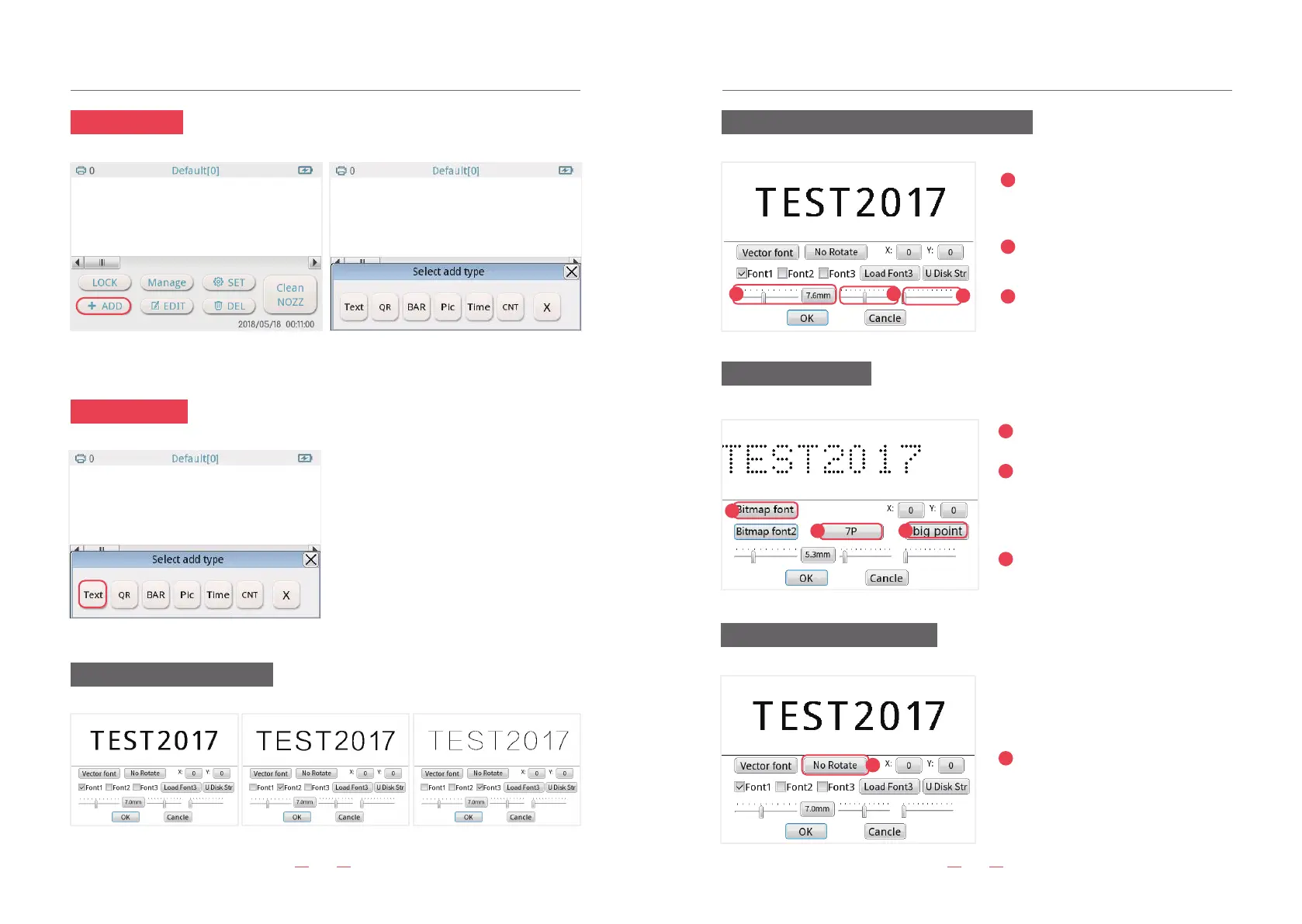
12.“ADD” button
13.“TEXT” button
Add the print conten, includes text, QR code, BAR code, Picture, Time,and count.
Vector font effects are as follows
Character size adjustment and spacing adjustment
Setting of bitmap fonts
No Rotate/Right Rotate/Left Rotate
09 10
4
1
2
3
Choose the rotate direction as
you need.
4
5
6
7
5
6
3
2
1
7
1. Click “TEXT”button, you can add Chinese,
English, number and date
2. The font of text: Enter the text font, there
are three vector fonts and three kinds of
Bitmap fonts. Bitmap fonts is adjustable.
The first sliding bar, to adjust the
size of the current text. Or directly
input a value, range: 20 to 180.
The second sliding bar, to adjust
the size of the current text.
Third slide bar, can adjust the
spacing between each character.
Click “Vector font” switch to “Bitmap
font”.
Or directly input a value, range:
5p,7p,11p,16p,24p,32p. Small point,
middle point, big point. For Chinese,
it can only print with 11p and 16p.
Small point,middle point, big point.


 To Next Page