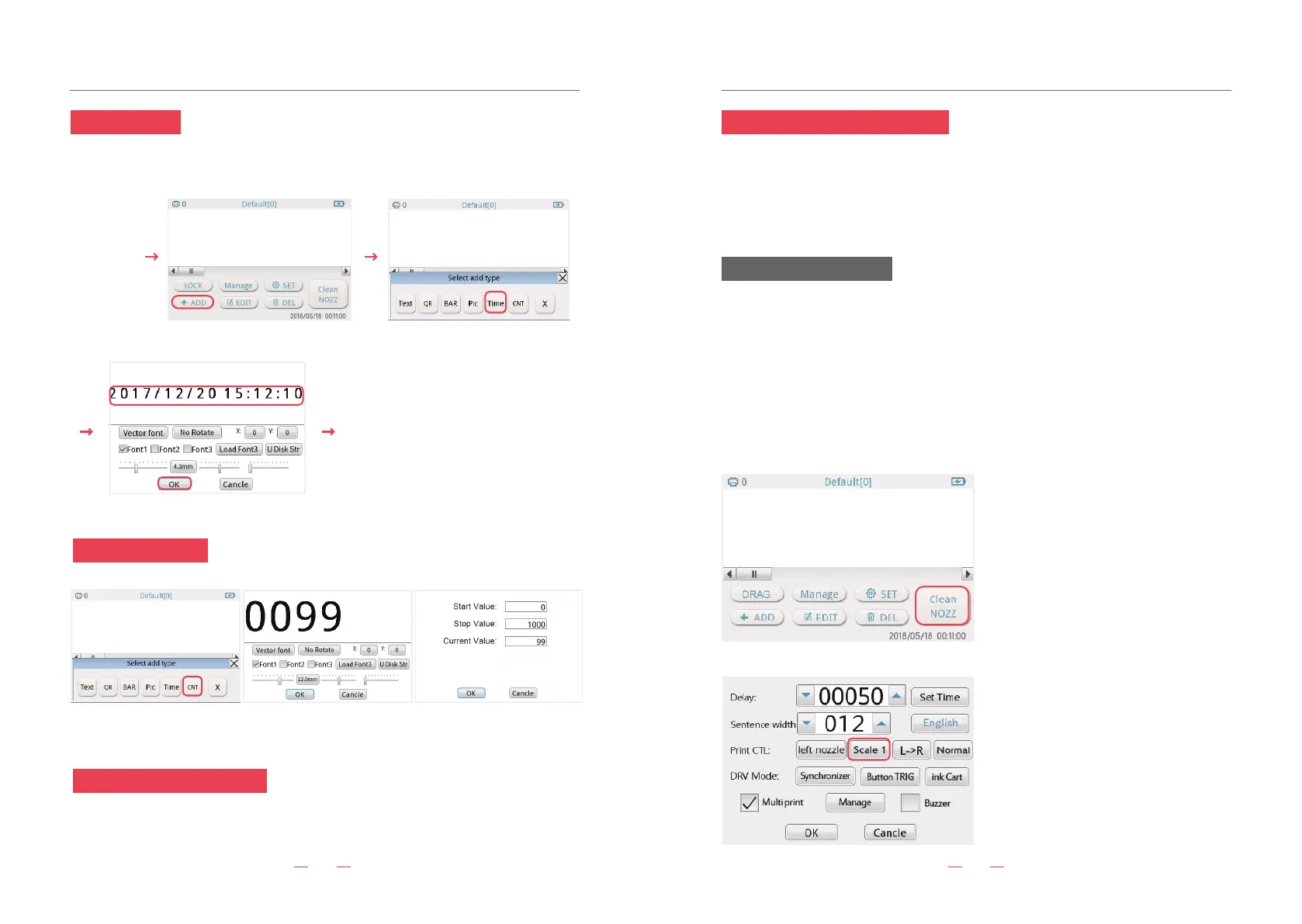
Click “CNT”. Calculator: counter, serial number, record number of prints, click on parameter settings,
1-8-bit variable sequence number, end value up to 99999999.
Introduction of operation Introduction of operation
13 14
18. Calculate setting
19.Hand held inkjet operation
Turn on the machine, press the “print button”. The light will turn blue while printing.(One
press, one print.)
20. Assemble line printing operation
Attention for ink cartridge
Use Built in sensor: Set- Select “Time DVR”.-Then please click “Button TRIG”-Adjust the
print delay interval-Start to work
Use External sensor:Assemble the external sensor-Set- Select “Time DVR”.-Then please
click “Electric TRIG”-Adjust the print delay interval-Start to work
1.1.When the ink cartridge is placed separate, please cover the head of ink cartridge.
Otherwise, the ink cartridge couldn’t use because of the nozzle clogging.
2.If the print content has white lines or missing, it means the nozzle is clogging. Please click
“Clean NOZZ” on the screen. Please also put a towel to absorb the ink. If it still has the
problem, please use more than 90% of alcohol to clean the nozzle.
3.While not continues printing, the first of print content will be a little blur. (It is normal
situation for the fast dry ink.)
17.Time setting
print (LED blue means printing)
Power on
Click “Time” button, it will print the current time.
click “ADD”button
click “OK”
click “Time”button
click edit box, input date
1) At the beginning of interval printing(non-con-
tinuous), the first word might be blurred.
Due to the fast drying ink, all of the handheld
printer meets the same problems.
2)Add “Prejet” function.
Choose “No move” in the prejet. Then you can
press the print button before printing. It will
quickly clean the nozzle.
If you want a deeper color, please choose
“quality” or “Scale”.


 To Next Page