1. Funcon key
By briey pressing the key, the current baery status is displayed through
the LED lights and the Powerbank is acvated.
If no device is connected to the Powerbank, or the connected device is fully
charged, the Powerbank changes automacally into standby mode aer a
me interval of approx. 5 seconds.
Operation
2. LED Status dislay
The individual LEDs display the remaining energy of the Powerbank:
LED light
% - Energy LED 1 LED 2 LED 3 LED 4
1 % - 25 %
26 % - 50 %
51 % - 75%
76 % - 100 %
3. Commissioning / Charging the Powerbank / Charging
connected Devices
a) Charging the Powerbank
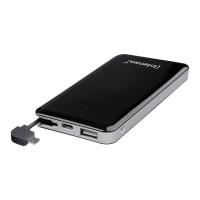
Connect the supplied microUSB cable with the microUSB port (IN) of the
Powerbank and connect the other end of the USB cable with a standard
USB port of a computer or USB power supply. The charging process and
the current charge status is signalled via the LED status lights When the
Powerbank is fully charged, the LED status lights are permanently on. The
required charging me of the Powerbank is dependent on the selected
charging source and its output (max. 5V / 2.1A).
b) Charging devices with the Powerbank
Connect the supplied USB cable with the USB A port (OUT) on the
Powerbank and the other end of the USB cable with the microUSB
input of the device to be charged. Press the funcon key to start the
charge process.
Of course you can also use your own USB charging cable to connect
the Powerbank with your device. However, please note that devices
can only be charged via the USB A port (OUT) of the Powerbank.
If a device is charged with the Powerbank and the capacity of the
Powerbank is almost exhausted, this is signalled by blinking of the last
status LED. Please re-charge the Powerbank.
Please note that while charging a device with a Powerbank, about 30%
of the total capacity is used up just through the charging process. This
is due, for example, through the loss of power from circuit warmth and
voltage conversion.
The Powerbank has to be used regularly for opmum performance.
If this is not the case, charge the Powerbank fully at least every three
months.
Make sure that the warmth created through the charging process can
be emied from the device (ideally place the Powerbank on a rm and
heat-resistant base while in use).
EN - Page 2 of 5


 To Next Page