REMOTE MIC STATION
9
RM-8000
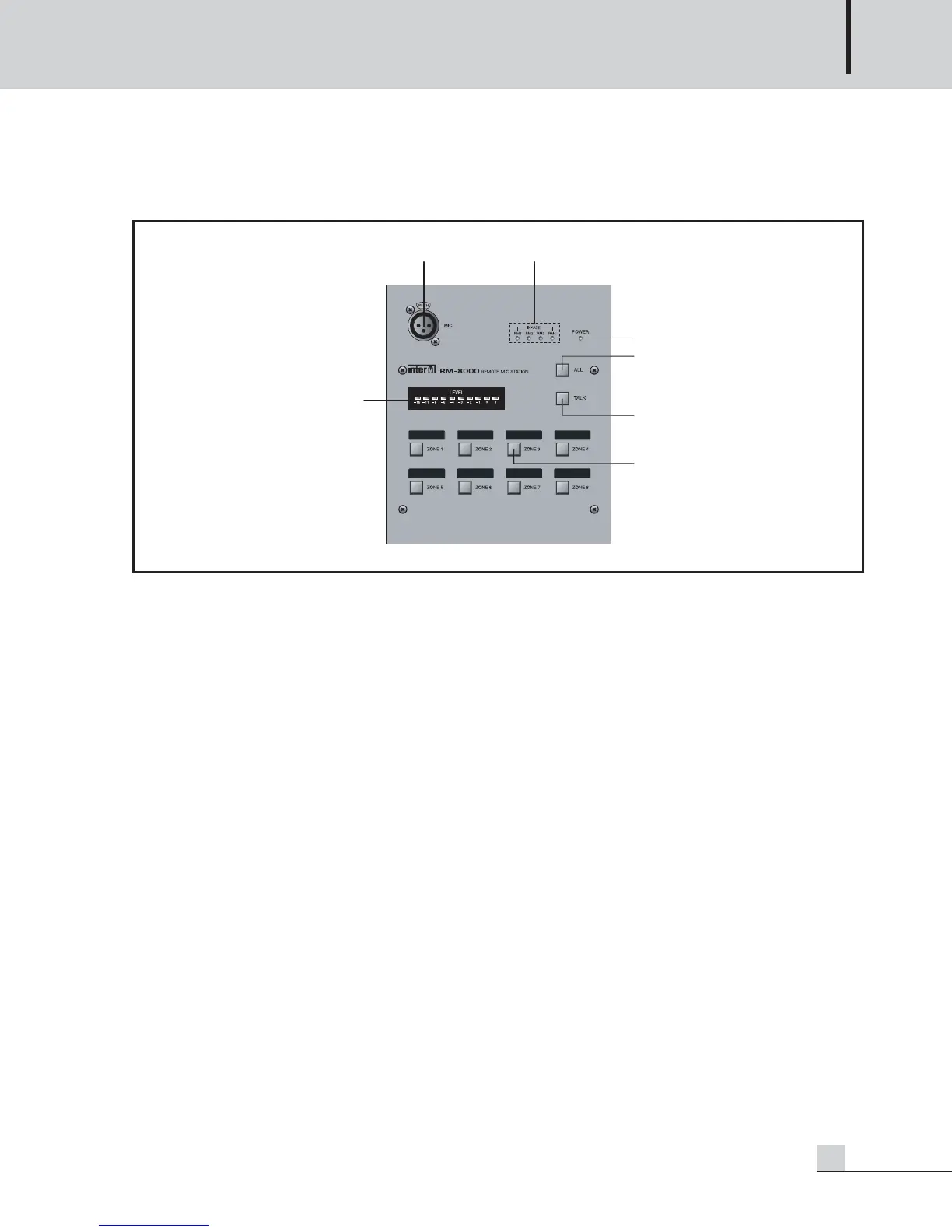
RM-8000 Front Panel
RM-8000 Front Panel
1. LEVEL METER
Displays level of the output volume in MIC broadcasting.
2. MIC JACK
A terminal to connect Condenser MIC.
Dynamic MIC can be used.
3. IN-USE LED
Displays the using status of 4 Remote MIC Stations.
4. POWER LED
If power supply is applied, the Power LED turns on.
5. ALL
Has toggle function as a switch to select all broadcasting areas.
6. TALK
Broadcasts with the button pressed, as a switch to start broadcasting after selecting the broadcasting area.
Release the button to end broadcasting. During broadcast, "R" is displayed on the relevant display of both
PX-8000 and LM-8000.
7. AREA SELECTION BUTTON
Turns on if pressing the switch to select the area to broadcast and turns off if pressing it again.



 To Next Page