REMOTE CONTROL WITH AUDIO IN
11
LM-8000
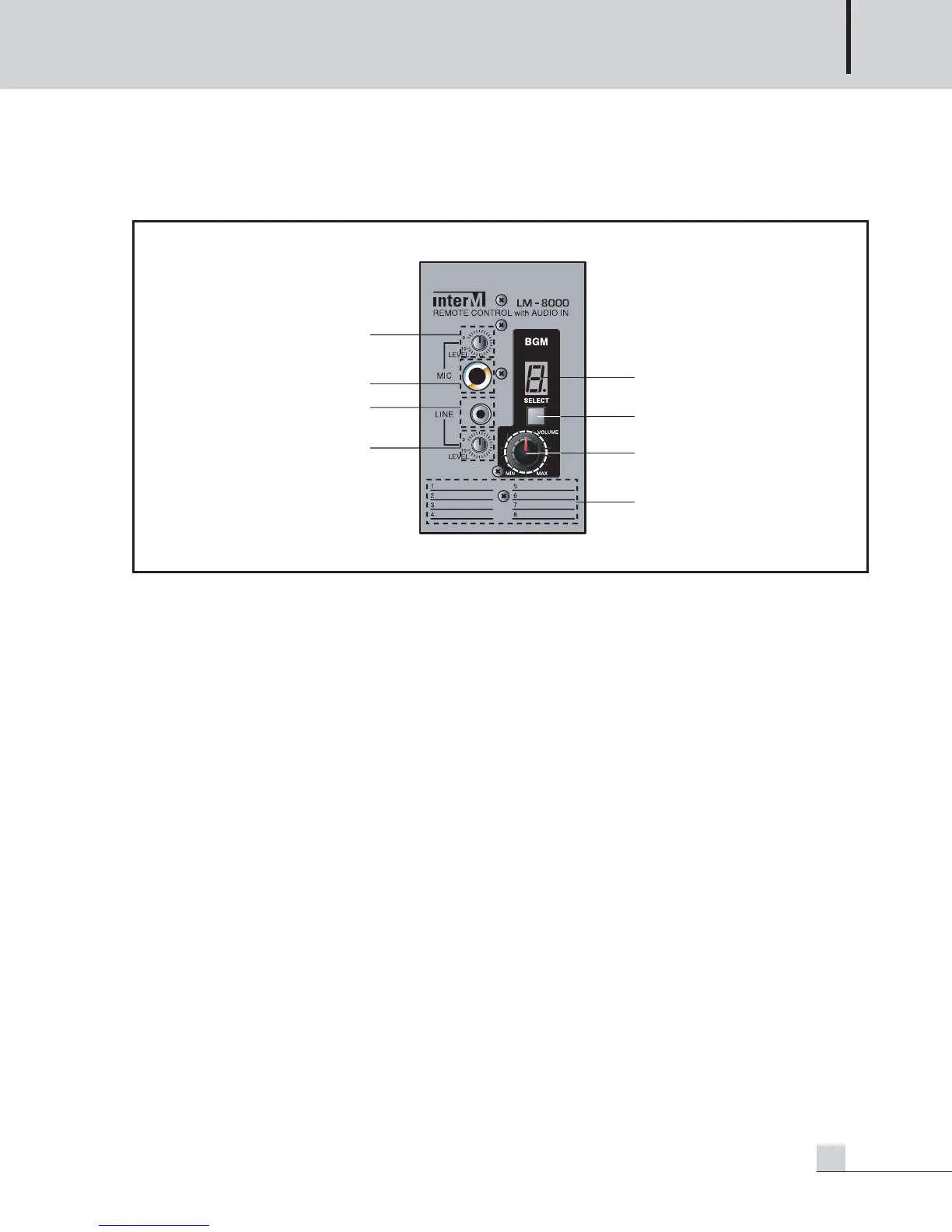
LM-8000 Front Panel
LM-8000 Front Panel
1. MIC INPUT VOLUME
Adjusts MIC input volume.
2. MIC INPUT JACK
MIC input terminal. It is recommended to input balance.
3. LINE INPUT JACK
LOCAL BGM input terminal.
4. LINE INPUT VOLUME
Adjusts volume of LOCAL BGM input.
5. BGM DISPLAY
Displays input channel of the MAIN BGM output to the relevant zone of the PX-8000. A DOT (.) display turns
on if control right is endowed to LM-8000.
6. BGM SELECT BUTTON
Switch to select MAIN BGM input channel.
7. ZONE VOLUME ENCODER
Volume to adjust BGM output volume in the area where LM-8000 is installed.
8. BGM LIST
Position to write the name of each BGM Source input so that the user can easily know.



 To Next Page