11
7.2 Two-way Intercom Conversation
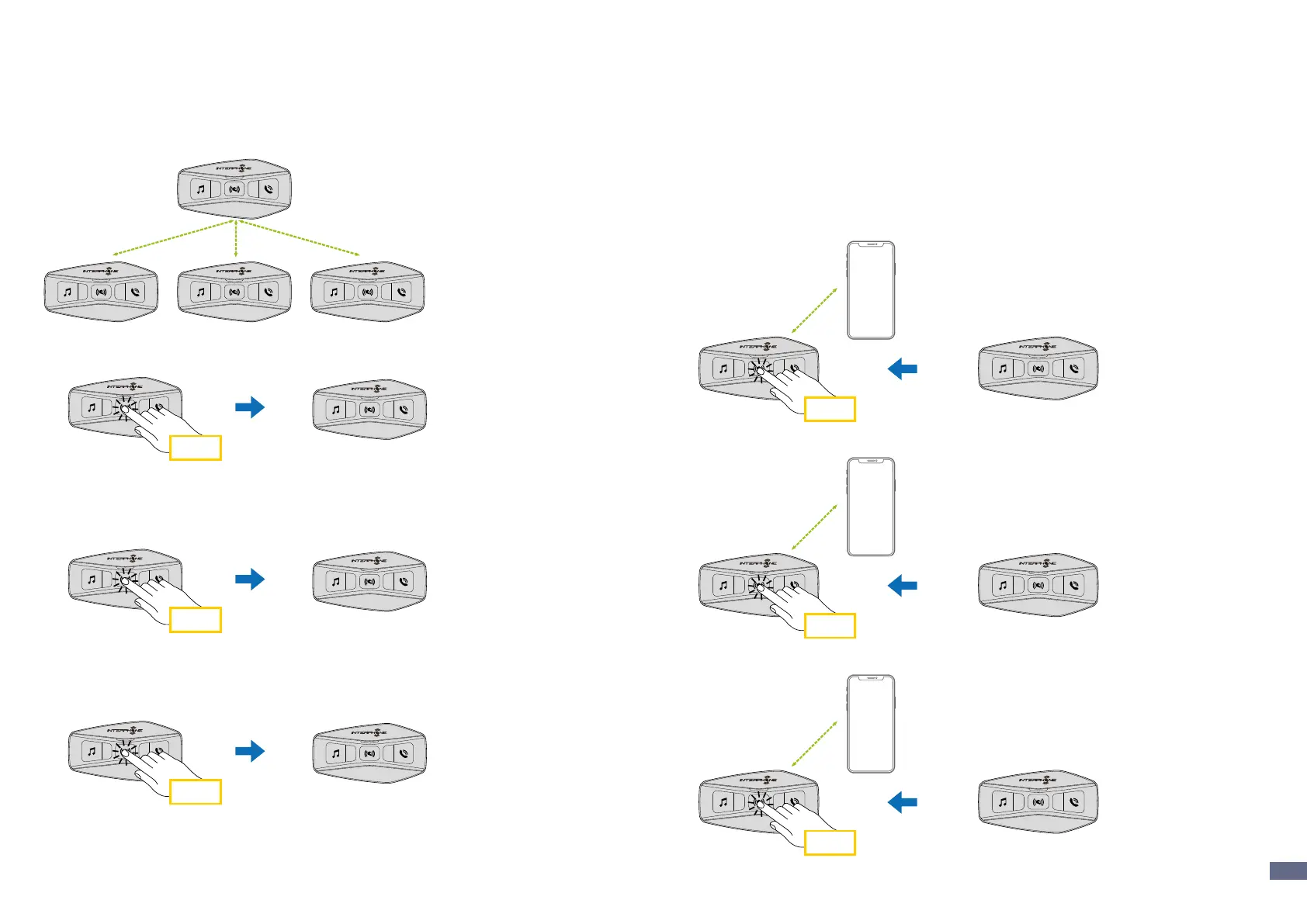
After pairing the control units, communication can be started, by pressing
the INTERCOM button (center button), according to the diagram below.
1. Press once to connect the control unit D.
A
B C D
Start/stop intercom connection with unit “D”
x 1
A
D
2. Press twice to connect the control unit C.
Start/stop intercom connection with unit “C”
x 2
A
C
3. Press three times to connect the control unit B.
Start/stop intercom connection with unit “B”
x 3
A
B
7.3 Three-Way Conference Phone Call with Intercom Users
(with “Advanced Features” activated by APP or Device
Manager)
You can have a three-way Conference-Phone Call by adding an intercom
user to the mobile phone conversation.
During a mobile phone call, tap the center button once, twice or three times,
to invite one of the intercom units (previously paired) to the conversation.
Press once to add unit D to the conference.
x 1
D
Press twice to add unit C to the conference.
x 2
C
Press three times to add unit B to the conference.
x 3
B


 To Next Page