8 WHEELCHAIR OPERATION
Invacare
3G Storm Series® 52 Part No 1143151
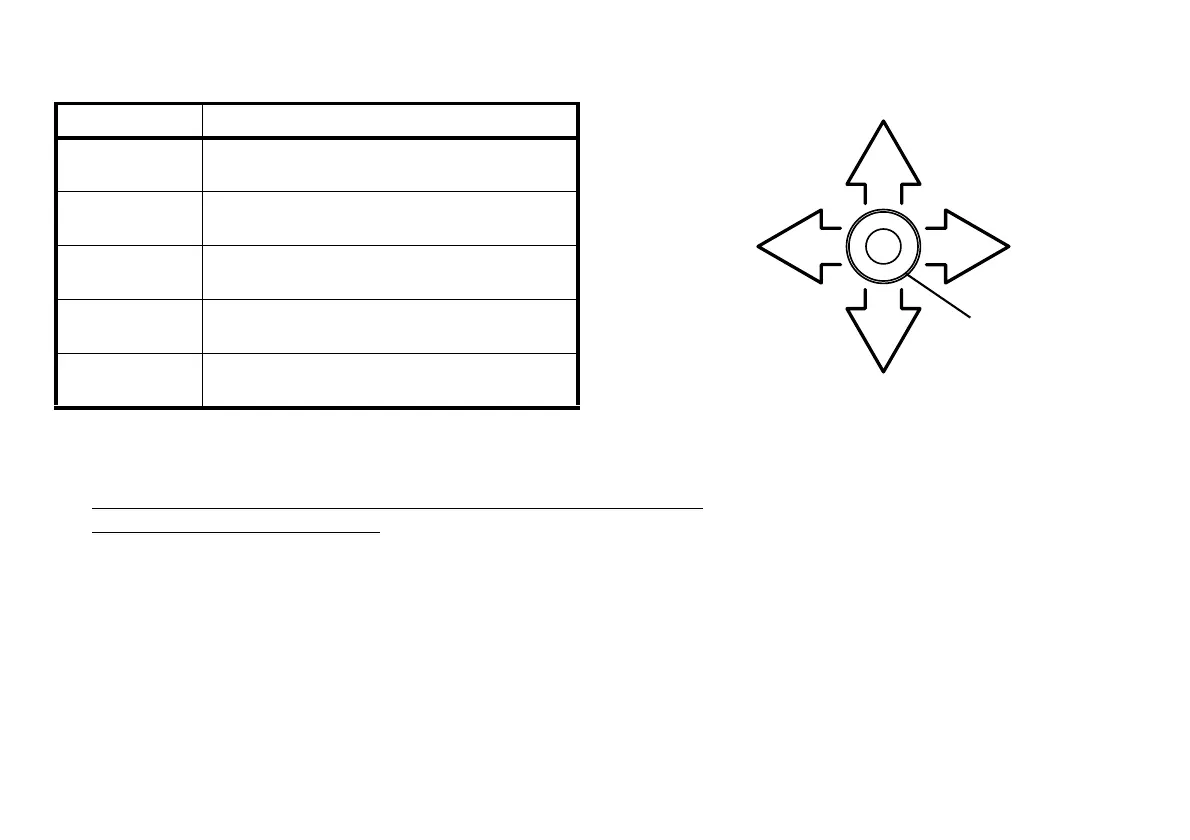
FIGURE2 Using the Joystick to Drive the Wheelchair
• SPJ™+, MK6i™ SPJ+ w/PSS and MK6i SPJ+ w/ACC Joystick Switches and Indicators
on page 53.
• CMPJ+ Joystick Switches and Indicators
on page 56.
MOVEMENT ACTION
FORWARD Push joystick forward, towards the front of the
wheelchair.
REVERSE Pull joystick back, towards the rear of the
wheelchair.
Turn RIGHT Move joystick toward the right side of the
wheelchair.
Turn LEFT Move joystick toward the left side of the
wheelchair.
STOP Release the joystick and the wheelchair will slow
to a stop.
To Move
Right
To Move Forward
To Move
Left
To Move Backward
Joystick
Front of
Wheelchair
Rear of
Wheelchair
For specific information about the joystick installed on the wheelchair, refer to one of these procedures:










 To Next Page