11 SETUP/MAINTENANCE
Part No 1143151
119 Invacare
3G Storm Series®
11.17 Disconnecting/Connecting the Joysticks
SPJ+ Joysticks
Disconnecting
1. Hold the light GREY collar portion of the joystick connector with one hand and the controller connector on the wheelchair in the other and
disconnect them by pulling them apart.
Connecting
1. Hold the light GREY collar portion of the joystick connector with
one hand and the controller connector on the wheelchair in the
other and align them.
2. Lightly push to engage the joystick connector and the controller
connector.
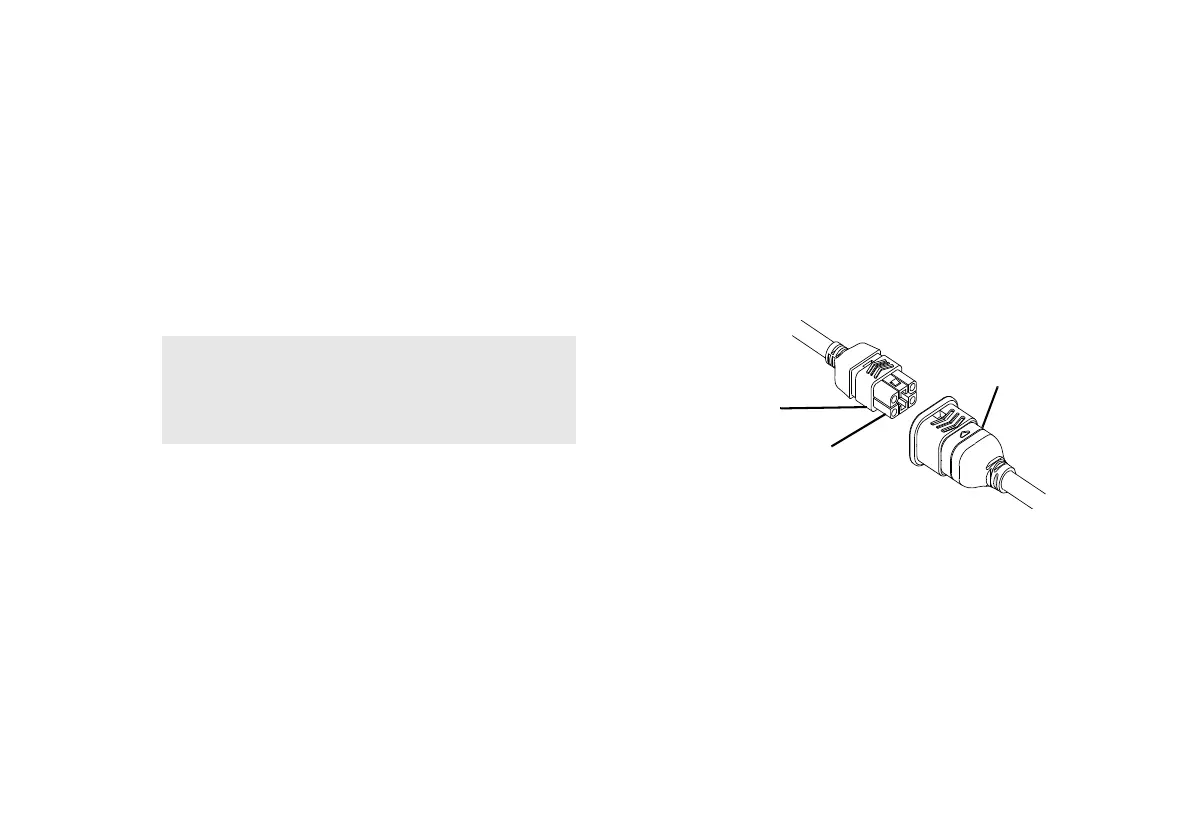
FIGURE16 Disconnecting/Connecting the Joysticks - SPJ+ Joysticks
For this procedure, refer to FIGURE16.
The joystick connector is located at the rear of the seat frame.
WARNING
The joystick connector and controller connector
fit together in one way only. DO NOT force them
together.
Joystick Connector
Light Grey
Collar
Controller
Connector






 To Next Page