11 SETUP/MAINTENANCE
Invacare
3G Storm Series® 120 Part No 1143151
CMPJ+ Joysticks
Disconnecting
1. Pull the latch away from the joystick connector.
2. Disconnect the joystick connector from the remaining connectors
Connecting
1. Ensure the latch is pulled away from the network connector.
2. Connect the network connector to the other connectors.
3. Top and Bottom Connectors - Install connector caps onto the
network connector.
4. Push the latch in to secure the network connectors and caps.
5. If necessary secure excess cable using tie-wraps.
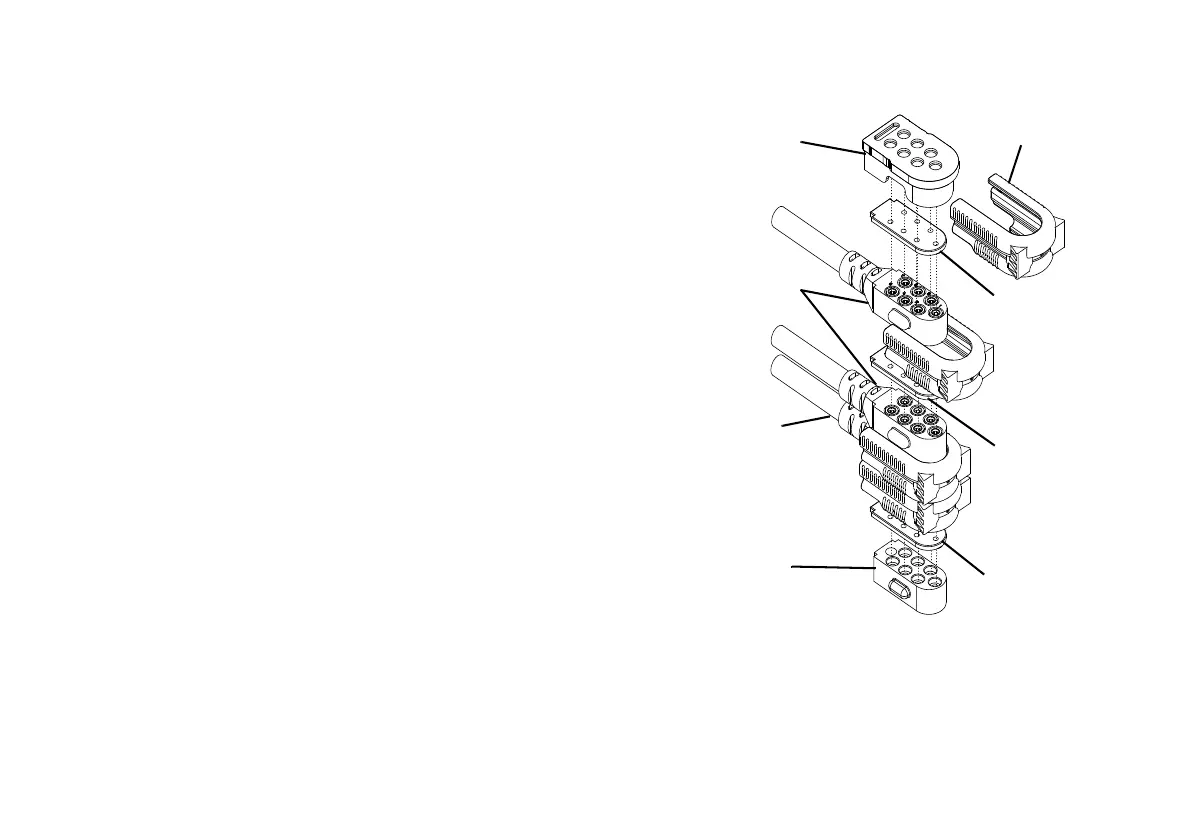
FIGURE17 Disconnecting/Connecting the Joysticks - CMPJ+
Joysticks
For this procedure, refer to FIGURE17.
Ensure the gaskets are installed in the top
connector cap and between network connectors.
Top Connector
Cap
Latch
Gasket
Network
Connectors
Gasket
Controller
Cable
Gasket
Bottom
Connector
Cap






 To Next Page