23
2.5 MIDI operation:
The device can be controlled via MIDI e.g. B. control with a MIDI keyboard or sequencer software.
For MIDI control, the device must be set to the MIDI channel via which it is to be controlled:
1. Hold down the / MIDI / ADD / button until the display shows "MIDI 01" on the top line.
2. Use the / BANK ▲ / and / BANK ▼ / buttons to select the MIDI channel
3. Press the / MIDI / ADD / button for two seconds to save the setting and exit.
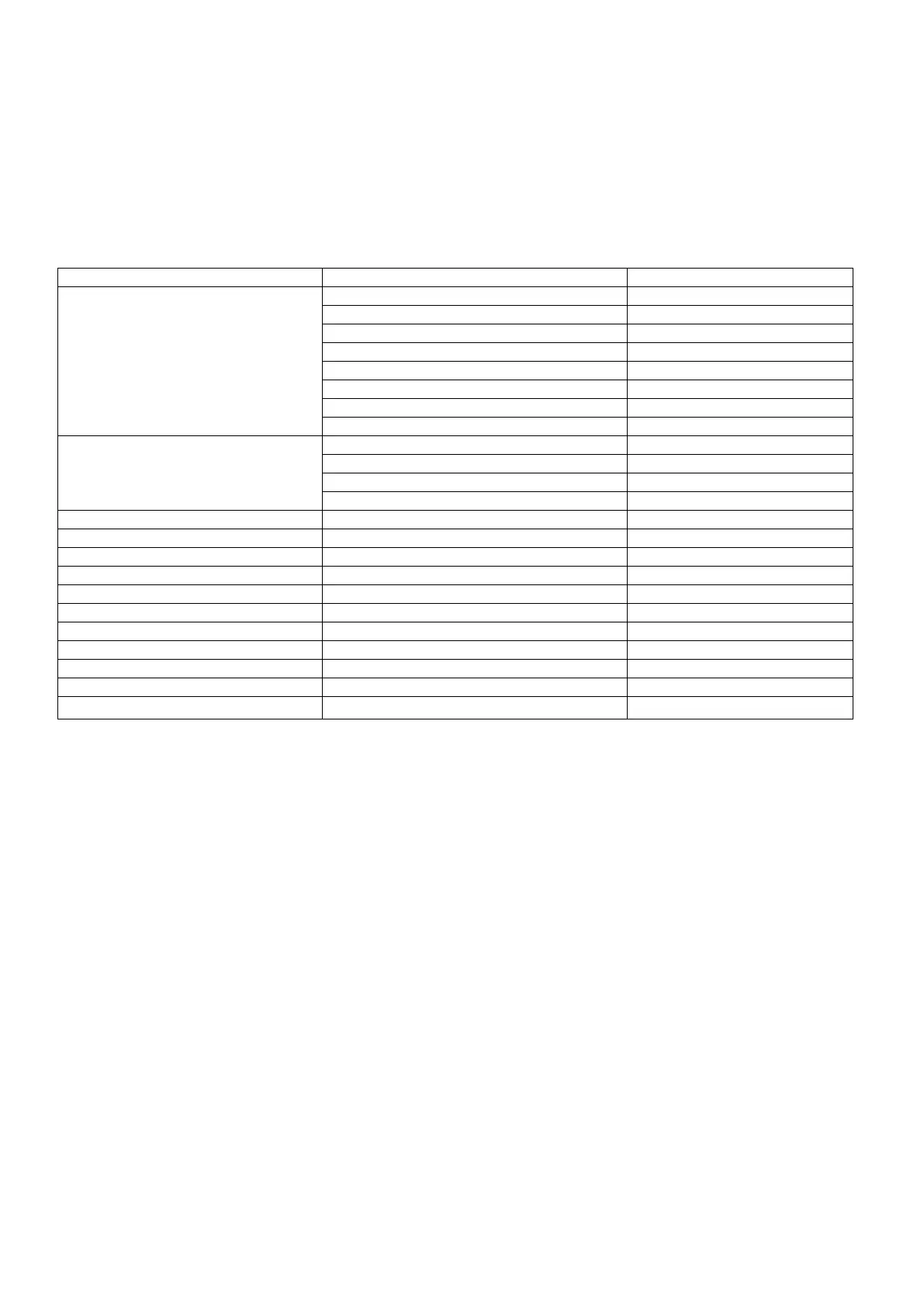
The Midi functions are assigned as follows:
2.6 USB connection:
Dient zum Anschluss einer USB-LED-Lampe.
Part 3. Maintenance:
The device should be cleaned regularly from impurities such as dust etc. Use for
Clean a lint-free, damp cloth. Under no circumstances alcohol or solvents
use for cleaning!
There are no serviceable parts inside. Maintenance and service work are exclusive
reserved for authorized dealers!


 To Next Page