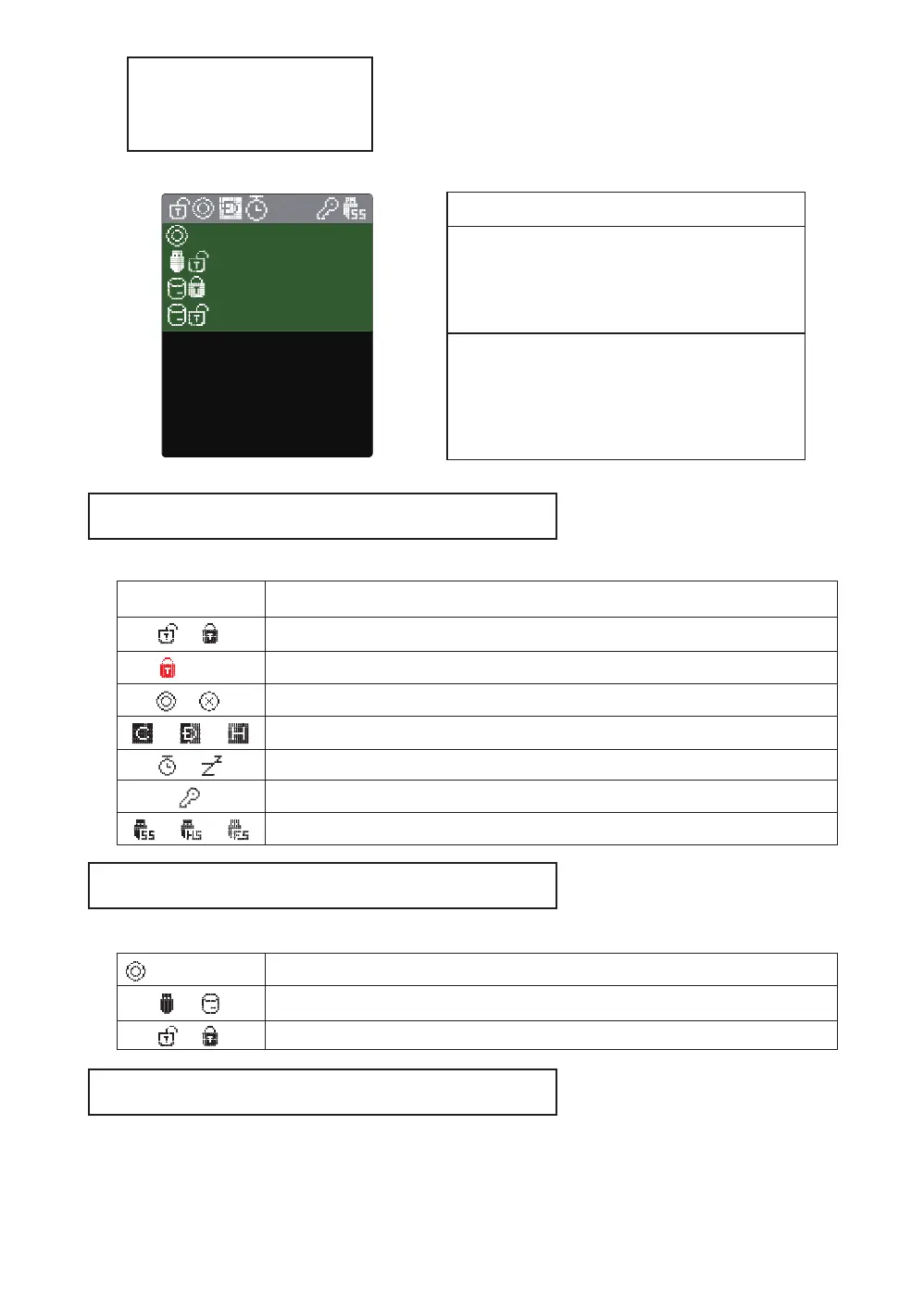
UI Info
Status Icons
Mount Information Area
File List Area
Status of the device
Icon
Description
Status Icons
Mount information Area
File list Area
Inform active ISO / VHD / RMD and settings.
● List folders and available files in the selected directory
● To use another partition,
Unmount all virtual drives and press button 4 for 3 seconds
to enter the [partition selection] .
windows10.iso
VHD_01_DATA
BACKUP VHD
OS
UTIL
Photobook.iso
linuxmint-17.3-cinn
Ubuntu-14.04.4.de
RMD_01_WTG
physical drive write-protect enable/disable status
Write-protect all (including virtual drives) disks
(Red)
/
Mount / unmount status of the ISO file/
Mode status (CD / DUAL / HDD)/ /
Power status (timer / sleep mode)/
AES256 encryption On
USB connection speed (3.0 / 2.0 / 1.1)/ /
/
Inform write protection on / off status (VHD/RMD)
Inform mounted file name (ISO/VHD/RMD)Filename.iso
Inform status of the virtual drive (removable / fixed)/



 To Next Page