■ Virtual Drive Function
XX4XX
XX3XX
Mode Setting
● One virtual ODD / three VHDs (or RMDs) can be mounted
at the same time.
● At the first time, automatically finds mountable files on the
largest partition (GPT / MBR, NTFS / exFAT / FAT32)
You can select default partition (button 4 in the file list area)
● The advanced mode manager handles the settings
of individual virtual drives.
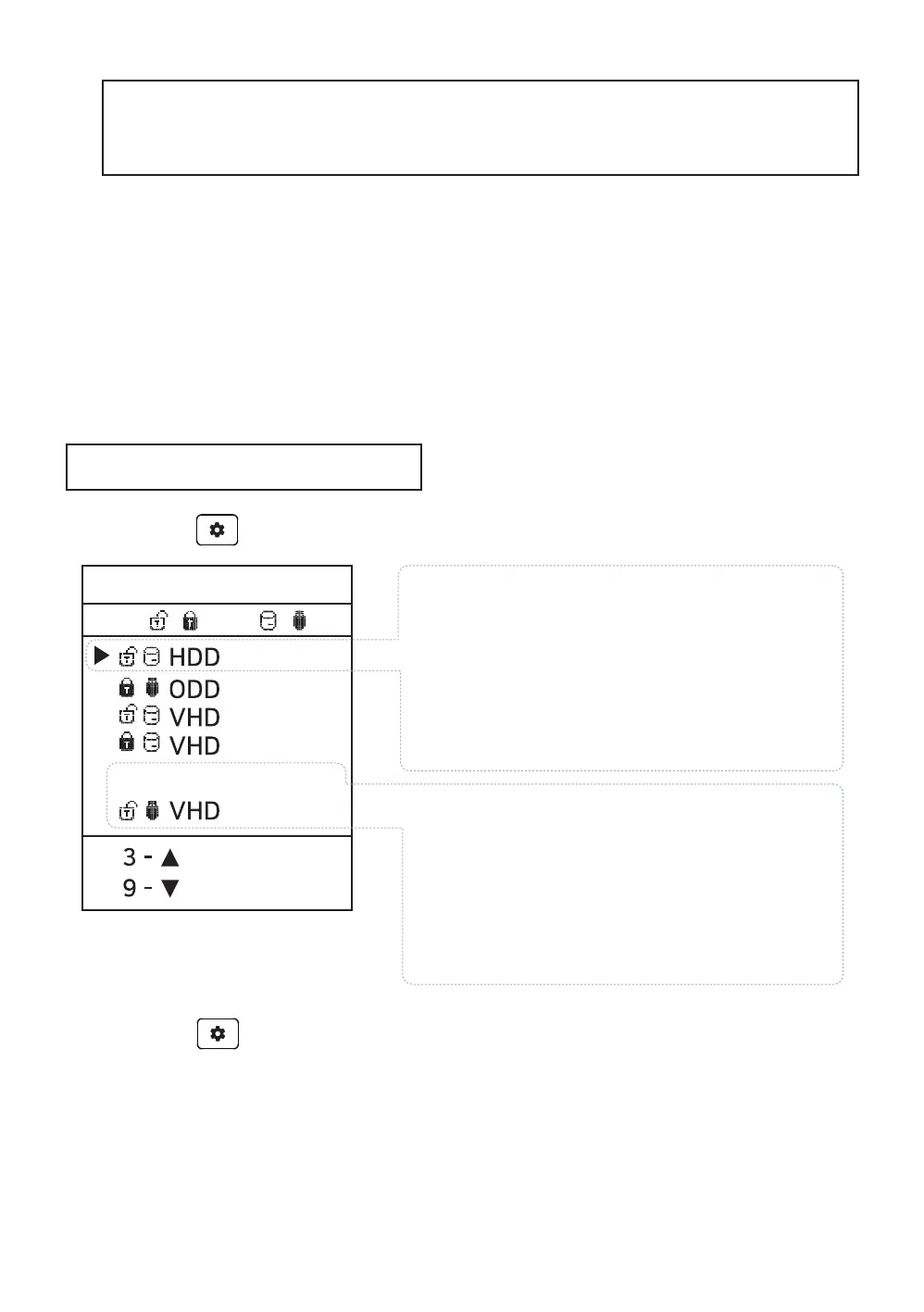
Press the button and select the [Mode setting] Menu.
Mode setting
To exit menu mode,
press the button and the settings is saved.
※ If any options change in the Mode Manager, the device reboots and
all currently mounted virtual drives are unmounted (ISO/VHD/RMD)
※ The drive order in menu may be same the
Virtual Drives Information Area of IODD.
//
5 - ,6-
---Disabled---
set the options of the selected (▶) drive.
Use the 5 button to enable / disable
the write protection function.
Use the 6 button to toggle
removable disk / fixed disk
You can change the order with the 3/9
buttons.The inactive bar can be moved.
Drives that are below the --Disabled--
Item are inactived.
1.Configure options for the selected
2. Configure the number of drives
and drive's order.



 To Next Page