EasyManua.ls Logo

ION 30ACi - User Manual

ION 30ACi
12 pages
Print Icon
To Next Page IconTo Next Page
Loading...
30ACi
Battery Back-Up System
OPERATION MANUAL
Dated: 07/23/2013
Document Name: 30ACi_OM
Page 1 of 12
Register your product at www.sumpro.com
IntroductIon
Reasonable care and safe methods should be
practiced. Check local codes and requirements
before installation. This manual contains important
information for the safe use of this product. Read
this manual completely before using this product and
refer to it often for continued safe product use.
DO NOT THROW AWAY OR LOSE THIS MANUAL.
Keep it in a safe place so that you may refer to it when
needed.
Important Safety InStrutIonS
Before proceeding further, kindly go through the
safety instructions carefully.
Always disconnect the unit from the receptacle power
source and battery before handling or making any
adjustments to the system.
Battery Backup Warning:
WARNING: Risk of electrical shock this unit
has not been investigated for use in outdoor
areas.
WARNING: Risk of electrical shock. Connect
only to a properly grounded, three pronged
grounding type receptacle. Under any circumstances,
do not remove the grounding prong from the power
cord.
WARNING: Do not smoke, use spark able
electrical devices or open ame when working
on this unit!
WARNING: Do not install unit in locations
classied as hazardous per N.E.C., ANSI/
NFPA 70 - 1999.
FAILURE TO HEED ABOVE CAUTIONS COULD
RESULT IN INJURY OR DEATH.
WARNING: The 30ACi system is designed to
operate only one pump, the one supplied
with the unit. Using anything other than the pump
supplied with the system will cause damage to the
unit and void the warranty.
General Precautions:
Before using the inverter, read all instructions and
caution markings on the inverter, the batteries & all
appropriate sections of this instruction manual.
WARNING: Do not expose the inverter to any
type of chemicals. The inverter is designed
for interior use only.
WARNING: Do not disassemble the inverter;
take it to a qualied service center when
service or repair is required. Opening by unqualied
personnel can lead to electrical shock or re hazard
and void the warranty.
To reduce risk of electric shock, disconnect all wiring
before cleaning.
WARNING: Avoid exposing the inverter or
batteries to any type of explosive gases (in
the vicinity, as batteries generate explosive gases
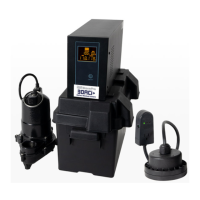
1. 30ACi Power Supply PN: TW20232
2. Single Battery Box, PN: EPO----300
3. WC-33M, PN: M5235033MN
4. Ion
®
Switch, 6” Range, 10’ Cord, PN:IN-006-
010-10PA
5. Ion
®
Pipe-Mount Bracket, PN: IN-PUMPBKT-1
6. Pig Tail with Anderson Connector
7. Power Cord
3
1
2
6
7
4
5


Questions and Answers

Summary

General Precautions

Battery Safety

Handling Battery Acid and Connections

Procedures for electrolyte contact, spills, and proper battery connection.

Battery Requirements

Battery Types and Selection

Replacing the Battery

Safety Precautions for Battery Replacement

Emphasizes protective gear and handling of corrosive electrolyte.

Battery Maintenance

Technical Specifications

Installation Instructions (Part 1)

Installation Instructions (Part 2)

Powering Up and System Testing

How to charge the battery, operate the inverter, and test system functionality.

Inverter Back Panel Overview

Inverter Front Panel Overview

Troubleshooting Guide (Part 1)

Inverter Power and Operation Issues

Troubleshooting for no power, non-operation, and frequent tripping in DC mode.

Pump Operation Issues in DC Mode

Steps to diagnose the pump not operating in DC mode.

Troubleshooting Guide (Part 2)

AC Mode Operation and Overheating Issues

Resolving issues when the inverter won't operate in AC mode or overheats.

Troubleshooting Guide (Part 3)

3 Year Residential Warranty

Summary

General Precautions

Battery Safety

Handling Battery Acid and Connections

Procedures for electrolyte contact, spills, and proper battery connection.

Battery Requirements

Battery Types and Selection

Replacing the Battery

Safety Precautions for Battery Replacement

Emphasizes protective gear and handling of corrosive electrolyte.

Battery Maintenance

Technical Specifications

Installation Instructions (Part 1)

Installation Instructions (Part 2)

Powering Up and System Testing

How to charge the battery, operate the inverter, and test system functionality.

Inverter Back Panel Overview

Inverter Front Panel Overview

Troubleshooting Guide (Part 1)

Inverter Power and Operation Issues

Troubleshooting for no power, non-operation, and frequent tripping in DC mode.

Pump Operation Issues in DC Mode

Steps to diagnose the pump not operating in DC mode.

Troubleshooting Guide (Part 2)

AC Mode Operation and Overheating Issues

Resolving issues when the inverter won't operate in AC mode or overheats.

Troubleshooting Guide (Part 3)

3 Year Residential Warranty

Overview

The 30ACi Battery Back-Up System is an inverter-based device designed to provide continuous power to a sump pump, particularly during utility power outages. At its core, the inverter converts Direct Current (DC) from a battery into Alternating Current (AC) to operate the pump. When normal utility power is available, the system charges the connected battery, ensuring it's ready to take over when needed.

Function Description:

The primary function of the 30ACi system is to act as a reliable backup power source for a sump pump. It ensures that the sump pump continues to operate even when the main AC power supply is interrupted. The system is designed to power only one specific pump, the WC-33M, which is supplied with the unit. Using any other pump could damage the unit and void the warranty.

The inverter continuously monitors the AC power supply. When AC power is present, it charges the connected 12 VDC deep cycle marine battery. The LCD display on the inverter shows the battery's charge status, cycling bars from bottom to top when charging, and indicating 100% when fully charged. In this AC mode, any AC load powered by the inverter should also function, as a portion of the AC power is passed through the inverter to power the load.

In the event of a power failure, the inverter automatically switches to DC mode, drawing power from the battery and converting it to AC to run the sump pump. The LCD display will then show the battery percentage slowly dropping as power is consumed. The system includes an Ion® switch, a non-contact electronic switch designed to activate the pump based on water level. This switch operates differently from standard pressure switches, lacking mechanical contacts and thus no "click" sound when activated. Its range, typically 6 inches, determines the "On" and "Off" levels for pump operation.

Usage Features:

The 30ACi system is designed for interior use only and should not be exposed to chemicals or installed in hazardous locations. Proper ventilation is crucial for the battery enclosure to prevent the accumulation of hydrogen gas. The system requires a 12 VDC deep cycle marine battery, with a minimum capacity of 80AH recommended. Starting batteries are not suitable for this application due to their design for high cranking power rather than deep cycling.

Installation involves placing the 12-volt deep cycle marine battery into the plastic battery box, ensuring the main circuit breaker (MCB) on the inverter's back is in the OFF position. The pig tail's black negative (-) wire connects to the battery's negative terminal, and the red positive (+) wire to the battery's positive terminal. The wires are routed over the short side of the battery box, allowing the Anderson connector to remain outside. The plastic cover is then installed, and the inverter is placed on top of the battery box cover. The Anderson connector from the inverter is plugged into the Anderson connector from the battery, matching wire colors.

The sump pump is installed in the sump pit, and the sump cover is replaced, ensuring the pump switch cord and pump power cord reach the inverter. The switch cord is plugged into the back of the inverter, and the pump cord into the switch cord. Finally, the inverter power cord is connected to a 120 AC power outlet, and the MCB switch is turned to the ON position.

Testing the system involves filling the basin with water (while on AC power) to verify the pump turns on at the correct level and pumps out the basin until it shuts off. This process should be repeated three times. To test DC mode operation, the power cord is unplugged from the wall outlet. The inverter will beep, and the battery bars will cycle, indicating it's running on battery power. The basin is then refilled to verify pump operation in DC mode. After testing, it's crucial to plug the inverter back into the wall outlet.

The Power button on the front of the inverter is primarily used for battery replacement when the unit is in DC mode. If AC power is available, the Power button is automatically on. Holding the Power button for 3-5 seconds in AC mode will turn off the inverter, making the display blank. It can be turned back on by holding the button again for 3-5 seconds or by unplugging and re-plugging the inverter from the wall outlet after 10 seconds.

Maintenance Features:

For AGM maintenance-free batteries, no specific maintenance is required. However, for other battery types, users should refer to the manufacturer's recommended battery maintenance section. Maintenance or replacement of batteries should only be performed or supervised by personnel knowledgeable about batteries and the necessary precautions.

When replacing batteries, it's essential to wear full eye protection and protective clothing. The replacement battery/batteries must be of the same type and size. Tools with insulated handles should be used, and metal objects or tools should not be laid on top of the batteries.

If electrolyte contacts the skin, it should be washed off immediately. If it contacts the eyes, flush thoroughly with water and seek medical attention. Spilled electrolyte can be neutralized with a solution of bicarbonate of soda (approximately one pound per gallon of water) until foaming ceases, then flushed with water and the area dried.

The warranty is void if an extension cord is used, if any power cord is cut, grounding prongs are removed, or an adapter fitting is used. It's also void if the inverter is used outdoors, if batteries not meeting specifications are used, if the inverter is submerged, tampered with, or if work is done on the inverter, pump, or switch while plugged in. Disassembling the inverter by the customer, applying it to products exceeding its maximum capacity (e.g., a pump other than the supplied one or more than one pump), applying it to the wrong voltage, or removing motor housing/impeller seal will also void the warranty. Running the pump continuously, pumping chemicals, corrosive liquids, gasoline, or other flammable liquids, or removing any tags or labels from the inverter, pump, or Ion™ Digital Level Control switch will also void the warranty.

ION 30ACi Specifications

General IconGeneral
TopologyLine Interactive
Capacity3000VA / 2700W
Output Voltage Regulation (Batt. Mode)+/- 10%
Surge ProtectionYes
Frequency50/60 Hz
Efficiency95%
Battery TypeSealed Lead Acid
Typical Recharge Time4-6 hours
IndicatorsLED indicators
Audible AlarmBattery Mode, Low Battery, Overload
CommunicationUSB

Related product manuals